Electronic mail is a popular form of communication
- Tweet
- Share
Electronic mail, commonly known as email, is a digital message between two or more people.
Instead of using a pen to write a letter on paper, people use a keyboard (or sometimes their voice) to write out a message on an electronic device such as a smartphone or computer. Email messages are sent digitally to the receiver via the program’s Send button or icon.
An email address is required to send or receive an email message; the address is unique to individual users. To access and store emails, either an internet-based application or a dedicated program on your computer is needed.
The very first email message was sent by Ray Tomlinson in late 1971. Although the exact words have been forgotten, this email is said to have included instructions on how to use the @ character in email addresses.
While there are many email applications and programs, all emails contain the same core elements, such as a ‘to’ section to indicate recipients, a Send button, and a subject line.
What is an Email Address?
Emails are sent to an email address from another email address. Email addresses are written with a custom username at the beginning followed by the email service provider’s domain name, with an @ sign separating the two. Here’s an example: [email protected].
If you’re not sure what your email address is, there are ways to find out.
What Does ‘Send an Email’ Mean?
When an email message is finished and has been addressed to the recipient’s email address, sending it allows the message to reach the intended recipient (or recipients if you’re sending a group email). A send button or icon is provided in every email program.
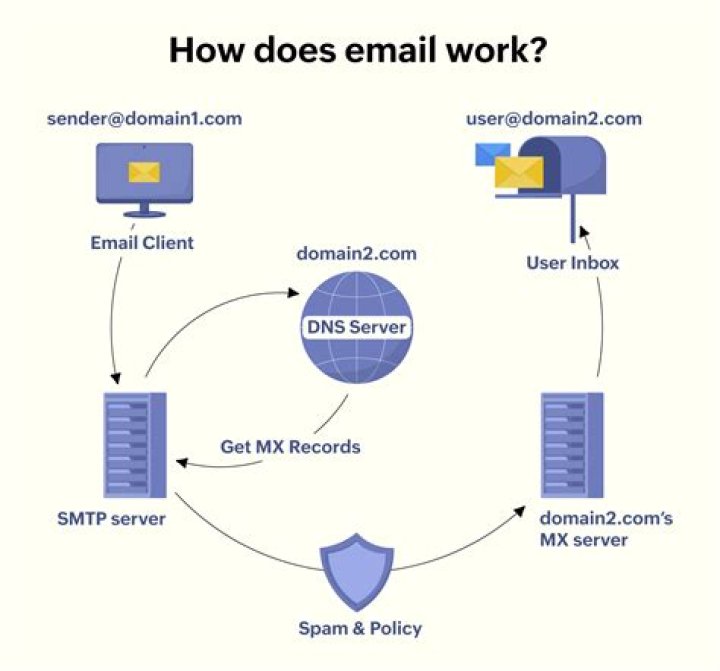
This process requires that email servers transmit messages from the sender to the recipient. SMTP is the name of the protocol used to send email messages, and POP or IMAP servers are needed to download electronic mail to the email client.
What is an Email Client?
An email client is a computer program used to read and send electronic messages. Typically, the client downloads messages from the server for local use (or for use within a browser) and uploads messages to the server for delivery to its recipients.
How Do I Open New Mail?
If you’ve got a new email in your inbox, simply tap on it (on a phone) or click it (on a computer) to open and read the message. Every email program works a little bit differently. For example, Gmail lets you open a new email in the same window as your inbox or you can choose to open the message in its own window.
What are File Attachments?
When you send an email message, it’s easy to attach a picture or other file to send along to the recipient. These add-ons are called file attachments.
Why Is Email Popular
There are many reasons so many people use email every day.
The speed at which an email can be sent and received is a huge benefit to most people. People can communicate in minutes or seconds from anywhere, whether it’s in the same building or across the world.
Emails also can be faster and easier than a phone call, as there’s no danger of being put on hold or forced to engage in lengthy conversations. If you have a quick question for someone, just send off an email. It’s simple to attach any file to an email message.
Email accounts are like large folders for not only private messages but also files and other important information. Good email clients make it easy to organize, archive, and search through your messages, so any information contained in an email is always readily accessible.
Email provides a record of a conversation, which you don’t get with verbal communication. It’s easy to print emails, or utilize your email provider’s large storage space to keep everything online as long as you want.
Unlike texting, you can write as much as you want in an email’s unlimited space. Email services are typically free, too, unless you have decided to go with a paid service. Like long-distance calling and physical mail messages, most email providers give you free access to an email account. Select your own email address, send and receive all the electronic mail you want, and store everything online without ever paying a dime.
Some email services are built specifically for privacy and security, so users can be confident that messages and files are hidden from everyone but the intended recipients.
The most popular web-based email client is Gmail, followed by Microsoft Outlook and Yahoo! Mail. Other popular email clients include Mozilla Thunderbird, MacOS Mail, IncrediMail, Mailbox and iOS Mail.
The Problem of Spam
Unfortunately, email’s biggest problem is unsolicited mail, more commonly known as spam. With hundreds of these junk emails in your inbox, the occasional good email can get lost. Fortunately, though, sophisticated filters exist that go through your new messages to help sort out the unwanted ones automatically.
You can help alleviate the junk mail problem by properly reporting spam. First, identify the real source of the message, then find the ISP used to send the message. Determine the correct person to contact and make them aware of the spam.
It happened to me yesterday.
Someone claimed she sent me an e-mail, but I did not get it.
It’s not in Inbox, Spam, Trash, etc.. it’s nowhere.
How is this possible (assuming there is no user error)?
Where can things go wrong?
2 Answers 2
Tracing the path from the sender to you:
It never actually sent. A lot of people don’t even notice that a message is sitting in their outbox, unable to be sent for any number of reasons.
The mail client successfully sent it to the SMTP server, but the SMTP server hasn’t been able to forward it on to the next hop.
- The SMTP server might be so busy that it has a backlog of messages to process, there might be a delay of several hours.
- The SMTP server might have tried to send it, but the receiving server couldn’t/wouldn’t immediately accept it. [deferral] The sending server will continue to attempt delivery, and most servers will do this or up to two days or more before bouncing the message back to you as undeliverable.
- The receiving server may have rejected the message outright [blacklisted/spam scan/mailbox full/non-existant user] and the sending server either cannot or will not send a bounce message back to you.
The message was accepted by the receiving server, but.
- The receiving server is backlogged and the message is sitting in a queue waiting to be processed/delivered.
- The message was flagged as spam and dropped. This is bad practice since the message should have been rejected outright, but many servers do this. [I suspect Gmail of doing this from time to time]
- The message was somehow undeliverable and either the server is configured to not send a bounce message, or the bounce message itself is undeliverable.
The message was delivered somewhere in your account, but.
- Your email client hasn’t properly synced with the server. Close and reopen it.
- You’re not looking hard enough. I know this sounds petty, but the majority of the time this is it and it is incredibly frustrating to resolve because people take insult in being asked to double check something so simple that they “couldn’t possibly be wrong”.
Source: I administrate email servers.
Because the majority of person-to-person personal email messages flow easily through the mail system and are delivered near-instantly people take that speed for granted and treat email like an instant messenger. Under certain circumstances your perfectly legitimate, 3-word email might take several minutes, hours, or even days to be delivered.
@asian_angel
Updated May 9, 2014, 3:38am EDT
There is nothing quite as frustrating as having an important e-mail someone sent you never arrive, and all without either party knowing what happened to it. Today’s SuperUser Q&A post looks at the problems that might stop an e-mail from ever arriving at its intended destination.
Today’s Question & Answer session comes to us courtesy of SuperUser—a subdivision of Stack Exchange, a community-driven grouping of Q&A web sites.
The Question
SuperUser reader otisonoza wants to know how an e-mail can get lost:
This happened to me yesterday. Someone claimed she sent me an e-mail, but I did not receive it. It is not in my Inbox, Spam, Trash, etc. It is nowhere to be found. How is this possible (assuming there is no user error)? Where can things go wrong along the way?
What are the problems an e-mail might encounter along the way that would stop it from arriving in someone’s inbox?
The Answer
SuperUser contributors Sammitch and Hennes have the answer for us. First up, Sammitch:
Tracing the path from the sender to you:
1. It never actually sent. A lot of people do not even notice that a message is sitting in their outbox, unable to be sent for any number of reasons.
2. The mail client successfully sent it to the SMTP server, but the SMTP server has not been able to forward it on to the next hop.
- The SMTP server might be so busy that it has a backlog of messages to process, there might be a delay of several hours.
- The SMTP server might have tried to send it, but the receiving server ‘could not/would not’ immediately accept it (deferral). The sending server will continue to attempt delivery, and most servers will do this for up to two days or more before bouncing the message back to you as undeliverable.
- The receiving server may have rejected the message outright (blacklisted, spam scan, mailbox full, non-existent user) and the sending server either can not or will not send a bounce message back to you.
3. The message was accepted by the receiving server, but…
- The receiving server is backlogged and the message is sitting in a queue waiting to be processed/delivered.
- The message was flagged as spam and dropped. This is bad practice since the message should have been rejected outright, but many servers do this (I suspect Gmail of doing this from time to time).
- The message was somehow undeliverable and either the server is configured to not send a bounce message, or the bounce message itself is undeliverable.
4. The message was delivered somewhere in your account, but…
- Your e-mail client has not properly synced with the server. Close and reopen it.
- You are not looking hard enough. I know this sounds petty, but the majority of the time this is it and it is incredibly frustrating to resolve because people take insult in being asked to double check something so simple that they “could not possibly be wrong”.
Source: I administrate e-mail servers.
Because the majority of person-to-person personal e-mail messages flow easily through the mail system and are delivered near-instantly, people take that speed for granted and treat e-mail like an instant messenger. Under certain circumstances your perfectly legitimate, 3-word e-mail might take several minutes, hours, or even days to be delivered.
Followed by the answer from Hennes:
Things can go wrong in lots of places.
Mail follows a path from server to server. One of those could have crashed after receiving the mail, but before passing it on.
Or it could have been identified as spam. Depending on your source, 95% to 98% of all e-mail is undesired spam. Some of those are recognized and put into a special folder. Some of them are simply dropped without notification. I have had this happen to me with scanned documents (from an MFC ‘printer’ which ‘scanned to a PDF e-mail’) at the time when PDFs were popular with spammers.
We eventually tracked down the problem after sending simple test e-mails containing only raw text, they arrived, but anything with only a PDF failed to arrive. For this, you would need the help of the people managing the receiving mail servers, and they will ask you some questions such as the exact time you sent your e-mail (without that they need to go through a lot of logs). With the precise time, they can at least confirm if the e-mail was received or not.
Needless to say, ask the user to look in their spam folder before raising a problem with the relevant postmaster.
Have something to add to the explanation? Sound off in the comments. Want to read more answers from other tech-savvy Stack Exchange users? Check out the full discussion thread here.
By John Fontana
Today’s Best Tech Deals
Picked by PCWorld’s Editors
Top Deals On Great Products
Picked by Techconnect’s Editors
Putting politics aside in the brewing White House e-mail scandal, the real question is: Can e-mail really get lost these days?
The answer, of course, is yes, but in most instances it would require a perfect storm.
“For e-mail to be lost it needs to be deleted by the sender and the recipient, neither can have archiving software and the backup tapes must be destroyed,” says Paul D’Arcy, vice president of marketing for MessageOne , which develops e-mail management, business continuity and disaster recovery software.
E-mail can be lost due to accidental corruption of e-mail stores or backup tapes, or deleted based on some established e-mail management policy, but the fact remains that those foibles or policies would have to be present on both the sender and the receiver side to ensure that e-mail is permanently lost.
Of course, some experts point out that if the sender and recipient are on the same e-mail system both copies could be lost in any system corruption or purge of backup tapes.
“So lost means it no longer exists or it exists on some very, very hard-to-find place such as a backup tape but you have no idea where it is,” D’Arcy says.
But D’Arcy adds that some organizations with a process of rewriting backup tapes on short intervals of a month or two and with no archiving in place could easily and permanently eliminate e-mails. “But again, a likely place those e-mails may reside is on the recipient side.”
Lost or Missing E-Mail
A better word than “lost” might be “missing,” which is a word that is now starting to creep into explanations as to the whereabouts of millions of e-mails sent by White House officials even though the White House admitted last Thursday that it has a policy to retain forever e-mails sent by someone with a White House e-mail address.
Another way e-mails go “missing” is because users turn to private e-mail accounts to find a way around the corporate e-mail system out of necessity, such as during a server crash, or to escape record-keeping policies.
A study released this month by Osterman Research shows that when the corporate e-mail system goes down, 60% of employees use a personal e-mail account to conduct business communications. The study includes interviews with 432 employees from midsize and large U.S. businesses.
A third of respondents say they used personal e-mail accounts at least once or twice a week for business purposes, and 17% say they do so every day.
Those are e-mails “lost” on the sender’s side of the equation because they are outside the corporate e-mail management system.
In the White House case, officials admitted to using e-mail accounts issued by the Republican National Committee (RNC) for some correspondence.
Part of the reason for that, however, is mandated by the Hatch Act, which bars White House employees from using taxpayer-funded resources, such as e-mail services, for partisan activities.
But while the RNC admits to having archives, it reportedly did not have a policy to archive all the e-mail accounts issued to White House officials, which could contribute to “lost’ e-mail.
Every once in a while, you just can’t seem to find the email you’re looking for. While Gmail has acknowledged this is a real issue for some users, they’ve never introduced a fix to prevent it from happening. For most users, the emails are lost because they’re deleted or filtered into a Spam or Trash folder. We’ll show you how to find lost emails in Gmail.
Only Three Ways to Delete Emails
There are only three known ways to actually delete emails in Gmail:
- Marking an email as spam, then emptying that folder
- Delete the email, then delete it directly from the Trash folder
- Delete the email, then let Gmail automatically delete it in 30 days
Unless you did one of the above, the email you’re looking for is somewhere within Gmail. It’s just a matter of locating it.
How to Find Lost Emails in Gmail
In order to effectively find lost emails in Gmail, you need to know some keywords contained in the email along with an approximate date it was sent or received. This makes narrowing down where the email is easier.
1. Perform a search with the keywords related to the email.
If you use more than one word, make sure you use quotations to isolate it as a phrase as opposed to multiple words. This can make it much easier to narrow down the search results as you look for your lost email.
2. When you view the results of that search, if you don’t find what you’re looking for, scroll all the way to the bottom and look for Deleted messages.
3. Click on “View them.”
This will show all the results in your Trash that relate to your keyword search.
4. If you found the email you’re looking for, make sure to move it to your inbox to keep it from being deleted in the Trash.
5. If you still haven’t found the email you’re looking for, look for the Spam folder in the left-hand side of Gmail and click it.
6. Now, search within the Spam folder with the same keyword or keywords you used before.
Gmail will automatically add what’s necessary to do this.
7. Go through the Spam results that match your keyword, and if you find the email, mark it as safe so it’ll move to your inbox. This will also help keep similar emails from going to your Spam folder in Gmail.
8. If you still can’t find the email you’ve lost, you can try going through any other default folders you have set up with the steps above. If you’re having no luck, chances are the email is gone for good and was deleted by you or Gmail at some point.
The only way to recover that email at this point is to contact the sender and request them to send it to you again.
Conclusion
Don’t panic if you can’t find the email you’re looking for in Gmail. As you can see, chances are it’s still there, it’s just misplaced. If you follow the steps above, you’ll find the email you’re looking for in no time or at least know for sure it’s gone for good.
In order to find lost mail, you must first contact your local post office and submit a Mail Recovery Center search request. Provide the postal worker with your mailing address, the sender’s mailing address, and the date the letter or package was mailed. The Mail Recovery Center is also known as the Dead Letter Office, and it is the final destination of damaged and undeliverable mail.
Lost mail occurs for a variety of reasons. In many cases, mail is undeliverable if the delivery address is missing a zip code or the apartment or unit number is off by one or two digits. The U.S. Postal Service offers several options when it comes to securing mail delivery that include insuring the package, certified delivery and delivery confirmation. These services are available at a slightly higher cost than regular mail, but they ensure that the sender’s packages or letters can be tracked in the event of a mail mix-up.
When sending letters or packages via first class or regular mail, it is important that the sender verify the delivery address with the recipient as well as clearly printing their return address on the parcel. This ensures that the parcel arrives at the proper destination within the standard delivery time.
06/30 Update below. This post was originally published on June 25
A Google bombshell last week gave users a great reason to quit Windows 10. Now serious new problems mean millions of Gmail users might want to join them.
Gmail users are finding these emails are being lost by Windows 10
Reported by both Windows Latest and MSPowerUser, Gmail users are discovering that Microsoft’s Windows 10 built-in Mail client is deleting their emails and/or sending them to spam automatically. One user described their experience:
“I have been facing an issue with the Windows 10 Mail app linked to a Google account. I have noticed that when I respond to emails, the email I send disappears and cannot be found in sent items, outbox, bin, spam, or anywhere actually. The disappeared email cannot be found on gmail’s web interface either. It appears that it is automatically deleted and erased from the server.”
Warning Issued For Millions Of Apple iPhone Users
Apple’s Mighty MacBook Pro Overpowers Microsoft
Don’t Pay The Google Storage Tax: Clear Out Online Files
06/30 Update: following the significant escalation of this problem (it has spread into Outlook as well as Windows 10 Mail – see update below), Microsoft has contacted me. The company confirmed that it recognizes the increase in user reports and that it has now started an investigation into the issue. Understandably, Microsoft was unable to provide a timeline for a fix. Given the workarounds users have discovered (guides below), I would be hopeful that this can be mitigated quickly. The only potential snag is if the cause also comes down to a behind-the-scenes change at Google, because cross-company collaboration tends to take more time. Whether the emails lost by Gmail users can be recovered, remains to be seen, but the good news is action is now underway.
06/28 Update: this problem appears to be getting worse with numerous threads now appearing on the Microsoft Communities forum citing Gmail email being lost, deleted or sent automatically to spam by the Windows 10 Mail app ( 1, 2 3, 4 5, 6, 7, 8 9, 10, 11, 12, 13, 14, 15, 16, 17, etc). In addition to this, reports are also growing of similar problems now occurring between Outlook and Gmail – both on Windows and Mac ( 1, 2. 3, 4 5, 6, 7 8, 9, 10, 11, 12, etc). At this point, it is clear that Microsoft has a significant syncing issuing with Gmail and, while there are temporary workarounds (see above and below), I would avoid using a Microsoft email client to access your Gmail at this time. Microsoft has acknowledged my request for more information about these issues, but it has yet to offer an explanation.
06/27 Update: according to several posters, Google has confirmed this is a Microsoft problem rather than Gmail which means users will have to wait for a Windows 10 update rather than a Googles server-side tweak. In addition to the workarounds detailed below, an additional temporary fix has been found:
- Gmail.com > Settings > Filters and blocked addresses > Create a new filter
- In ‘From’ field enter your address
- Click ‘Create filter’
- On the next page, select ‘Never send it to Spam’
- Click ‘Create filter’
This workaround isn’t perfect because it creates two sent items in Windows Mail but it does stop Gmail emails being lost or deleted which is the most important thing until Microsoft comes up with a fix.
“The latest version of Windows Mail has broken the settings for Gmail,” confirmed a Windows Insider MVP. Stating that the only workarounds are to either a) remove your Gmail account from the Mail app and weaken the security settings in Gmail by allowing access to less secure apps (guide), or b) remove your account and use Gmail’s manual IMAP settings (guide). If you are lucky, you may be able to recover some of your lost email from spam afterwards.
So what has caused this potentially damaging problem? Most fingers currently point at the troubled Windows 10 May 2020 Update (surprise, surprise), though by no means all. As it stands, Microsoft has not acknowledged the problem and it remains an ongoing cause of concern for all Gmail users who access their email via the Windows 10 Mail app.
I have contacted Microsoft and Google about this and will update the post when I know more.
Share This Article
There is no denying that missing mail or package is frustrating. Whether you’re the recipient or sender, your time and in some cases, money is wasted anyway.
USPS handles millions of mail pieces on a daily basis so it would make sense for a letter or package to get lost. But unfortunately, when it’s a critical mail or expensive package, it’s even worse.
So you’re still waiting for your USPS lost package or mail, now what? Luckily, there are a few steps you can take to try and recover your mail.
However, there is no guarantee that you will retrieve your lost mail or package in the end.
Why would mail get lost?
There are many reasons as to why you wouldn’t get mail or packages such as the shipping label falling off, the address or recipient name getting smeared in case of bad weather, or the most common reason of all, an incorrect address.
Just one wrong digit in the zip code can make all the difference with mail delivery. Or in another scenario, you move and don’t apply for a change of address so your mail is sent to your old address.
You need to be careful when sending out mail to get the address right, write it clearly and in permanent marker. Now that we have an idea of why this might’ve happened let’s see how we can fix it.
Step 1: Check your mail or package status:
If your mail has a tracking option (the sender can give you the tracking number if you’re the recipient), go to USPS Tracking and check on the current status of your mail.
It’s possible that it is only delayed, stuck in transit and not necessarily lost.
Most online orders are accompanied with tracking numbers so if you’re waiting for a package delivered by USPS, you can use this tool.
If you’re using other mail carriers like UPS or FedEx, they also provide tracking services. So first, find out the latest update with your mail.
Step 2: Ask your neighbors:
It is possible that the status was “delivered” and you never got anything.
In this case, you need to start asking your neighbors if they’ve received any mail or packages for you, it is possible there was a confusion with the apt. or building number.
You should also ask your mailman about it; this may even be the first, obvious thing to do.
Sometimes, if you’re not home, but you’re expecting a valuable package, your mailman will leave a missed delivery notice instead. Another answer to a delivered status is mail theft.
It is a common problem with mail in the United States and gets even worse during the holidays. So, if you think this is the case, it’s best to immediately report it to your local Post Office and the Police.
Step 3: Collect Mail info:
Now that you’ve confirmed your mail is missing, you need to collect all the information possible on your mail before contacting USPS.
For USPS to start a mail search, they need to know everything you know about your package.
You need to make sure that:
- The correct address was used
- The sender’s and recipient’s address
- The monetary value of it
- The tracking number if available
- The receipt if it’s an online purchase
- The package description like the package size, content, brand, pictures of the item, and anything else you can gather.
Step Four: Submit a Mail Search Request:
Go to your local Post Office, or you can submit the request online at the USPS Missing Mail Search , it is advised to submit one if you haven’t received your mail within seven business days.
USPS will send you an email confirmation when they receive your request and begin their search.
How does the USPS Missing Mail Search work?
USPS starts their search at the Mail Recovery Center which is headquartered in Atlanta, GA, also known as the mail’s lost & found. This is where all the mail with an “incorrect address” or “return to sender” winds up.
However, most of the time, if mail or packages are left unclaimed and have a monetary value of less than $25 it is shredded without opening.
USPS holds the mail according to its delivery service and value. For example, priority mail, certified or ordinary mail is kept for up to 3 months.
While insured packages or express mail is help for up to 6 months, maybe even longer sometimes.
At the end of this period, the valuable packages are put up in auctions.
If your package is insured, valuable, priority or registered mail, you can file a claim .
Claims can be filed for domestic and international shipping; however, it shouldn’t be delayed any later than 60 days from the time of mailing.
In this case, if the package is not found, you will be reimbursed for it.
It is also recommended that the sender and recipient submit a mail search in case your missing USPS package or mail. This way, the priority for finding your mail would be higher.
An Alternative Solution?
In order to avoid the risk of losing mail again in the future, you can secure your mail & packages by signing up for a virtual mailbox.
A virtual mailbox is a convenient, online mailbox. Your mail will be delivered to state-of-the-art mail facilities lessening the risk of mail theft and mail going missing.
Experienced mail operators will scan the envelopes of your mail and upload it to your mailbox.
PostScan Mail offers virtual mailboxes with a variety of nationwide addresses . You can choose to have a virtual PO Box or a virtual mailbox with a real street address.
Logging into your online mailbox can be done through your phone; you just choose the mail piece and pick an action like open & scan, forward, archive, or shred.
You can forward mail to yourself wherever you are, no matter how many times you move. Get your virtual mailbox today and never worry about your mail getting lost, stuck, or misplaced again.
People photo created by freepik –
Enjoy this article? Don’t forget to share.
Download
Our Free Guide
Get free guide for the benefits of accessing postal mail online.
Download Now –>
E-mail this article
Sending your article
Your article has been sent.
- E-mail |
- Print |
- Reprints |
Text size – +
Q. I am in a newly constructed open-plan office with a communal kitchen. The acoustics project any conversation in the kitchen into the adjacent office space. A small group without desks in this space seemed unaware of this, so I labored over an e-mail to say, as diplomatically as possible, that their conversations are easily overheard. I wanted to let them know to avoid any embarrassment for what was overheard. The next time two of them entered the kitchen, one said in a sarcastic stage whisper, “Shhh . . . shhh. They can hear us.’’ I did hear them and felt upset at this reaction. Now, it feels like a bigger deal that I don’t want to pursue, but nevertheless I’m sorely disappointed. I fear reprisals and being considered unreasonable even though I don’t think this is unreasonable.
A. It’s so unfortunate that what started out as a simple considerate action on your part to let people know that conversations in the kitchen were being overheard has escalated into a relationship issue. It sounds like the real problem here is not your original message, but the possible misinterpretation of your intent.
The real culprit may be the way the message was delivered — by e-mail. Unfortunately, when you compose an e-mail, people receiving it have no other clues (such as body language, facial expressions, or tone of voice) to help them understand your intent.
E-mail is great for transmitting factual information: who, what, when, where. But when it gets into issues that seem to be about judgment, opinion, or belief — the why — without those additional clues, it’s easy for people to see the negative in the message.
At this point, you have two options: You can do nothing and hope the situation blows over. Now that they’ve had the chance to let you know that they know you can hear them, that may be the end of it. If, on the other hand, you want to try to resolve the situation, it’s time to talk.
Let them know you are concerned that your e-mail may have been misinterpreted. You only wanted them to know before they said anything private or confidential. You hope they realize you only had their best interests at heart.
Be genuine and sincere, not accusatory or defensive in your tone. Inject a little humor if you can. Projecting a “no harm, no foul’’ attitude coupled with a smile may put the situation to rest.
E-mail questions about business etiquette to [email protected]