You can file a GST/HST return electronically, by TELEFILE, or on paper. Before you choose a method, you must determine if you are required to file online and which online method you can use.
To help you prepare your GST/HST return, use the GST/HST Return Working Copy and keep it for your own records. The working copy lets you calculate amounts and make sure that everything is correct before completing your personalized return.
For instructions about how to complete each line of your return, see Instructions for completing a GST/HST return.
NETFILE
GST/HST NETFILE is an online filing service that allows registrants to file their GST/HST returns and eligible rebates directly to the Canada Revenue Agency (CRA) over the internet.
My Business Account
My Business Account is a secure online portal that allows you to interact electronically with the CRA on various business accounts. Business accounts include GST/HST (except for GST/HST accounts administered by Revenu Québec), payroll, corporation income taxes, excise taxes, excise duties, and more.
Represent a client
Represent a Client is a service that provides you with secure and controlled online access to tax information on behalf of individuals and businesses, including your employer.
Electronic Data Interchange (EDI)
EDI lets you pay the net tax you owe electronically through a participating Canadian financial institution.
GST/HST TELEFILE
GST/HST TELEFILE is a fast, free, and easy-to-use filing option that allows qualifying registrants to file their GST/HST returns in a matter of minutes, using their touch-tone telephone and a toll-free number.
GST/HST Internet File Transfer
GST/HST Internet File Transfer is an internet-based filing service that allows eligible registrants to file their GST/HST returns directly to the CRA over the internet using their third-party accounting software.
Paper filing
If you are not required to file online, you may be eligible to file a paper return. To use this method, you can either mail your GST/HST return (GST34-2 or GST62) to the address on your return, or file in person at a participating financial institution.
You cannot file in person at a participating financial institution if:
you are claiming a refund
you are filing a nil return
you offset the amount owing on your return with a rebate or refund
Your personalized GST/HST return package
Each fiscal year, the CRA will mail you a personalized GST34-3 return package that includes:
an information sheet with your reporting periods and due dates
an access code for filing your returns electronically on GST/HST NETFILE or by phone using GST/HST TELEFILE
remittance vouchers to use if you make your payments at your financial institution
If you are filing electronically and make 2 consecutive electronic payments, the CRA will no longer send you an electronic filing package unless you request one.
If you file on paper, the CRA will send you the GST34-2 filing information package, which also includes personalized returns. You can use the access code provided in the package if you decided to start using GST/HST NETFILE or GST/HST TELEFILE.
If you need a new return package or access code, do one of the following:
to request a new GST34-2 or GST34-3, call the Business Enquiries phone line at 1-800-959-5525
to get a new access code for GST/HST NETFILE or GST/HST TELEFILE, go to GST/HST Access Code Online
to get a non-personalized version of the paper return (Form GST62), use the Order forms and publications
View a previously filed GST/HST return
You may view the status and the details of a previously filed GST/HST return using My Business Account. You will also be able to view upcoming and overdue GST/HST returns by using the same online service.
GST/HST outreach seminars for non-profit organizations, charities, and similar organizations
GST/HST outreach seminars are informal presentations designed to help non-profit organizations, charities and similar organizations understand their GST/HST obligations and claim all eligible amounts to which they are entitled.
Other GST/HST returns
Depending on your situation, you may have to file a different return. For more information, see:
Due dates for filing a GST/HST return
The personalized GST/HST return (Form GST34-2) will show your due date at t he top of the form. The due date of your return is determined by your reporting period. We can charge penalties and interest on any returns or amounts we have not received by the due date. We will hold any GST/HST refund or rebate you are entitled to until we receive all outstanding returns and amounts. If you are a sole proprietor or partnership, your personal income tax refund will also be held. If you are closing a GST/HST account, you must file a final return.
You must file a GST/HST return even if you have:
no business transactions
no net tax to remit
When a due date falls on a Saturday, a Sunday, or a public holiday recognized by the CRA, your payment is on time if we receive it on the next business day .
For more information on how to pay, or what to do if you can’t pay, see Remit (pay) the GST/HST.
GST/HST filing and payment deadlines
The filing deadline will be different depending on your GST/HST filing period.
See filing deadlines for the different filing periods:
Monthly
GST/HST filing and payment deadlines – Monthly
Filing deadline
Payment deadline
Example
One month after the end of the reporting period
One month after the end of the reporting period
Reporting period: July 31
Filing deadline: August 31
Payment deadline: August 31
Quarterly
GST/HST filing and payment deadlines – Quarterly
Filing deadline
Payment deadline
Example
One month after the end of the reporting period
One month after the end of the reporting period
Reporting period: March 31
Filing deadline: April 30
Payment deadline: April 30
Annually – (except for individuals with a December 31 fiscal year-end and business income for income tax purposes)
GST/HST filing and payment deadlines – Annually (except for individuals with a December 31 fiscal year-end and business income for income tax purposes)
Filing deadline
Payment deadline
Example
3 months after fiscal year-end
3 months after fiscal year-end
Reporting period: August 31
Filing deadline: November 30
Payment deadline: November 30
Annually – (individuals with a December 31 fiscal year-end and business income for income tax purposes)
GST/HST filing and payment deadlines – Annually (individuals with a December 31 fiscal year-end and business income for income tax purposes)
Filing deadline
Payment deadline
Example
Reporting period: December 31
Filing deadline: June 15
Payment deadline: April 30
Different rules apply to most listed financial institutions that file annually and to all selected listed financial institutions.
For more information about payment deadlines for annual filers, see When to pay the GST/HST instalments.
Refund holds
If you have to file any returns under the Excise Tax Act, the Income Tax Act, the Excise Act, 2001, or the Air Travellers Security Charge Act, but have not done so, any GST/HST refund or rebate you are entitled to will be held until all required returns are filed. If you are a sole proprietor or partnership, your personal income tax refund will also be held.
Once we receive your GST/HST return
Once we receive your GST/HST return, we will send you a notice of assessment if either:
we owe you a refund or rebate
your amount owing is more than the payment you made
If we send you a notice of assessment and you are registered to receive email notifications, we will send a notification that there is mail for you in My Business Account. If you are not registered for email notifications, we will mail you your notice of assessment.
If there is an amount owing, we will send you both your notice and Form RC159, Remittance Voucher – Amount Owing – personalized. Use this form to pay any outstanding amount. Form RC159 is not available on our website. We can only provide it in a pre-printed format. To order this personalized form, go to My Business Account, or Represent a Client.
To view the status and the details of a previously filed GST/HST return, see My Business Account.
When to expect your refund
You can claim a refund if your net tax (line 109 of your GST/HST return) for a reporting period is a negative amount.
Generally, we process a GST/HST return in:
2weeks if you filed electronically
4weeks if you filed a paper return
If you did not include all the necessary information but completed your return correctly, the processing of your refund could be delayed.
We will hold any GST/HST refund or rebate you are entitled to until we receive all outstanding returns and amounts. This includes all amounts payable and returns required under other programs administered by the CRA. We can also use any GST/HST refund or rebate that you are entitled to receive to pay that outstanding amount.
You may receive your refund deposited directly into your bank account. To enroll for direct deposit, use My Business Account or fill out Direct deposit – Canada Revenue Agency.
We pay refund interest according to the prescribed interest rate. Refund interest is compounded daily on an overpayment up to and including the day the overpayment is refunded, repaid, or applied. The calculation of interest we pay ends on the day the refund is paid or applied.
Penalties and interest
Failing to comply with your GST/HST obligations could lead to penalties, interest, or even prosecution.
For example, penalties or interests may apply if you:
did not file on time
received a demand to file and did not file
had to file electronically and did not
made a false statement or omission
Interest is charged if you:
have an overdue balance owing on a return
make a late or insufficient instalment payment
Change a return
To change a return you have already sent us, do not file another return. Instead, go to :
Make a voluntary disclosure
The Voluntary Disclosures Program (VDP) allows you to:
fix inaccurate or incomplete information
disclose information you had not previously reported to us
You may apply to the VDP to avoid penalties and prosecution. If you are eligible, you will only have to pay the taxes owing and interest.
Support for small businesses
The Liaison Officer Service is designed to help small businesses understand their tax obligations. Selected small and medium-sized businesses can voluntarily choose to participate in the program. If you participate, a liaison officer will help you:
understand your tax obligations
find out where you can get more information
learn the common mistakes businesses make
get answers to your questions
Prepare for a GST/HST audit
Being audited can be overwhelming. The following questions will help you prepare for a GST/HST audit and understand how the CRA’s tax audit process works:
Why do we audit and what is a tax audit?
What are your responsibilities and what happens during an audit?
What are your rights?
For more information on these subjects, see Business audits.
If you have a complaint
If you are not satisfied with the service you received or you disagree with the CRA, you have different options depending on the nature of your complaint.
If you are not satisfied with the service that you receive from CRA, see Make a service complaint.
If you believe that you have been subject to reprisal, see Reprisal complaints.
What records to keep
Usually, you must keep your records for 6 years from the end of the year to which they relate. This includes all sales and purchase invoices, and all other records related to your business operations and the GST/HST. However, we may ask you to keep the invoices longer than 6 years. If you want to destroy your records earlier, you have to send us a written request and wait for our written approval.
As a registrant, you also need the correct information on the invoices you get from your suppliers to support your ITC claims.
You can file a GST/HST return electronically, by TELEFILE, or on paper. Before you choose a method, you must determine if you are required to file online and which online method you can use.
For instructions about how to complete each line of your return, see Instructions for completing a GST/HST return.
GST/HST NETFILE is an online filing service that allows registrants to file their GST/HST returns and eligible rebates directly to the Canada Revenue Agency (CRA) over the internet.
My Business Account
My Business Account is a secure online portal that allows you to interact electronically with the CRA on various business accounts. Business accounts include GST/HST (except for GST/HST accounts administered by Revenu Québec), payroll, corporation income taxes, excise taxes, excise duties, and more.
Represent a client
Represent a Client is a service that provides you with secure and controlled online access to tax information on behalf of individuals and businesses, including your employer.
Electronic Data Interchange (EDI)
EDI lets you pay the net tax you owe electronically through a participating Canadian financial institution.
GST/HST TELEFILE
GST/HST TELEFILE is a fast, free, and easy-to-use filing option that allows qualifying registrants to file their GST/HST returns in a matter of minutes, using their touch-tone telephone and a toll-free number.
GST/HST Internet File Transfer
GST/HST Internet File Transfer is an internet-based filing service that allows eligible registrants to file their GST/HST returns directly to the CRA over the internet using their third-party accounting software.
Paper filing
If you are not required to file online, you may be eligible to file a paper return. To use this method, you can either mail your GST/HST return (GST34-2 or GST62) to the address on your return, or file in person at a participating financial institution.
You cannot file in person at a participating financial institution if:
you are claiming a refund
you are filing a nil return
you offset the amount owing on your return with a rebate or refund
Your personalized GST/HST return package
Each fiscal year, the CRA will mail you a personalized GST34-3 return package that includes:
an information sheet with your reporting periods and due dates
an access code for filing your returns electronically on GST/HST NETFILE or by phone using GST/HST TELEFILE
remittance vouchers to use if you make your payments at your financial institution
If you are filing electronically and make 2 consecutive electronic payments, the CRA will no longer send you an electronic filing package unless you request one.
If you file on paper, the CRA will send you the GST34-2 filing information package, which also includes personalized returns. You can use the access code provided in the package if you decided to start using GST/HST NETFILE or GST/HST TELEFILE.
If you need a new return package or access code, do one of the following:
to request a new GST34-2 or GST34-3, call the Business Enquiries phone line at 1-800-959-5525
to get a new access code for GST/HST NETFILE or GST/HST TELEFILE, go to GST/HST Access Code Online
to get a non-personalized version of the paper return (Form GST62), use the Order forms and publications
You can also register for My Business Account to view the due dates for your returns, make electronic payments or file your GST/HST returns without an access code.
View a previously filed GST/HST return
You may view the status and the details of a previously filed GST/HST return using My Business Account. You will also be able to view upcoming and overdue GST/HST returns by using the same online service.
GST/HST outreach seminars for non-profit organizations, charities, and similar organizations
GST/HST outreach seminars are informal presentations designed to help non-profit organizations, charities and similar organizations understand their GST/HST obligations and claim all eligible amounts to which they are entitled.
Other GST/HST returns
Depending on your situation, you may have to file a different return. For more information, see:
Making Sure Your Account Is Up to Date Is Key
Is it time to close your GST/HST account? If you think the answer is yes, keep in mind that you may close your GST/HST account with the Canada Revenue Agency for the following reasons.
If You’re No Longer a Small Supplier
If, for instance, your small business’s revenue drops below the $30,000 annual threshold, which means that you have to charge GST/HST, you can close your GST/HST account and reclaim your small supplier status according to the Canada Revenue Agency (CRA). However, you must have been a GST/HST registrant for at least one full year before they will close your account.
(Remember that to be a small supplier, your total taxable revenues (before expenses) from all your businesses must total $30,000 or less in the last four consecutive calendar quarters and any single calendar quarter.)
To close your GST/HST account, you will need to complete Form RC145, Request to Close Business Number Accounts (BN) and send it to your tax services office or call the Business Window at 1-800-959-5525.
As part of closing the account, make sure you file any outstanding GST/HST returns for the period up to the day the account is closed (and pay any remittances due).
If you are closing the business, you are assumed to be disposing of the assets of the business and have collected GST/HST on the sale of the assets. You will need to determine the fair market value of the assets and report this on the final GST/HST return.
What Are Other Reasons for Closing a GST/HST Account?
You may need to (or be required to) close your GST/HST account and stop charging and remitting GST/HST in the following circumstances:
you sell or close your business
you are no longer making taxable supplies
you are in receivership, i.e., if appointed by the courts, a receiver may take control of your existing GST/HST account until (probable) closure of the business, at which point the GST/HST account is also closed
you are filing for bankruptcy. You have to send copies of the court issued bankruptcy documents to your tax services office.
you are merging or amalgamating with another business (the CRA may allow reuse of the existing business number (BN) or register a new one)
the business is a sole proprietorship, and the owner passes away (the heirs or agents will be required to close the GST/HST account and file a final return)
the business is a partnership, and one partner leaves the business or passes away. Depending on the circumstances, the existing business number may be reused or a new one required.
What Happens If I Don’t Close It?
If you don’t close the account, the Canada Revenue Agency will assume that you are still in business and will expect GST/HST returns to be filed.
If your business has closed or is inactive, but you intend to reactivate it at some time in the future, you can file nil returns (no GST/HST collected or remitted) until your business starts up again. If you continue to file nil returns for several years, the CRA may eventually contact you to ask if you want to close the account.
If you stop filing GST/HST returns and don’t close the account, you will receive notification by mail from the CRA that you are required to file for the missing date(s). If you do not respond (either deliberately or innocently because your business has changed addresses), you will likely receive a phone call and/or a visit from a CRA officer to your place of business.
If your GST/HST account is still open and after investigation, the CRA determines that your business is still active, you can be criminally prosecuted under the Excise Tax Act for failing to file GST/HST returns. If convicted, you could be liable for penalties and interest.
For small businesses, input tax credits are the answer
Most Canadian businesses must register to collect and pay the goods and services tax (GST) and harmonized sales tax (HST) on eligible items. If you are operating a Canadian business and registered for the GST/HST, you can get back the GST/HST you’ve paid out during a particular reporting period by claiming it through input tax credits (ITCs) on your GST/HST return.
When you complete your GST/HST return, you declare the amount of GST/HST you collected from various customers and deduct your ITCs from this amount to determine your GST/HST net tax. If the resulting amount is negative, you will get a GST/HST refund.
Rules for Claiming Input Tax Credits
The general rules for claiming input tax credits are just like the rules for claiming any business expenses:
Your business must have been registered for GST/HST at the time of the purchases.
You must have receipts to back up your claims
You can only claim ITCs “to the extent that your purchases are for consumption, use, or supply in your commercial activities.”
Time Limit for Input Tax Credits
Normally you should claim your Input Tax Credits for the reporting period in which you made the purchases. If for some reason you missed or forgot to file an ITC you can claim it in a later reporting period. The claim must be made within four years from the end of the reporting period in which the claim was originally due, unless your business has had revenues in excess of $6 million in each of the previous two fiscal years. In that case, the ITC claim must be made within two years from the end of the original reporting period.
You must retain all receipts in support of your ITC claims in case the Canada Revenue Agency (CRA) wishes to examine your records. The CRA can audit your GST/HST return up to four years after submission.
The Quick Method of Accounting for GST/HST
If your business does not normally qualify for GST/HST refunds (that is, the total GST/HST that you collect from sales is more than what you pay out for supplies) you can elect to use the quick method of accounting for GST/HST. The quick method was introduced to save paperwork and accounting for small businesses.
In a nutshell, the quick method allows you to pay a reduced portion of the GST/HST you collect based on a formula rather than claiming ITCs on most of your purchases and paying the difference between what you collect and what you pay. For certain types of businesses that have few taxable expenses (such as IT contractors, writers, graphic artists, etc.) the quick method allows you to save money.
To qualify for quick accounting:
You must have been in business for 365 days prior to the start of the reporting period.
Your annual revenue (including GST/HST) must be $400,000 or less for the first or last four of five fiscal quarters.
Your business must not provide legal, accounting, bookkeeping, financial consulting, tax preparation, or consulting services.
Your business can’t be certain kinds of financial institutions, charities, or public institutions.
Note that even though you do not have to state the actual GST/HST collected or paid on your return using the quick method, you still have to retain records of the information for six years after the year in question in case you receive a CRA audit.
You can apply to use the quick method via your online My Business Account.
Gst Forms Canada
How it works
Rate form
SignNow’s web-based program is specifically designed to simplify the organization of workflow and enhance the entire process of proficient document management. Use this step-by-step guideline to complete the Hst form quickly and with perfect precision.
The way to complete the Online gst form canada on the internet:
To begin the blank, use the Fill & Sign Online button or tick the preview image of the form.
The advanced tools of the editor will direct you through the editable PDF template.
Enter your official identification and contact details.
Utilize a check mark to indicate the choice wherever necessary.
Double check all the fillable fields to ensure complete precision.
Utilize the Sign Tool to create and add your electronic signature to certify the Hst form.
Press Done after you finish the form.
Now it is possible to print, save, or share the form.
Follow the Support section or contact our Support staff in case you have any questions.
By utilizing SignNow’s comprehensive platform, you’re able to perform any necessary edits to Hst form, create your customized digital signature in a couple of quick steps, and streamline your workflow without the need of leaving your browser.
Create this form in 5 minutes or less
Video instructions and help with filling out and completing Get and Sign online hst remittance form Form
Find a suitable template on the Internet. Read all the field labels carefully. Start filling out the blanks according to the instructions:
Instructions and help about Gst Forms Canada
hey guys has a gold judge from live see a chartered accountant at WWF c-anca in today’s video blog I want to show you guys how to file your GST or HST return online using the gst/hst net file system so let’s take a look how to do this alright so let’s do a Google search here for GST HST net file and it should be the first option that comes up in the listing so here is your GST HST net file screen but to go ahead and do the the net file you’re going to need an access code so let me show you what the GST return looks like that you get in the mail so this you should arrive this should arrive in the standard Canada Post mail you’ve got your due date up here when your return is due your business number that usually ends in our t triple zero 1 for just the HST and your reporting period as to when the period begins and ends if it’s annual or quarterly or monthly and then here in this section here will be your four digit access code the rest of the GST return is going to be the same so your to
Here is a list of the most common customer questions. If you can’t find an answer to your question, please don’t hesitate to reach out to us.
Need help? Contact support
4. After you file
What happens when we receive your GST/HST return?
When we receive your GST/HST return, we will assess and send you a notice of assessment in one of the following methods:
send an email notification that there is mail for you to view in My Business Account
mail a notice of assessment
A notice of (re) assessment explains our assessment of your return and any changes that we made.
If there is an amount owing, we will send you Form RC159, Amount Owing Remittance Voucher, with your notice. Use this form to pay any outstanding amount. Form RC159 is not available on our website. We can only provide it in a pre-printed format. To order this personalized form, go to My Business Account, or Represent a Client.
You will not receive a notice of assessment when either of the following situation applies:
you filed a nil return because you had no business activity
you paid the full amount owing when you filed the return
If you want to change a return you have sent us, do not file another return. For more information, see Correcting a GST/HST return. To view the status and the details of a previously filed GST/HST return, see My Business Account.
When can you expect your refund?
Generally, we process as the GST/HST return as follows:
in two weeks if you filed electronically
in four weeks if you filed a paper return
If you have not included all the necessary information and completed your return correctly, processing of your refund could be delayed.
We will hold any GST/HST refund or rebate you are entitled to until we receive all outstanding returns and amounts. This includes all amounts payable and returns required under other programs administered by the CRA. We can also use any GST/HST refund or rebate that you are entitled to receive to pay that outstanding amount
You may view the status and the details of a previously filed GST/HST return using My Business Account.
We pay refund interest according to the prescribed interest rate. Refund interest is compounded daily on an overpayment up to and including the day the overpayment is refunded, repaid or applied. The calculation of interest we pay ends on the day the refund is paid or applied.
How do penalties and interest apply?
Failing to comply with your GST/HST obligations could lead to penalties, interest or even prosecution.
For example, penalties or interests may apply if you:
did not file on time
received a demand to file and did not do so
had to file electronically and did not do so
made a false statement or omission
Interest is charged if you:
have an overdue balance owing on a return
make a late or insufficient instalment payment
How do you make a voluntary disclosure?
The Voluntary Disclosures Program (VDP) allows you to:
correct inaccurate or incomplete information
disclose information you had not previously reported to us
By making a voluntary disclosure, you can avoid penalties and prosecution. You will only have to pay the taxes owing plus interest. Conditions apply.
What support does CRA offer to help small businesses?
The Liaison Officer Initiative (LOI) is designed to help small businesses understand their tax obligations. Selected small and medium-sized businesses can voluntarily choose to participate in the program. If you participate, you will receive a visit from a liaison officer who will help you:
understand your tax obligations
find out where you can get more information
learn the common mistakes businesses make
get answers to your questions
How do you prepare for a GST/HST audit?
Being audited can be overwhelming. The following topics will you help you prepare for a GST/HST audit and understand how the CRA’s tax audit process works:
Why do we audit and what is a tax audit?
What are your responsibilities and what happens during an audit?
What are your rights?
For more information on these subjects, see Business audits.
What if you have a complaint?
If you are not satisfied with the service you received or you disagree with the CRA, you have different options depending on the nature of your complaint.
If you are not satisfied with the service that you receive from CRA, see How to make a service complaint.
If you believe that you have been subject to reprisal, see How to make a reprisal complaint.
What records should you keep?
Usually, you have to keep all sales and purchase invoices and other records related to your business operations and the GST/HST for six years from the end of the year to which they relate. However, we may ask you to keep the invoices longer than six years. If you want to destroy your records earlier, you have to send us a written request and wait for our written approval to do so. For more information, see GST/HST Memorandum 15.1, General Requirements for Books and Records.
As a registrant, you also need the correct information on the invoices you get from your suppliers to support your ITC claims. For more information, see What records do you need to support your claim?
How to Complete the T1 Income Tax Form as a Business
Filing your first income tax return as a business in Canada this year? If your business is a sole proprietorship or partnership, you’ll file a T1 business income tax form—the same income tax return you use to file your personal income taxes. (If your business is a corporation, you have to file a T2, or corporate income tax return.)
You will declare all of your income using this one form, whether it is income from having a job and a business or income from one or several businesses.
Organize Your Paperwork
Prepare yourself by gathering your necessary papers and arranging everything you need around the computer if you are using income tax-preparation software. You will need:
Your business tax-ID number
Your social insurance number
A copy of the Canada Revenue Agency’s (CRA’s) “Business and Professional Income Guide”
Your business records, showing your annual totals for sales, cost of goods sold, and business expenses
Register for “My Account”
If you haven’t already, registering with the CRA’s “My Account” online service has many advantages. It lets you manage your tax information and view payment history and assessments, as well as receive email notifications.
Entering Your Tax Information
Fill out the “Personal Identification” section (the first section) of the T1 income tax form just as you would for your personal income tax. One of the great things about tax-preparation software is the ability to carry over information from the previous year. If none of this information has changed, the software can fill it in automatically from the previous year’s return.
The first step to figuring out your total income is to calculate your business income. To do this, you will need to fill out a T2125: Statement of Business or Professional Activities form. If you have more than one business, you’ll need to fill out a separate T2125 form for each.
Fill out the “Business Identification” section of the T2125 form. If you haven’t done this previously, you will need to know the 6-digit Industry Classification Code for your business.
Use your business records to complete the Income and Expenses parts of the Statement of Business or Professional Activities income tax form.
If your business is a partnership, you will see sections on the form for filling in details of partners and for claiming “Other amounts deductible from your share of net partnership income.”
Entering Business Expenses
Most tax-preparation software will walk you through the steps of identifying business expenses, but there are some common expenses to consider when filling out the form:
Are you claiming motor vehicle expenses? The form contains charts to help you calculate your “motor vehicle expenses,” “available interest expenses for passenger vehicles,” and “eligible leasing costs.”
Are you making a capital cost allowance claim as part of your business expenses? There are sections on the form to help you calculate your allowable claim. Capital cost allowance is covered in depth in Chapter 4 of the CRA’s “Business and Professional Income Guide.”
Did you operate a home-based business this past tax year? If you did, you’ll want to work through the section of the form titled “Calculation of business-use-of-home expenses.”
Entering Total Income
Go back to the “Total Income” section on the first page of your T1 income tax return. You will see a subsection titled “Self employment income.” Enter your gross and net business, professional, or commission income on the appropriate line.
Enter all your other income on the appropriate lines. If you have a job as well as a business, for instance, you will be entering your employment income from your T4 slips on line 101. Once you’ve finished working through this section, you’ll have calculated your Total Income—including your business income.
Continue filling out the rest of the T1 income tax form just as you normally would.
There! You’re done with your first business income tax return. All you need to do now is double-check it and then file it. If you are using tax preparation software it can automatically NetFile your return.
Remember, if you have a balance owing, you have to pay what you owe by April 30, even though, as a self-employed individual, your income tax return doesn’t have to be filed until June 15.
Your Canadian small business can get a GST/HST refund
Input Tax Credits (ITCs) are the sum of the GST/HST you paid on legitimate business expenses or the allowable portion of the GST/HST paid. Often referred to as ITCs in Canada Revenue Agency (CRA) documents, Input Tax Credits are the vehicle for recovering the GST/HST paid out on purchases and expenses related to your commercial activities.
You must be registered for the GST/HST to use Input Tax Credits. Once you are, when you make a business-related purchase or incur a business-related expense, you need to keep track of the GST/HST you paid on that purchase or expense separately in your bookkeeping or accounting system.
As with all expense claims, make sure you keep all related receipts so you can back up your claims if necessary.
What Qualifies as Input Tax Credit
As per the CRA’s website, the following are some of the expenses for which you can claim Input Tax Credits:
There is also a list of capital expenses that qualify including:
Capital property
Machinery and vehicles
Furniture and appliances
Improvements to capital property
A full list is available on the CRA’s website.
Filing Your GST/HST Return
When you complete your GST/HST Return for Registrants for a particular reporting period, enter the following:
On line 103, enter the total amount of GST/HST collected by you or owed to you for the reporting period (from your invoices to customers).
On line 104, “Enter the total amount of adjustments to be added to the net tax for the reporting period (for example, GST/HST obtained from the recovery of a bad debt).”
On line 105, enter the sum of lines 103 and 104.
On line 106, enter the sum of the GST/HST (ITCs) you paid out on qualifying purchases and expenses including any unclaimed from a previous period.
On line 107, “Enter the total amount of adjustments to be deducted when determining the net tax for the reporting period (for example, GST/HST included in a bad debt).”
On line 108, enter the sum of lines 106 and 107.
On line 109, enter the value obtained by subtracting line 108 from line 105. Check the box if the result is negative.
On line 110, enter the amount of any installment or other payments made for the reporting periods. For example, if you are filing a yearly return and have made quarterly installments, enter the sum of the installment payments.
On line 111, “enter the total amount of the GST/HST rebates, only if the rebate form indicatesthat you can claim the amount on this line. Attach the rebate form to this return.”
On line 112, enter the sum of lines 110 and 111.
On line 113a, enter the amount obtained by subtracting line 112 from line 109.
On line 205, “enter the total amount of the GST/HST due on the acquisition of taxable real property” – CRA.
On line 405, “enter the total amount of other GST/HST to be self-assessed.” This applies, for example, in the case of purchasing an item from another province where there is no HST or the HST rate is lower — in this case, you must add the difference in the HST for your province of business.)
On line 113B, enter the sum of lines 205 and 405.
On line 113C, enter the sum of lines 113A and 113B. Check the box if the result is negative.
Line 113C is your GST/HST net tax. If it is positive, you make a payment to the Canada Revenue Agency. If it is negative, you are entitled to a GST refund.
Remember, you can only claim Input Tax Credits for anything you claimed related only to your business. According to the CRA, the purchase or expense must be reasonable in quality and nature, as well as in cost.
Non-Qualifying Expenses
Obviously, from the definition of Input Tax Credits, goods and services you purchased for your own personal use or enjoyment don’t qualify as Input Tax Credits.
Other purchases or expenses you cannot claim Input Tax Credits (ITCs) for include:
If you’ve been collecting Goods and Services Tax (GST) or Harmonized Sales Tax (HST) from your customers for the goods or services you’ve provided them as a business, it’s important to understand how to remit those taxes back to the government.
Filing a GST/HST return also refers to claiming the GST/HST you pay on services or supplies that you need to run your business is eligible for a credit, up to a certain limit. This credit is commonly called a ‘write-off’ or ‘business expense’. Check the Government of Canada’s website to see if you qualify for ITC savings.
If you’re a first-time business owner, filing a GST/HST return may seem more complicated than filing your personal income tax and the information required, and the process of filing the return are both very different. But as we’ll show you here, filing your first GST/HST return follows some basic rules.
What is a GST/HST number?
A Goods and Services Tax (GST) is a unique tax identification number that is assigned to your business by the Canada Revenue Agency (CRA). It is also known as your business number (BN), as you will use it to collect, report, and remit GST and Harmonized Sales Tax (HST) to the CRA. It’s also used to identify any other business activities your company has with the CRA, such as payroll deductions or corporate income tax.
Your GST/HST number is part of your business number (BN). So, if you don’t already have a BN, you will be assigned one when you register for a GST/HST number.
When (and how often) do you file GST/HST?
Your first step is to figure out when your return is due.
The Canada Revenue Agency (CRA) assumes that you’ll file your GST/HST return once in a year. You may be able to opt to file more frequently, but most small businesses are not required to file more than once a year.
After you’ve registered for your GST/HST number, the CRA will mail you a personalized GST or HST return form, which includes the date when you are required to file your return.
If you are a sole proprietor, the deadline for filing your GST/HST return and making any outstanding payments is usually aligned to the deadline for filing your personal income tax return. Your personal income tax return form will confirm the deadline for filing your GST/HST return.
Corporations typically have the same fiscal year-end for both income tax and GST/HST purposes. If a corporation wants to follow a different GST/HST fiscal year-end, they have to receive CRA’s consent. If your corporation has a calendar fiscal year-end (i.e. December 31 st ), your GST/HST return must be filed by June 15 th of the following year and your payment must be made by April 30 th of the following year.
If your corporation has a non-calendar fiscal year end (i.e. a date other than December 31 st ), your GST/HST return must be filed and payment must be made no later than three months following your fiscal year-end. While most corporations file their GST/HST return on an annual basis others file more frequently (i.e. monthly or quarterly). For more information on when to file your GST/HST return place visit the Revenue Canada website.
How do you file GST/HST?
Choose an accounting method
The first step is to determine which accounting method suits your specific situation. Lots of businesses opt for what’s called the ‘standard method’ where you pay the difference between how much GST/HST you’ve collected, and any input tax credits that you’ve earned. The CRA also allows two additional methods: the Quick Method and the Simplified Method.
The Quick Method, allows you to calculate the GST or HST you owe by multiplying the tax you’ve collected on sales to customers using a specific “remittance rate.” This may be a faster and easier way to calculate what you owe, versus using the standard method. However, not all businesses are eligible. For example, accountants, lawyers and financial advisors cannot use the Quick Method. Check out the Canadian government’s GST/HST guide, “Who can make this election?” to find out if you’re eligible.
The Simplified Method uses a single formula to help businesses file a GST/HST return and claim the ITC. All you need to do is add up all your eligible business expenses, multiply it by a fixed amount, which is based on the rate at which you paid tax, and then add any additional amounts that apply to your situation. This method reduces the compliance effort businesses have to put in to separately record their GST and HST.
It’s advised to work with an accountant to arrive at a method that’s best for your situation. They can help you understand the impact of choosing one method over the other.
Fill out your return form
Once you’ve taken care of the above (registered for your GST or HST number, selected an accounting method, confirmed the due dates for your return, and any payments you might owe), it’s time to complete the actual GST/HST return.
The paperwork the CRA will send you includes two parts:
A “working copy” of your GST/HST return, which allows you to work through all of the required calculations (yours to keep for records)
The actual tax return form, which includes the information you need to submit to the CRA
On the working copy, you enter the following information:
Total sales and other revenue
Total tax you’ve collected
Total tax you’ve paid
Any other credits or debits
After you’ve completed these steps, you’ll be able to calculate if you are owed a refund or if you need to pay the CRA.
Complete and file your return
The final step in preparing your return is to transfer all applicable figures from section (a) (the working copy) to the actual return form. Then you’ll be ready to file and complete your return.
You can mail in your GST/HST return to the address printed on it. The form also includes a four-digit access code to file your return electronically.
The CRA allows four methods to file your return electronically. It can be through your bank or credit union, your computer (NETFILE), filed by phone (TELEFILE), or via third-party software the CRA has certified for filing GST/HST returns. You can pay any balance that you owe through your financial institution.
There are different benefits for corporations and sole proprietors as it relates to your taxes. You can take advantage of these, by registering or incorporating your business with Ownr.
Ownr is here to help you start your business today. If you have questions about how Ownr can help you register or incorporate a business, and if you’d like to know more about any of our promotions, give our customer success team a call at 1-800-766-6302, Monday through Friday from 9 am to 5 pm EST.
You can also book a free 30-minute session with a member from our customer success team to ask all your questions.Schedule a session here.
If you’d rather email us, no problem you can reach us at [email protected]
Ownr is not an accounting firm, and we do not provide any accounting, tax or other professional advice or opinions. The information contained in this article is provided solely for informational purposes. You are advised to seek accounting, tax or other professional advice by contacting an accountant or other relevant professional.
Tax Question:
How is GST reported and paid on the purchase of taxable Real Property?
Facts:
For tax purposes, Real Property refers to land and anything permanently affixed to the land that can be purchased or leased including mobile homes, commercial buildings, apartments, homes and offices. Generally speaking, GST is charged on the sale or lease of Real Property.
Discussion:
If you are registered for GST for business purposes and have a GST number, GST paid for business purposes can be claimed as an ITC (income tax credit) on your GST return. However, paying the GST on a large transaction such as Real Property and then waiting to claim the ITC’s on your next GST return can be tough on your cash flow.
In recognition of this, CRA requires you to self-assess the GST on the purchase of Real Property instead of paying it to the supplier. If you are using the Real Property primarily (more than 50%) in the course of commercial activities, the self-assessment of the GST on the Real Property is reported on your regular GST return (on form GST 34) at line 205 (GST due on the acquisition of taxable Real Property) and the same amount is reported as ITC’s on line 106 (GST paid on qualifying expenses) resulting in no cash outlay for the GST on this transaction.
If you are using the Real Property less than 50% for commercial activities, you would use form GST 60 to self-assess and pay the GST before the last day of the month after the transaction took place. You would be eligible to claim the business portion of the ITC’s on your next regular GST return (form GST 34).
If you are unaware of this self-assessment obligation and pay the GST to the supplier in error, you are still obligated to self-assess in the manner stated above resulting in zero cash flow for the ITC’s. It is up to you to recover the GST from the supplier.
Recommendation
If you have any questions about reporting and remitting GST on commercial purchases of Real Property, please reach out to us.
GST is a tax added to the price of most goods and services, including imports.
It is a tax for people who buy and sell goods and services. You might need to register for GST if you sell goods or services. GST is charged at a rate of 15%.
Overview of how GST works for buyers and sellers of goods and services.
If you supply goods or services you might need to register for GST. Find out if you need to register and how to do it.
Specific accounting rules that apply to exempt, zero-rated and special supplies.
How tax invoices work, the different types of invoices, and credit and debit notes.
You can claim GST on supplies you receive for your business.
When you acquire a good or service, you need to make adjustments based on how much it will be used, or is available to use, in your business
How to file your GST return, pay GST or get a refund.
You can change your GST filing frequency or accounting basis. In some situations you must change.
There are 4 types of GST registration for non-resident businesses.
If you have many GST-registered entities, you can form a GST group to reduce compliance costs.
You can cancel your GST registration if things change in your business or organisation. In some situations you must cancel your registration.
Updates: GST (goods and services tax)
03 Aug 2020 Late payment penalty grace periods for GST incorrectly removed
We’ve implemented a solution to stop late payment penalty grace periods being incorrectly removed from some GST periods. However, this is not a.
In response to the outbreak of COVID-19, Inland Revenue realises that many customers may not be able to meet the 28-day period in s 11(4) of the.
Hero Images / Getty Images
The GST/HST your small business collects on sales needs to be remitted to the Canada Revenue Agency (minus the Input Tax Credits (ITCs) you receive credit for on your GST/HST return). Even when you use GST Netfile to file your GST/HST return online if the result of your filing is a balance owing, you’ll still have to pay the GST/HST your small business owes in one of these four ways:
How to Pay GST/HST Your Small Business Owes
Pay Electronically
Use the Canada Revenue Agency’s (CRA’s) My Payment electronic payment service. This service uses Interac Online to allow individuals and businesses to make payments directly to the CRA from their online banking account. (Note that not all financial institutions have Interac Online.)
Phone it In
Use your bank or credit union’s internet or telephone banking services to pay your GST.
Pre-authorization
You can authorize the Canada Revenue Agency (CRA) to debit a GST/HST payment amount from your bank account on a specified date. Pre-authorized debit payments can be set up using the CRA My Business Account service.
Walk it In
Pay in person at your financial institution using form RC158, GST/HST Netfile/Telefile Remittance Voucher.
Snail Mail
Complete the personalized GST Return the CRA has mailed to you and mail the form’s remittance voucher with a cheque or money order made payable to the Receiver General to the address on the back of the voucher, being sure to write your 15 character business number on the back of the cheque or money order.
If you have not received your personalized GST Return, you can request form GST62: Goods and Services Tax/Harmonized Sales Tax Return (Non-Personalized) by calling the Canada Revenue Agency’s Forms and Publications Call Centre at 1-800-959-2221.
*GST/HST Payments of $50,000 or more must be made at a financial institution, credit union, or corporation authorized under the laws of Canada or a province.
Online Filing of GST/HST
As of July 1, 2010, certain businesses must file their GST/HST returns electronically:
GST/HST registrants with greater than $1.5 million in annual taxable supplies (except for charities); or all registrants required to recapture input tax credits for the provincial portion of the HST on certain inputs in Ontario or British Columbia; or builders affected by the transitional housing measures announced by Ontario or British Columbia” (Canada Revenue Agency News Release).
Electronic Filing (Such as GST/HST) Is Encouraged
All GST/HST registrants are encouraged to use electronic GST/HST return filing methods. The Canada Revenue Agency offers a variety of options, which are available to all eligible GST/HST registrants, except for those in Quebec:
GST Netfile
With GST Netfile, you complete your GST/HST return online and send it to the Canada Revenue Agency directly via the internet. (Note: using GST Netfile requires an access code; you should receive it in the mail from the Canada Revenue Agency. GST/HST Netfile is available to all GST/HST registrants, except for those in Quebec. To pay any GST/HST owing when you use Netfile, you will need to pay using one of the four methods outlined above.
GST/HST Telefile
You may use a touch touch-tone, call 1-800-959-2038 and proceed as instructed to file your GST/HST return. If you do this, you will need to pay the GST/HST owing (if there is any) by mail, through your financial institution, or electronically using the Canada Revenue Agency’s My Payment electronic payment service.
Electronic Data Exchange (EDI)
Electronic Data Exchange (EDI) uses a computer-to-computer exchange of information in a standard format to file and pay your GST/HST return. After registering with a provider (such as a financial institution), you supply GST/HST return and payment information via computer or phone which is then converted to the appropriate GST/HST return format and transmitted to the CRA.
GST HST Internet File Transfer
This internet-based filing service allows eligible registrants to file their GST/HST returns directly to the Canada Revenue Agency over the Internet using their third-party accounting software. You will need to pay any GST/HST owing by mail, through your financial institution, or electronically using the Canada Revenue Agency’s My Payment electronic payment service.
My Business Account
My Business Account is an online Canada Revenue Agency service that allows businesses to manage a variety of tax-related business activities including GST/HST, payroll, corporate income tax, excise tax, etc. You can use it to file/adjust GST/HST returns, view account balances, manage direct deposits, and view rebates.
What Happens If You Don’t File a GST/HST Return on Time
If your GST/HST account balance is $0 or negative there are no penalties for late filing your GST/HST return. If there are funds owing and your return is late you will be subject to penalties.
The Balance does not provide tax, investment, or financial services and advice. The information is being presented without consideration of the investment objectives, risk tolerance or financial circumstances of any specific investor and might not be suitable for all investors. Past performance is not indicative of future results. Investing involves risk including the possible loss of principal.
Taxes on goods and services can vary provincially by amount and how they work together with provincial sales taxes. It’s useful for business owners to understand how the Goods and Services Tax (GST) works, as well as common items that are exempt from GST.
What Is the Goods and Services Tax?
GST is a sales tax that applies to most goods and services in Canada.
While the Harmonized Sales Tax applies to the same goods and services as GST, HST is only used in certain provinces that have chosen to combine their provincial sales tax with GST. These provinces include:
New Brunswick
Nova Scotia
Newfoundland and Labrador
Ontario
Prince Edward Island
All other provinces and territories use GST, and may also have a separate provincial sales tax.
Almost everyone is required to pay GST/HST, with the exception of status Indians, certain provincial and territorial governments, and other qualified parties.
Registering a Small Business For GST/HST
Small suppliers are not required to register for GST/HST
New businesses may elect to register for GST/HST by choice, or can choose to not charge GST/HST if it is expected to be a small supplier.
Once a business has sales of $30,000 within a year, it is no longer considered a small supplier and must register to charge customers GST/HST.
Generally, GST/HST should be ideally paid by the final user. As such, a business who is a registrant of GST/HST can usually receive Input Tax Credits (ITC) for the amounts of GST/HST that they paid before the sale of a good or service.
For example, a business sells a book that cost $50 plus GST of five percent ($2.50). Later, the business then sells the item to a customer for $150 plus GST of five percent ($7.50). The business would then remit to the government the amount of GST that was collected during sale minus the amount of GST it paid originally. In this scenario, that amount would be $5. This way, ITCs help businesses avoid double taxation.
Depending on the size of your business revenue, you may be required to file your GST return either quarterly or annually.
Most small businesses with revenues under $1.5 million file their GST return annually.
However, you can elect to file quarterly or monthly if you prefer.
Which Common Items Are Exempt?
It is useful to be aware that some common goods and services are actually exempt from GST/HST. These can include:
Used residential complexes
Long-term residential accommodation and residential condominium fees
Most health, medical, and dental services performed by licensed physicians or dentists
Child care services for children age 14 and younger
Bridge, road and ferry tolls
Legal aid services
Most educational services
Music lessons
Most food or beverage sold in an elementary or secondary school cafeteria primarily to students of the school, and most meal plans provided by a university or public college
Most services provided by financial institutions, such as arrangements for a loan or mortgage
Arranging for and issuing insurance policies by insurance companies, agents and brokers
Most goods and services provided by charities
Determining Whether You Are Required to File
International students are required to file a tax return if they owe taxes or if they want to claim a refund or credits.
Since Canadian-earned income is always taxable in Canada, employment with a Canadian company is a clear indication that you should file a tax return, for both a residents and non-residents. As such, international students employed in Canada may find themselves either owing tax or being owed a tax refund.
Credit and benefit eligibility as an international student depends on residency status, which in turn is dependant on several factors.
Claiming Benefits and Credits
Students who have established significant residential ties to Canada can be considered residents of Canada. Significant residential ties include a home, whether owned or rented, a Canadian bank account or drivers license, living with a spouse or dependants, or other significant social ties to Canada.
Like all other Canadian residents, international students under this category are eligible for GST credits, tuition carry-forward credits, and other provincial credits or tuition rebates.
Students who spend less than 183 days (six months) in Canada, and who do not establish residential ties in Canada, are generally considered to be non-residents. Non-residents are not eligible for benefits and credits, and are only required to file a tax return to pay taxes or to receive a refund if too much tax was paid on income from Canadian sources.
This also applies to deemed non-residents, who are students who have established significant residential ties with Canada, but are considered residents of other countries with which Canada has a tax treaty agreement.
Residency status is determined by the Canada Revenue Agency (CRA) on a case by case basis. If you aren’t sure of your status, it is best to contact CRA directly for guidance.
Filing a Tax Return
The first step to filing a tax return is to obtain a Social Insurance Number from Service Canada, or an individual Tax Number from the Canada Revenue Agency.
Canadian residents should then complete their tax return with the General Income Tax and Benefit package of the province in which resided on Dec. 31 of the tax year. Complete the return by stating your income from both Canadian and international sources. As a resident, you will be taxed on income from all sources, but you will be able to claim any taxes paid to a foreign government as a foreign tax credit. Non residents and deemed non-residents will complete an income tax package specifically for non- and deemed non-residents.
Finally, keep in mind that, as a student, you are eligible to claim tuition credits using the T2202/T2202A form, which is given to you by your school.
There is more to closing a business than announcing an end date, putting up an “Out of Business” sign, and closing the doors forever. When you decide to close your business (a sole proprietorship, partnership or corporation) and no longer need your Business number (BN) with the Canada Revenue Agency (CRA), you will need to notify the CRA, file your final returns and pay any outstanding balances before the BN, and then the business can be officially closed.
Closing Business Accounts
The first item to take care of is your business’ accounts. Essentially, everything you opened at the start of your business needs to be closed, including your registration, corporation, and tax accounts.
Here is a list of things that the CRA expects to be closed:
Cancel your business registration for your sole proprietorship or partnership OR
Voluntarily dissolve your corporation
File a last tax return, if you have dissolved a corporation
Close your RST/PST/QST account(s) with the appropriate provincial agency
Close your payroll account(s) with the CRA, and
Close your GST/HST account(s) with the CRA
These can only be done provided there is no balance owing to the Canada Revenue Agency, or with any provincial agency. If there is a balance owing, or returns or filing outstanding, the government can prevent you from closing the business and knowing that you are closing, could step-up collections actions.
Notice of Dissolution
Dissolving a corporation is the legal act of ending its existence. Every Canadian business must file a Notice of Dissolution at the time of closing. Partnerships and sole proprietorships will file a “Dissolution or Change of Proprietorship (or Partnership).” Meanwhile, corporations will file an “Application for (Voluntary) Dissolution.” Both of these forms have to be filed with the provincial Corporate Registry office.
Payroll Accounts
When you are closing your business, within one week of the official end date, you must remit all outstanding:
Payroll deductions from employees wages to the CRA
Pension contributions to the CPP/QPP
Employment insurance premiums
You also have 30 days to complete and file any outstanding T4 or T4A slips and summaries of pension, retirement, annuity, or any other income due to employees or other people or entities related to your business.
Close Your GST/HST Account
Once you are ready to close your GST/HST account, you will need the following information:
Business number
Legal name of the business
Cancellation date and the reason for closing the GST/HST account
Once you have this information you will need to:
Determine the GST/HST owing on non-capital property held at the time of closing (this includes commercial goods and property not considered capital property).
Determine the GST/HST owing on capital property held at the time of closing (this includes investments such as land or property).
Adjust your ITCs for services, rents, royalties, and similar payments at the time of closing
File your final GST/HST return and remit any outstanding amount owing
In all cases, you’ll have to determine and pay the outstanding GST/HST amounts to the CRA after closing your business. You’re responsible for paying these amounts within a month of closing your GST/HST account, regardless of when you usually file your GST/HST return. This return should include all the information from the first day of the fiscal year to the day your business closed.
Any GST/HST you collect after you close your account and before the end of the month need to be filed. This information will have to be filed on a separate GST/HST return.
File Your Final Tax Return
You’ll need to file a final tax return for your business. In this final return, be sure to include a copy of the Articles of Dissolution for the CRA. If you don’t, the CRA will assume the corporation still exists and will expect you to continue to file an annual tax return, even if there is no tax payable.
If a balance remains after the business has closed, the CRA will continue to collect on that balance owing to them, regardless if it is a partnership, sole proprietorship or corporation.
Another Approach
Another approach, is to complete and file form, RC145 Request to Close Business Number (BN) Program Accounts with the CRA. This allows you to complete three operations at once: closing payroll accounts, forwarding GST/HST, and filing the appropriate notice of dissolution. If there are any outstanding issues, like missing returns or balances owing, the CRA will notify you as they will need to be taken care of before the company is closed.
Closing a business thoroughly and properly, ensures that there will be no issues with the CRA at a later date.
Ensure that if you have an active business – active as in not closed – and have moved, that you notify the CRA of the current address in case something comes up in the closing process which they need your input on.
Closing it right the first time can save you from financial headaches in the future.
Keyword Analysis
Keyword
CPC
PCC
Volume
Score
Length of keyword
canada gst tax return
0.19
0.9
7863
58
21
canada
0.19
0.6
4577
16
6
gst
0.26
0.4
4091
28
3
tax
1.75
0.4
8272
24
3
return
0.44
0.7
6369
58
6
Keyword Research: People who searched canada gst tax return also searched
Keyword
CPC
PCC
Volume
Score
canada gst tax return
0.83
0.1
2349
3
canada gst tax return form
1.13
0.3
5715
29
canada gst tax return due date
1.64
0.6
866
90
Search Results related to canada gst tax return on Search Engine
canada.ca
Due dates for filing a GST/HST return. The personalized GST/HST return (Form GST34-2) will show your due date at t he top of the form. The due date of your return is determined by your reporting period. We can charge penalties and interest on any returns or amounts we have not received by the due date. We will hold any GST/HST refund or rebate .
canada.ca
Method to file. You can file a GST/HST return electronically, by TELEFILE, or on paper. Before you choose a method, you must determine if you are required to file online and which online method you can use.. To help you prepare your GST/HST return, use the GST/HST Return Working Copy and keep it for your own records. The working copy lets you calculate amounts and make sure that everything is .
github.io
3. Send (file) the return What is the due date to file a GST/HST return? The personalized GST/HST return (Form GST34-2) will show the due date at t he top of the form. The due date of your return is determined by your reporting period.We can charge penalties and interest on any returns or amounts we have not received by the due date. If you are closing a GST/HST account, you need to file a .
wikihow.com
If you electronically filed your last GST/HST return, the CRA will mail you an electronic filing information sheet (Form GST34-3: Goods and Services Tax/Harmonized Sales Tax Return for Registrants). If you didn’t file electronically, the CRA will mail you a personalized four-page return (Form GST34-2).
github.io
Line 105 – Total GST/HST and adjustments for the period. Add line 103 and line 104, and enter the result on line 105.If you file a paper return, enter this amount on Part 1 and Part 2 of the return.. If you provide the Ontario First Nations point-of-sale relief, the amount of HST collected or collectible on the supply must be included in the line 105 calculation at the full 13%.
bench.co
Types of sales tax in Canada. Each province has its own method of calculating sales tax. The three different tax models used in Canada are GST, HST, and PST. GST (Good and Services Tax) GST is a Canada-wide tax that can show up in two different ways, depending on the province in which your business is registered: A separate tax, charged at a .
thebalancesmb.com
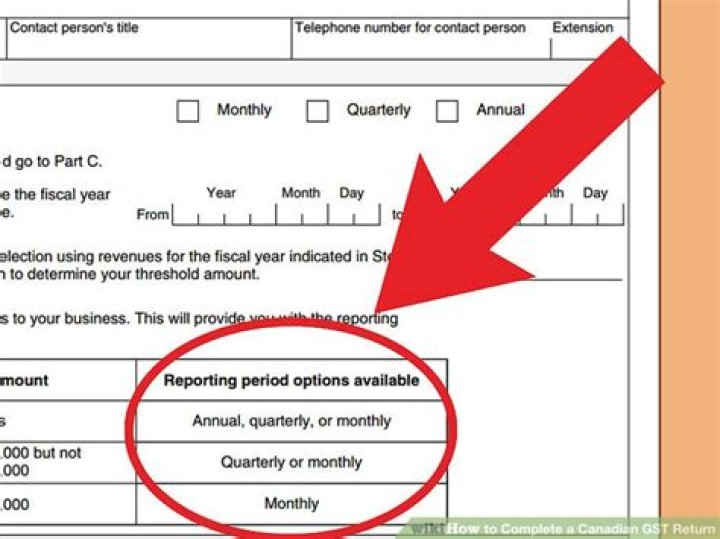
Reporting Periods and the GST/HST Return . When you register for the GST in Canada, the Canada Revenue Agency (CRA) assigns you a GST/HST reporting period based on your total annual sale of GST/HST taxable goods and services. This reporting period may be monthly, quarterly or annual.
cpacanada.ca
The CRA is also waiving interest on existing tax debts related to individual, corporate, and trust income tax returns from April 1, 2020, to September 30, 2020 and from April 1, 2020, to June 30, 2020, for goods and services tax/harmonized sales tax (GST/HST) returns.
intuit.ca
“The Goods and Services Tax is a federal sales tax of 5 percent levied on most transactions in Canada, such as retail purchases, real estate sales and personal services,” says Christopher Liddiard, certified financial planner with Investors Group in London, Ontario.“The GST applies across the country, and some provinces have incorporated the federal GST with provincial sales taxes .
mondaq.com
Section 165 of the Excise Tax Act imposes GST/HST on “every recipient of a taxable supply made in Canada.” A “taxable supply” is the provision of a property or service in the course of a commercial activity, or in plain English the sale of goods or services.
Keyword Analysis
Keyword
CPC
PCC
Volume
Score
Length of keyword
gst tax return canada
1.27
0.9
9010
15
21
gst
1
0.4
1527
28
3
tax
1.35
0.1
3662
71
3
return
1.44
0.3
2931
46
6
canada
0.74
0.7
8533
24
6
Keyword Research: People who searched gst tax return canada also searched
Keyword
CPC
PCC
Volume
Score
canada gst tax return
0.96
0.8
9311
2
canada gst tax return form
0.97
0.5
4380
45
canada gst tax return due date
1.59
0.5
2482
59
Search Results related to gst tax return canada on Search Engine
canada.ca
Due dates for filing a GST/HST return. The personalized GST/HST return (Form GST34-2) will show your due date at t he top of the form. The due date of your return is determined by your reporting period. We can charge penalties and interest on any returns or amounts we have not received by the due date. We will hold any GST/HST refund or rebate .
canada.ca
Method to file. You can file a GST/HST return electronically, by TELEFILE, or on paper. Before you choose a method, you must determine if you are required to file online and which online method you can use.. To help you prepare your GST/HST return, use the GST/HST Return Working Copy and keep it for your own records. The working copy lets you calculate amounts and make sure that everything is .
wikihow.com
How to Complete a Canadian GST Return. If you do business in Canada—or plan to at some point—you should be familiar with the goods and services tax (GST) and harmonized sales tax (HST). The GST is a tax that is applied to most of the goods.
github.io
3. Send (file) the return What is the due date to file a GST/HST return? The personalized GST/HST return (Form GST34-2) will show the due date at t he top of the form. The due date of your return is determined by your reporting period.We can charge penalties and interest on any returns or amounts we have not received by the due date. If you are closing a GST/HST account, you need to file a .
intuit.com
The Canada Revenue Agency issues goods and services tax credits on July 5, October 5, January 5 and April 5 of each tax year. The GST rebate payment is either by cheque or direct deposit. The GST credits are issued to offset the GST paid by certain residents of Canada. When you file your income tax return, the CRA determines whether you’re .
wikipedia.org
The goods and services tax (GST; French: Taxe sur les produits et services) is a value added tax introduced in Canada on January 1, 1991, by the government of Prime Minister Brian Mulroney.The GST replaced a previous hidden 13.5% manufacturers’ sales tax (MST); Introduced at an original rate of 7%, the GST rate has been lowered twice and currently sits at rate of 5%, since January 1, 2008.
intuit.ca
Overview The Goods and Services Tax/Harmonized Sales Tax (GST/HST) credit is intended to help low- to modest-income Canadians offset the tax they pay on consumer goods and services. Revenue Canada pays out the GST/HST credit quarterly. Application simply entails ticking off a box on your annual tax return. There are two parts to eligibility.
mondaq.com
Section 165 of the Excise Tax Act imposes GST/HST on “every recipient of a taxable supply made in Canada.” A “taxable supply” is the provision of a property or service in the course of a commercial activity, or in plain English the sale of goods or services.
fool.ca
The GST, with the Harmonized Sales Tax (TSX) to others, is tax-free money, which the CRA pays quarterly to eligible individuals and couples. On average, individuals will get an extra $400, while .
gst.gov.in
Goods And Services Tax. Lodge your Grievance using self-service Help Desk Portal
ISBN: 978-1-4249-5482-7 (Print), 978-1-4249-5484-1 (PDF), 978-1-4249-5483-4 (HTML) Published: December 2007 Content last reviewed: August 2010
Line 1 Total Sales
Enter your total sales (rounded to the nearest dollar). You must include all taxable and non-taxable sales of goods and services that you made from Ontario locations. If you have locations outside Ontario, you must also include sales made from those locations into Ontario. Do not include GST or RST. If you have no sales to report, you must still file your return. Simply enter 0 on Line 1.
Line 2 Tax Collectable Sales
Determine your total tax collectable on sales during the reporting period and then deduct from that amount the eligible compensation calculated and previously reported at line 5. The result of this calculation must then be entered on line 2 (Tax Collectable on Sales – Compensation = Net amount entered on line 2). Even if you have not yet collected the RST, you still have to report all RST charged to your customers during the filing period. If you have no RST to report, enter 0 on Line 2.
Line 3 Tax Payable for Own Use
This includes items you:
took from your inventory for your own use
manufactured for your own use
brought into Ontario for your own use
purchased tax-exempt in error
Line 4 Current Penalty
If you file your return after the due date and/or you don’t pay what you owe in full, you must pay a penalty and enter the amount on Line 4.
You can calculate the penalty as follows:
Penalty assessed on
Rate
Tax Collectable on Sales (Line 2)
10%
Tax Payable for Own Use (Line 3)
5%
NOTE: When you don’t pay your return in full, the penalty is calculated based on the difference between the amount paid and the amount owing.
For further information, please refer to RST Guide 205 – Penalties.
Line 5 Compensation
Compensation is an amount you receive for filing your RST return. In the transition period to the Harmonized Sales Tax, the compensation amount is limited to $375 for the shortened collection period of April 1 to June 30, 2010. All returns mailed for periods ending after March 31, 2010 will indicate AT LIMIT in the Compensation box at Line 5. Do not enter an amount in this line.
Please see line 2 for instructions on claiming during this period.
If you charged.
then deduct
$20.00 or less
the whole amount
$20.01 to less than $400.00
$20.00
$400 or more
5% of the tax collectable (maximum $375)
Line 6 Total Tax Due
You calculate this amount by adding Line 2 plus Line 3 plus Line 4.
Line 7 Payment Amount
This is the amount you are paying. This should be equal to the amount from Line 6 plus or minus the account balance shown on your return. If you have an amount owing, it is added to the Line 6 amount while a credit balance is subtracted.
NOTE: The account balance shown is effective the date your return was printed. If you have made payment toward your balance owing or used a portion/all of your credit in a previous return, you should adjust the amount accordingly.
You must file your return on time, even if you did not make any sales or charge/collect any RST during the return period (i.e., you have a nil return).
You may file your return and make payment in one of the following ways:
Electronically, using a financial institution’s Internet banking services to send your return, including a nil return. For more information, visit our website at
In person at your Ontario financial institution free of charge. The payment must be teller stamped on or before the due date. Financial institutions will not accept returns without a payment. If you have a nil return, then you must send it directly to the address at the top of your return, take it to a Ministry of Finance Tax Office or file it electronically.
By mail to the address at the top of the return. The return must be received by the Ministry of Finance on or before the due date.
Make your cheque or money order in Canadian funds payable to the Minister of Finance.
Filing your income tax return can be a stressful event, but it is really much less complicated than it appears, especially if you’re using the right tools, have the right expertise, and have comfort that you are doing it right.
You may have heard that you are not required to file an income tax return if you did not earn any income during the year, and yes, in some circumstances that might be true, but there are many more benefits to filing income taxes which far outweigh the reason not to file.
For example, by filing your taxes, you may be eligible for a tax refund, as well as other federal and provincial tax credits or benefits. If you do not file, however, then you are simply not eligible.
Here are some reasons why you should file your Canadian Personal (T1) Income Tax Return.
Benefits of Filing
One of the main benefits of filing your taxes is to receive a tax refund. After all, the government will only pay out your tax refund if you file your taxes.
Did you know that any money you get back as a refund is actually your money? A tax refund is when the government sends you back all or part the taxes you’ve already paid since your tax liability in the year was less than the taxes you paid.
This occurs when your employer takes too much taxes off for the income tax bracket you are in, or when you’re eligible for certain non-refundable tax credits that lower the amount of taxes you owe.
If you’re 19 years old or older, you may also be eligible for a larger refund from refundable credits such as:
Working Income Tax Benefit
GST/HST credit
Canada Child Benefit (CCB).
Students who pay tuition at a qualifying post-secondary institution can also benefit from filing their taxes, even if they have no tax refund. Unlike most non-refundable credits, tuition credits can be carried forward to a future year to use when you have earned more income and need the credit, or transferred to a spouse/common-law partner or parent/grandparent.
You Might Be Required to File
You must file a Canadian Personal Income Tax Return (T1), for 2018 if:
You have to pay tax for 2018.
The Canada Revenue agency (CRA) sent you a request to file a return.
You and your spouse or common-law partner elected to split pension income for 2018.
You received Working Income Tax Benefit advance payments in 2018.
You disposed of capital property in 2018 (for example, if you sold real estate, your principal residence, or shares) or you realized a taxable capital gain (for example, if a mutual fund or trust attributed income to you, or you are reporting a capital gains reserve you claimed on your 2017 return).
You have to repay any of your Old Age Security (OAS) or Employment Insurance (EI) benefits.
You have not repaid all amounts withdrawn from your registered retirement savings plan (RRSP) under the Home Buyers’ Plan or the Lifelong Learning Plan.
You have to contribute to the Canada Pension Plan (CPP). This can apply if for 2018 the total of your net self-employment income and pensionable employment income is more than $3,000.
You are paying employment insurance premiums on self-employment and other eligible earnings.
You are a non-resident receiving certain types of Canadian source income.
As mentioned previously, even if none of these requirements apply, you should file a return if:
You want to claim a refund.
You want to claim the working income tax benefit for 2018.
You want the goods and services tax/harmonized sales tax (GST/HST) credit (including any related provincial credits).
You or your spouse/common-law partner want to begin or continue receiving Canada child benefit payments, including related provincial or territorial benefit payments.
You have incurred a non-capital loss in 2018 that you want to be able to apply in other years.
You want to transfer or carry forward to a future year the unused part of your tuition.
You want to report income for which you could contribute to an RRSP and/or a pooled registered pension plan (PRPP) to keep your RRSP/PRPP deduction limit for future years current.
You want to carry forward the unused investment tax credit on expenditures you incurred during the current year
You receive the guaranteed income supplement or allowance benefits under the old age security program. You can usually renew your benefit by filing your return by April 30th. If you choose not to file a return, you will have to complete a renewal form. This form is available from Service Canada.
How to Complete Your Tax Return
If you are filing your tax return for the first time, you generally will only need to be concerned with a few of sections of your T1 tax form. Income is the first section of this form, so make sure you have collected and saved a T4 all your income slips from the past year including T4s, T5s and T3s.
If you are a Canada Revenue Agency My Account holder, you can view copies of your T4’s online.
You should also be prepared to record any extra money you may have made from a small business venture or cash jobs.
If you are filing online using TurboTax, most of your slips can now be brought into your return through the CRA’s Auto-fill my return feature, which will even enter the data in all the correct places in your return. This feature saves time and help you ensure the details are entered accurately. This feature also ensure that you do not miss reporting any T-slips that you may have received during the year which can result in penalties or interest charges against you.
In order to claim tuition, make sure you get a T2202A from your post-secondary institution.
To reduce the amount of taxes you owe, save receipts for medical expenses, professional or union fees, and child care expenses as you may be able to claim these amounts as well.
If you are filing for the first time, or you have always filed, and you want to make sure that you are doing it correctly, while maximizing the amount of refund that you are eligible to claim, then you should strongly consider using TurboTax.
TurboTax has been helping Canadians get their taxes done right for more than 20 years. With simple to use software options that guide you through your taxes step by step, to full service TurboTax Live options where a tax pro can help you prepare your taxes, TurboTax takes the work out of taxes.
Canadian Tax Expert @ TurboTax. Former CRA employee.
There are different sales taxes levied in Canada. The tax charged depends on both the province and goods or services acquired.
There are different sales taxes levied in Canada. The tax charged depends on both the province and goods or services acquired.
Overview
The Canadian sales taxes include the Provincial Sales Tax (PST), the Quebec Sales Tax (QST), the Goods and Services Tax (GST), and the Harmonized Sales Tax (HST) which is a combination of the provincial sales tax portion and the GST in some provinces.В
The GST applies to most goods and services made in Canada; however, certain exceptions may apply.
The PST is a retail sales tax that is payable when a taxable good or service is acquired for personal or business use, unless a specific exemption applies.
The HST generally applies to the same base of goods and services as the GST. The participating provinces (New Brunswick, Newfoundland and Labrador, Nova Scotia, Ontario and Prince Edward Island) harmonized their provincial sales taxВ with the GST to implement the HST.
In Quebec, the most common sales taxes are the:
GST, which is calculated at a rate of 5% on the selling price.
QST, which is calculated at a rate of 9.975% on the selling price excluding the GST.
Canadian Sales Tax Table (Updated July 1, 2019)
PROVINCE
APPLICABLE SALES TAX
GST 1
HST 1
QST 2
PST 3
TOTAL
Alberta
GST
5%
5%
British Columbia
GST + PST
5%
7%
12%
Manitoba
GST + PST
5%
7%
12%
New Brunswick
HST
15%
15%
Newfoundland and Labrador
HST
15%
15%
Northwest Territories
GST
5%
5%
Nova Scotia
HST
15%
15%
Nunavut
GST
5%
5%
Ontario
HST
13%
13%
Prince Edward Island
HST
15%
15%
Quebec
GST + QST
5%
9.975%
14.98%
Saskatchewan
GST + PST
5%
6%
11%
Yukon
GST
5%
5%
1 Generally, GST/HST for shipments is calculated based on the rate applicable in the destination province instead of the origin province.
2 Generally, QST is only applicable to shipments within Quebec (i.e., when Quebec is both the shipment origin and destination province).
3 Generally, PST is not applicable to shipping charges, including most surcharges. However, HST is applicable in most cases.
A Manitoba manufacturer hires FedEx to transport products from its plant in Winnipeg to a wholesaler in Toronto.
The supply of this transportation service is subject to HST at a rate of 13% because the destination of the transportation service is in Ontario.
As part of the introduction of the Harmonized Sales Tax (HST) in Ontario and British Columbia, the Canada Revenue Agency requires large businesses to be subject to a scheme billed as a recapture of input tax credits (RITCs). Businesses can currently claim a credit on the HST they have paid on certain expenses for the running of their business. However, beginning in 2010 and finishing in 2018, businesses are required to pay back those credits on some of their expenses. In the first five years of the scheme, the payback rate is 100 percent, and for the final three years the rate decreases by 25 percent per year until it is eliminated completely.
Step 1
Enter the your gross input tax credits (ITCs) and adjustments for the reporting period on line 1,400 of your GST/HST Netfile return. This is equivalent to the eligible tax paid on eligible expenses for your business that can be claimed by you as a credit.
Step 2
Enter the total amount of recaptured ITCs for each province for the reporting period on line 1,401 of your GST/HST Netfile return. This is the total amount of the specific ITCs the government has indicated must be paid back by businesses. Review the government’s tax bulletin on the subject to get details on what must be paid back.
Step 3
Confirm the GST/HST Netfile program has correctly determined the recapture rate, which will automatically appear on line 1,402. The calculation is done by multiplying the amount on line 1,401 by the recapture rate. For the first five years of the program, the recapture rate is 100 percent. For year six, it is 75 percent; for year seven, it is 50 percent; and for year eight it is 25 percent.
Due to the complexity of what can be claimed as an ITC and what must be recaptured by the government under the RITC scheme, it is strongly advisable to obtain the services of a qualified financial adviser or accountant to help you complete your GST/HST Netfile return.
Warning
Businesses cannot forgo claiming ITCs and not paying the equivalent amount of RITCs. The Canada Revenue Agency mandates that the above calculation method be used.
Keyword Analysis
Keyword
CPC
PCC
Volume
Score
Length of keyword
canada gst tax return
0.34
0.1
9939
93
21
canada
1.52
0.4
1793
51
6
gst
1.2
0.1
8619
34
3
tax
0.62
0.8
8763
60
3
return
1.16
0.4
2827
24
6
Keyword Research: People who searched canada gst tax return also searched
Keyword
CPC
PCC
Volume
Score
canada gst tax return
0.03
0.5
2615
96
canada gst tax return form
1.71
0.9
720
22
canada gst tax return due date
1.25
0.8
687
13
Search Results related to canada gst tax return on Search Engine
canada.ca
Due dates for filing a GST/HST return. The personalized GST/HST return (Form GST34-2) will show your due date at t he top of the form. The due date of your return is determined by your reporting period. We can charge penalties and interest on any returns or amounts we have not received by the due date. We will hold any GST/HST refund or rebate .
canada.ca
Method to file. You can file a GST/HST return electronically, by TELEFILE, or on paper. Before you choose a method, you must determine if you are required to file online and which online method you can use.. To help you prepare your GST/HST return, use the GST/HST Return Working Copy and keep it for your own records. The working copy lets you calculate amounts and make sure that everything is .
github.io
3. Send (file) the return What is the due date to file a GST/HST return? The personalized GST/HST return (Form GST34-2) will show the due date at t he top of the form. The due date of your return is determined by your reporting period.We can charge penalties and interest on any returns or amounts we have not received by the due date. If you are closing a GST/HST account, you need to file a .
wikihow.com
If you electronically filed your last GST/HST return, the CRA will mail you an electronic filing information sheet (Form GST34-3: Goods and Services Tax/Harmonized Sales Tax Return for Registrants). If you didn’t file electronically, the CRA will mail you a personalized four-page return (Form GST34-2).
github.io
Line 105 – Total GST/HST and adjustments for the period. Add line 103 and line 104, and enter the result on line 105.If you file a paper return, enter this amount on Part 1 and Part 2 of the return.. If you provide the Ontario First Nations point-of-sale relief, the amount of HST collected or collectible on the supply must be included in the line 105 calculation at the full 13%.
bench.co
Types of sales tax in Canada. Each province has its own method of calculating sales tax. The three different tax models used in Canada are GST, HST, and PST. GST (Good and Services Tax) GST is a Canada-wide tax that can show up in two different ways, depending on the province in which your business is registered: A separate tax, charged at a .
thebalancesmb.com
Reporting Periods and the GST/HST Return . When you register for the GST in Canada, the Canada Revenue Agency (CRA) assigns you a GST/HST reporting period based on your total annual sale of GST/HST taxable goods and services. This reporting period may be monthly, quarterly or annual.
cpacanada.ca
The CRA is also waiving interest on existing tax debts related to individual, corporate, and trust income tax returns from April 1, 2020, to September 30, 2020 and from April 1, 2020, to June 30, 2020, for goods and services tax/harmonized sales tax (GST/HST) returns.
intuit.ca
“The Goods and Services Tax is a federal sales tax of 5 percent levied on most transactions in Canada, such as retail purchases, real estate sales and personal services,” says Christopher Liddiard, certified financial planner with Investors Group in London, Ontario.“The GST applies across the country, and some provinces have incorporated the federal GST with provincial sales taxes .
mondaq.com
Section 165 of the Excise Tax Act imposes GST/HST on “every recipient of a taxable supply made in Canada.” A “taxable supply” is the provision of a property or service in the course of a commercial activity, or in plain English the sale of goods or services.
View this quick video to learn more about GST/HST Accounts.
What is the GST/HST Number? GST/HST is a tax that applies on most supplies of goods and services made in Canada. The GST rate is 5% across Canada and the HST rate varies from province to province.
As of July 01, 2010, much of Canada has now harmonized their provincial sales tax with GST to create the harmonized sales tax (HST). This rate is 13% in Newfoundland, New Brunswick and Ontario, 12% in British Columbia and 15% in Nova Scotia.
HST registrants who make taxable supplies (other than zero-rated supplies) in one of these participating provinces collect tax at the provincial HST rate. Registrants collect tax at the 5% GST rate on taxable supplies made in the rest of Canada (other than zero-rated supplies).
Who pays GST/HST? Almost everyone has to pay GST/HST on purchases of taxable supplies of goods and services (other than zero-rated supplies). However, Indians and some groups and organizations, such as many provincial and territorial governments, do not always pay GST/HST on their purchases.
Who charges GST/HST? Generally, GST/HST registrants have to collect GST/HST on all taxable (other than zero-rated) supplies of goods and services they provide to their customers. However, there are some exceptions for sales of taxable real property.
What is the Federal Business Number (BN)? The BN is issued by the Canada Revenue Agency (CRA) and is used to unify all accounts a business may have with the federal government. The BN is used to operate corporate income tax, import/export accounts, payroll deductions and GST/HST.
When should I apply for the Federal Business Number (BN)? Registration should take place after the company has been registered. We can assist you with both, the business registration and the GST/HST registration at the same time.
General Information about GST/HST Most goods and services sold or provided in Canada are taxable at the rate of 5% (GST) or 12% to 15% (HST). Certain items, such as sales of basic groceries and prescription drugs are taxable at a rate of 0%. These are referred to as zero-rated goods and services. A limited number of goods and services are exempt from the GST/HST.
The GST/HST applies to most transactions from manufacturing to marketing and sales. Businesses and organizations registered for the GST/HST are referred to as registrants.
A Business must register to obtain a Business Number with a GST/HST account. Registrants can claim a credit to recover the GST/HST that is paid or payable on purchases used to provide taxable goods and services. This credit is called an input tax credit and can be claimed for the GST/HST paid or payable for goods or services acquired or imported for use, consumption or supply in their commercial (taxable) activities.
GST/HST registrants who provide taxable goods or services have to charge and collect the GST/HST on their sales. If the GST/HST collected is greater than the GST/HST paid or payable, the difference is sent to the CRA. If the GST/HST collected is less than the GST/HST paid or payable, a refund can be claimed.
Do I need to register for GST (Goods and Services Tax)? While you are not required to register for GST/HST until your annual gross revenues exceed a minimum threshold (currently $30,000) we generally recommend that any business register as soon as possible.
Three reasons to register: 1. Unless you are a GST/HST registrant you cannot claim GST/HST input tax credits (GST/HST paid on business expenditures). If you are a GST/HST registrant and your input tax credits exceed GST/HST collected on sales, you may claim a refund of the excess from Canada Revenue Agency. If you’re not a registrant the GST/HST paid on expenses is included as part of the expense when computing net income.
2. Not being registered for GST/HST tells everyone that you are running a truly small business. (Your sales are below $30,000 per year) If your customers are other businesses, they expect to pay GST/HST.
3. Companies that are required to register for GST/HST must remit the GST/HST tax to Canada Revenue Agency – even if it has not been collected from the customer. By registering for GST/HST upon starting your business you will eliminate the possibility of inadvertently surpassing the $30,000 threshold and being exposed to penalties and interest charges for noncompliance
You have two options when registering for GST/HST number:
Option # 1 You can always visit your local Canada Revenue Agency office and complete the registration form. Please make sure that you fully understand the questions on the registration form and answer them correctly. It is quite difficult to change certain information once it is recorded. (You may have to wait for up to one year). Also, be prepared for delays due to the workload.
Option # 2 We can easily assist you with registration. You can visit our office or submit your information online. If you are wondering why should you let us help you with registration, the answer is simple.
You do not have to take any time from your busy schedule to do the registration.
If you are located in a small town, there is no need to travel, just order online.
We have the expertise to complete the registration in the way that best suits your needs.
We work for you, not the government.
For a small fee of $39.95 we will do all the necessary work for you.
We can help you with the next step – GST/HST report preparation.
As always, it is up to you to decide to do the work the easy way or the hard way. In any case, we are always available to answer your questions. Feel free to contact us by e-mail or telephone, at the numbers listed below.
Stay informed about Canadian Small Business Matters. Get frequent Tips about running your business, making more sales and saving on taxes. Sign up for our free Newsletter now.
Using NETFILE to File Your Canadian Taxes
Comstock Images/Getty Images
B.A., Political Science, Carleton University
NETFILE is an electronic tax-filing service that allows you to send your individual income tax and benefit return directly to the Canada Revenue Agency (CRA) using the Internet and a NETFILE-certified software product.
To file your Canadian income taxes online, you first have to prepare your tax return using a commercial tax preparation desktop software package, a Web application or a product for an Apple or Android mobile device. These products must be certified for NETFILE.
When you file your taxes online, you’ll get an immediate confirmation that your return has been received. If you’ve made arrangements for direct deposit and the Canada Revenue Agency owes you a refund on your income taxes, you should get a faster refund than if you file on paper, possibly within two weeks.
However, it’s not quite as simple as hitting the send button on your email program, so leave some time to get prepared and to get comfortable with the system.
Eligibility to File Taxes Online
Although most income tax returns can be filed online, there are some restrictions. For example, you cannot use NETFILE to file a return for a year before 2013, if you are a non-resident of Canada, if your Social Insurance Number or individual tax number begins with 09 or if you went bankrupt during the preceding two years.
There are quite a few other specific restrictions, so be sure to check the full restrictions list before you begin.
Software to File Taxes Online
To file your tax return online, you must prepare your income tax form using software or a Web application certified by the CRA for the current tax year. The CRA tests and certifies software between December and March, so it is usually at least late January before a commercial tax software package or Web application is put on the approved list of certified software. Be sure the software you plan to use is certified for the current tax year. If you purchase or download your income tax software before it is certified by the CRA for use with NETFILE, you may have to download a patch from the software vendor.
Some software certified for use with NETFILE is free for individuals. Check the list of certified software and the vendor’s site for specific details.
Identification for NETFILE
Your current address must be on file with the CRA before you send your income tax return by NETFILE. Here’s how to change your address with the CRA. You won’t be able to do it through NETFILE.
You will need to provide your Social Insurance Number and date of birth when you file.
You need to provide the location of your “.tax” file containing your tax return that you prepared using NETFILE-certified tax preparation software or Web application.
If you have concerns about the security of your personal and financial information when using NETFILE, you should check the NETFILE Security page from the CRA.
NETFILE Confirmation Number
As soon as you send your income tax return online, the CRA does a very quick preliminary check of your return (usually in minutes) and sends you a confirmation number telling you that your return has been received and accepted. Keep the confirmation number.
Tax Information Slips, Receipts, and Documents
Keep all the tax information slips, receipts and documents you use to prepare your income tax return. You do not need to send them to the CRA unless the agency asks to see them. Be sure to include your telephone number on your income tax return so the CRA can contact you quickly. Your notice of assessment and tax refund may be delayed if the CRA has to contact you.
Getting Help With NETFILE
For help using NETFILE, consult the CRA’s Online Help. The Frequently Asked Questions may also be useful.
Remember, if you run into problems, you can still file the old-fashioned way—by getting a paper income tax package, filling in the paper form, attaching the schedules and receipts, and getting it to the post office in time to be postmarked by the deadline.