Craig Lloyd is a smarthome expert with nearly ten years of professional writing experience. His work has been published by iFixit, Lifehacker, Digital Trends, Slashgear, and GottaBeMobile. Read more.
When you go on vacation, there are probably a handful of things you to do to your house to prepare it for a prolonged vacancy. That list should include taking care of your smarthome devices.
If you rely on a smarthome automation from day to day, it’s important to know how to put all of it into “vacation mode” while you’re away. Otherwise, that automation becomes less useful while you’re not there to take advantage of them. Here’s what you should know.
Some Devices Have a Dedicated “Vacation Mode”
Not all smarthome devices have a dedicated vacation mode feature, but some do, and you can use that to have that device automatically go into and out of vacation mode at certain times.
For example, the Ecobee line of smart thermostats lets you schedule a vacation mode, which is basically nothing more than just setting the thermostat at a specific temperature starting at a certain time and day. You then set the end time and date, which makes the temperature settings go back to normal once you get home—or even have your home already comfortable for you when you get back.
Each smarthome device is a bit different when it comes to vacation mode and how you set it up, but more often than not, you can find it in the app settings for the device.
Randomize Your Smart Lights
Perhaps one of the best features you can take advantage of while way from home for an extended amount of time is randomizing your smart lights so that it looks like you’re home. Most smart lights have a dedicated feature for this.
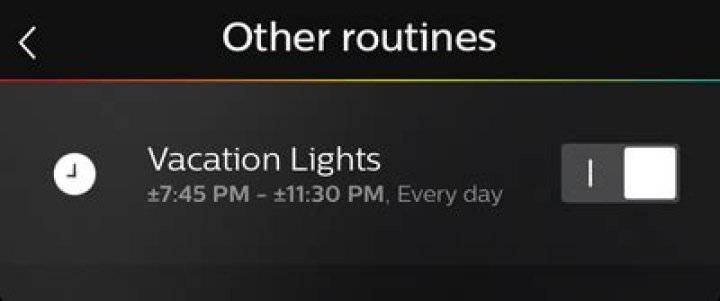
For Philips Hue lights, you just need to create a routine. When you select the times that the lights should turn on and off, you can make it choose random times within a certain time window. So if usually go to bed around 10pm, you can have your Hue lights turn on and off at random times each day between 9:45pm and 10:15pm—simulating someone being there.
Other smart light brands may have this kind of feature set up differently within the app, but it’s usually easily accessible in the settings.
Make a List of All Your Devices and Set a Reminder
For smarthome devices that don’t have a dedicated vacation mode, your best bet is to set yourself a reminder so that you can manually adjust all of your devices before you take off for the week, and another reminder to re-enable them when you get back.
For instance, if you have smart plugs automatically turn on your coffee maker or space heater every morning, you don’t want those things to automatically turn on while you’re on vacation away from home. So you’ll need to go in and turn the automation off manually.
Depending on how many devices you have across your home, it can be easy to forget some. With that in mind, make a list of all the smarthome devices that you’ll need to adjust manually and then set a reminder for it right before you leave for your vacation.
It can be tedious work for sure, and while you could probably let some devices remain on without harm, you don’t want things like smart plugs turning on stuff automatically while you’re away.
Whether you simply forgot to turn out the lights before you left home or, for security reasons, you want to make it look like your vacant home is occupied, you can control your Philips Hue lighting setup whilst you’re away from your house.
If you’d like to add a Philips Hue set up to your home, I’d recommend going for one of the starter kits since it includes the necessary HomeKit-enabled Philips Hue bridge.
There are two methods for remote control: the Philips Hue app and Apple’s HomeKit. Let’s take a look at how to set up both methods!
How to set up remote access with the Philips Hue app
By logging in to the Philips Hue app with your Philips Hue account, you can use the Philips Hue bridge to control your lights while you’re away from home and set up location-based triggers to turn on the lights when you arrive and turn them off when you leave.
- Launch the Hue app.
- Tap Explore.
- Tap Log in to My Hue.
Tap Log in.
The app will indicate you’re Logged in.
How to set up remote access with HomeKit and the Home app
Using HomeKit to control your Philips Hue setup while you’re away from home actually means using a so-called Home Hub to control your devices. A fourth generation Apple TV and an iPad can both function as a Home Hub — they take in the commands you dictate while you’re away and communicate that information to the devices on your home network.
How to make your Apple TV a Home Hub
- Open Settings on your Apple TV.
- Scroll down and click to open Accounts.
Make sure you’re signed in with your Apple ID.
Click to open iCloud.
If the HomeKit setting reads Not Connected, click to connect.
How to make your iPad a Home Hub
- Launch Settings on your iPad.
- Scroll down and tap Home.
Tap the switch to enable Use this iPad as a Home Hub.
If you have trouble getting your Home Hub set up, head here for some troubleshooting tips:
Once you’ve got your Home Hub all set up, it’s as simple as launching the Home app or talking to Siri to control your Philips Hue lights! Your commands will make their way to the iPad or Apple TV you’ve got at home and it’ll tell the Philips Hue bridge what you want to make happen. The bridge will take those commands the distance (to your lights) and BOOM! — your living room lights have been turned off while you’re away from home.
Questions?
Run into trouble trying to get remote access set up? Want to learn more about Philips Hue lights? Let me know in the comments or over on Twitter and we’ll get things figured out!
We may earn a commission for purchases using our links. Learn more.
Review: Logitech somehow made its best wireless mouse even better
The MX Master 3 is a fan-favorite among many for wireless mice, but Logitech just made it even better with the new MX Master 3S.
Apple’s M2 MacBook Air pre-order date is reportedly just days away
Apple’s hotly-anticipated M2-powered MacBook Air will reportedly go on sale as soon as July 15, according to a new report.
Review — Fire Emblem Warriors: Three Hopes is a fun but repetitive return
Fire Emblem Warriors: Three Hopes allows players to revisit the same characters from Three Houses. However, it’s very different and will only be enjoyable if you understand that going in.
Make your ceiling fan smart with these HomeKit switches
Adding a HomeKit-enabled switch for your ceiling fan can is an easy way to keep your cool when things get a little too hot. Take control of your fan with the best switches that you can buy today.
Si vous voulez donner l’illusion que vous êtes à la maison lorsque vous êtes en vacances, vos ampoules intelligentes Phillips Hue ont maintenant un
CONNEXION: Les meilleures fonctionnalités expérimentales dans la section des nouveaux laboratoires de Philips Hue
Historiquement, ce fut un peu pénible de configurer vos lumières Hue à imiter une présence de toute la maison. Au début, vous deviez vous fier à des solutions de rechange tierces ou créer laborieusement votre propre liste de minuteries pour toutes vos lumières. Maintenant, cependant, la présence mimant la fonctionnalité Labs est hors de la bêta et intégrée directement dans l’expérience Hue. Il est si simple à utiliser que vous pouvez configurer votre système d’éclairage pseudo-randomisé en quelques minutes.
Pour suivre, vous aurez besoin d’un système d’éclairage Hue avec au moins 1 ampoule, un bridge exécutant le micrologiciel mis à jour, et la dernière version de l’application Hue pour Android ou iOS. Pour éviter les frustrations, prenez le temps de vérifier votre magasin d’applications respectif pour vous assurer que vous exécutez le logiciel le plus récent et vérifiez si l’application dispose d’alertes de mise à jour de votre passerelle qui vous attendent.
Avec tout mis à jour et prêt, la mise en place d’une minuterie de vacances aléatoire est un jeu d’enfant. Ouvrez simplement l’application Hue sur votre appareil mobile. En utilisant la barre de navigation du bas, sélectionnez l’entrée pour “Routines”
Dans le menu Routines, sélectionnez “Autres routines”
Dans le menu “Autres routines”, tapez sur le cercle avec le symbole + dans le bas
Une fois que vous entrez dans l’écran de création de routine, vous êtes dans le coup, et tous les paramètres sont étroitement liés. Donnez-vous un nom de routine, comme “Lumières de vacances”. Sélectionnez l’heure à laquelle vous souhaitez ancrer la routine. Nous vous recommandons de choisir une heure qui est environ 45-60 minutes avant le coucher du soleil, de cette façon, votre maison n’est pas sombre pendant une heure avant qu’il y ait une activité lumineuse.
Vous devez également cocher les jours que vous souhaitez déclencher. Dans la plupart des cas, la meilleure solution est de vérifier tous les jours de la semaine, puis d’allumer et d’éteindre la routine quand vous partez en vacances et quand vous revenez. Si vous avez un emploi du temps plus fixe, comme si votre travail vous emmène loin de la maison tous les vendredis au lundi, alors il est probablement plus logique de laisser la routine tout le temps et de simplement cocher les jours où vous êtes loin de la maison, alors vous n’oublierez pas de l’allumer.
Enfin, et c’est la clé de toute la routine de “mimétisme de présence”, vous devez cocher “Aléatoire”.
Par défaut, les lumières sont réglées pour s’allumer instantanément (la valeur par défaut “Fade: Instant”), et nous vous recommandons de les laisser comme cela immédiatement pour imiter l’utilisation humaine réelle. Vous pouvez également, en option, basculer le paramètre “Réglage quantité”. Le montant de l’ajustement correspond à la durée avant ou après l’heure de démarrage définie, les lumières s’allumeront. Plus la valeur est petite, plus la durée d’activation des lumières est proche de la valeur définie, plus le degré de variabilité entre l’heure réglée et l’activation des lumières est élevé.
À ce stade, faites défiler vers le bas “Que devrait-il se passer?” Sélectionnez “Où?” Pour sélectionner les lumières qui s’activent.
Ici, vous pouvez sélectionner vos lumières de deux façons différentes. Vous pouvez sélectionner toute la maison en cochant la case “Maison”, ou vous pouvez sélectionner (jusqu’à 4) pièces individuelles. Ce que vous avez choisi est une préférence personnelle, mais dans notre cas, parce que le mimétisme le plus réaliste de notre utilisation de la lumière habituelle serait d’éteindre les lumières et les lumières à l’étage, nous avons choisi les quatre pièces les plus utilisées sol. Nous vous recommandons de choisir les pièces correspondant à la façon dont vous utilisez normalement votre maison pour lui donner l’apparence la plus réaliste.
Une fois que vous avez sélectionné les lumières souhaitées, appuyez sur la petite flèche dans le coin supérieur gauche pour revenir au menu précédent. Là, vous avez une dernière série de décisions à prendre. Faites défiler vers le bas sous la sélection “Où?” Que vous venez de faire et vous trouverez l’option de basculer quel éclairage “scène” joue dans chaque pièce ou dans toute la maison que l’éclairage est déclenché. La valeur par défaut est “Bright”, et nous vous recommandons de la conserver: vous pouvez enregistrer l’effet disco pour un autre projet.
Le paramètre le plus important ici est “Tournez la (les) chambre (s) à”, car cela ne semble pas très réaliste si vos lumières s’allument et restent allumées pendant une semaine. Sélectionnez l’heure à laquelle les lumières doivent s’éteindre et, tout comme l’heure d’activation, cette heure d’arrêt sera sélectionnée au hasard pour chaque zone avec une variable +/- basée sur la valeur «Ajustement» que vous avez sélectionnée dans la section précédente. Encore une fois, il est préférable d’imiter votre routine habituelle. Nous éteignons donc les lumières au hasard dans les trente minutes qui précèdent ou après 11 h 30, ce qui correspond à notre comportement habituel en fin de soirée.
Une fois la dernière sélection effectuée “Enregistrer” dans le coin supérieur droit. Vous verrez votre nouvelle routine dans la liste des routines.
Par défaut, la routine sera activée, il vous suffit donc de la désactiver si vous n’êtes pas encore tout à fait en vacances ou de la laisser si vous partez. Chaque fois que vous avez besoin d’un éclairage domestique réaliste et pseudo-randomisé pour créer l’illusion que quelqu’un est à la maison, ouvrez simplement l’application Hue et retournez l’interrupteur.
Vous avez donc soigneusement sélectionné certaines parties et construit un ordinateur, mais cela ne fait rien . encore . Avant de vous lancer dans l’installation de votre système d’exploitation, nous devons jeter un coup d’œil au BIOS et le préparer pour notre système d’exploitation. Le BIOS est synonyme de “Basic Input-Output System”.
Vous continuez à entendre parler de podcasts, de vos amis, en ligne, même à la télévision. Mais qu’est-ce que les podcasts, et comment les écoutez-vous? Ne vous inquiétez pas: les podcasts sont l’une des formes de médias en ligne les moins accessibles. Tout le monde peut cliquer sur un lien vers une vidéo YouTube, et même les personnes sans compte Twitter peuvent faire défiler les discussions sur Twitter.
Als u de illusie wilt geven dat u thuis bent wanneer u echt op vakantie bent, hebben uw Phillips Hue slimme lampen nu een “Aanwezigheid nabootsende” functie die het vervaardigen van de illusie dood eenvoudig maakt.
GERELATEERD: De beste experimentele kenmerken in de nieuwe Labs sectie van Philips Hue
Historisch gezien was het een klein beetje vervelend om uw Hue-lampen te configureren voor bootsen een hele huisaanwezigheid na. Vroeger moest je op tijdelijke oplossingen van een andere partij vertrouwen of moeizaam een eigen lijst met timers maken voor al je verschillende lichten. Nu is de aanwezigheid die de Labs-functie nabootst echter niet meer in de bèta en is deze direct ingebakken in de Hue-ervaring. Het is zo eenvoudig te gebruiken dat je in een kwestie van minuten je hele pseudo-willekeurige lichtsysteem kunt instellen.
Om dit te volgen, heb je een Hue-verlichtingssysteem met minstens 1 lamp nodig, een brug met bijgewerkte firmware, en de nieuwste versie van de Hue-app voor Android of iOS. Neem even de tijd om uw respectievelijke app store te controleren om er zeker van te zijn dat u de meest recente software gebruikt en controleer of de app tijd-tot-update heeft-uw-brugwaarschuwingen die op u wachten.
alles is bijgewerkt en klaar, het instellen van een willekeurige vakantietimer is een eitje. Open eenvoudig de Hue-applicatie op uw mobiele apparaat. Gebruik de onderste navigatiebalk om de invoer voor “Routines” te selecteren.
Selecteer “Andere routines” in het menu Routines.
Tik in het menu “Andere routines” op de cirkel met het + -symbool in de onderste rechterhoek om een nieuwe routine te maken.
Zodra u het routine-aanmaakscherm binnengaat, zit u er middenin en zijn alle instellingen behoorlijk dicht bij elkaar gepakt. Geef je routine een naam, zoals ‘Vacation Lights’. Selecteer de tijd waarop u het anker de routine wilt toewijzen. We raden aan om een tijd te kiezen die ongeveer 45-60 minuten voor zonsondergang valt, op die manier is uw huis een uur donker voordat er enige lichtactiviteit is.
U moet ook afvinken op welke dagen u de lichtroutine wilt activeren. In de meeste gevallen is de beste oplossing om alle dagen van de week te controleren en de routine gewoon in en uit te schakelen wanneer u op vakantie gaat en wanneer u terugkeert. Als je een meer vast schema hebt, bijvoorbeeld als je werk je van vrijdag tot maandag wegbrengt van huis, dan is het waarschijnlijk logischer om de routine altijd aan te laten staan en gewoon de dagen af te vinken. weg van huis – dan zul je niet vergeten om het in te schakelen.
Uiteindelijk, en dit is de sleutel tot de hele “aanwezigheid nabootsende” routine, moet je schakelen tussen “Willekeurige tijden” op.
Standaard, de lampjes gaan onmiddellijk branden (de “Fade: Instant” standaard), en we raden aan om ze op die manier te laten staan als direct na te bootsen op echt menselijk gebruik. U kunt ook, optioneel, de instelling “Aanpassingsbedrag” wijzigen. Het aanpassingsbedrag is de hoeveelheid tijd vóór of na de ingestelde starttijd dat de lichten aangaan. Hoe kleiner het bedrag, hoe dichter bij de ingestelde tijd dat de lichten worden geactiveerd, hoe groter het bedrag, hoe groter de variabiliteit tussen de ingestelde tijd en de tijd dat de lichten worden geactiveerd.
Schuif nu omlaag in de instellingen naar de Wat zou er moeten gebeuren? Selecteer “Waar?” Om te selecteren welke lichten worden geactiveerd.
Hier kunt u op een of twee manieren uw lichten selecteren. U kunt het hele huis selecteren door “Home” uit te vinken, of u kunt (maximaal 4) afzonderlijke kamers selecteren. Wat jouw keuze is, is een persoonlijke voorkeur, maar in ons geval, omdat de meest realistische mimiek van ons gebruikelijke lichtgebruik zou zijn om de lichten beneden te hebben en de lichten boven, kozen we ervoor om de vier meest gebruikte kamers op de bovenste verdieping te kiezen verdieping. We raden u aan de kamers te kiezen die overeenkomen met de manier waarop u uw huis normaal gesproken gebruikt om het de meest realistische weergave te geven.
Nadat u de gewenste lichten hebt geselecteerd, tikt u op de kleine pijl in de linkerbovenhoek om terug te keren naar het vorige menu. Daar moet je nog een laatste reeks beslissingen nemen. Blader naar beneden onder de “Waar?” -selectie die u zojuist hebt gemaakt en u zult de optie vinden om in te stellen welk licht “scène” in elke kamer of in het hele huis wordt afgespeeld terwijl de verlichting wordt geactiveerd. De standaardinstelling is “Helder” en we raden u aan dit te doen; u kunt het disco-effect opslaan voor een ander project.
De echt belangrijke instelling hier is “Schakel kamer (en) uit”, maar het ziet er niet erg realistisch uit als je lichten aan gaan en een week blijven branden. Selecteer een tijdstip waarop u de lichten wilt uitschakelen en net als de aanschakeltijd wordt deze uitschakeltijd willekeurig geselecteerd voor elk gebied met een +/- variabele op basis van het “Aanpassings” -bedrag dat u in de vorige sectie hebt geselecteerd. Nogmaals, het nabootsen van je normale routine is het beste, dus we zetten de lichten in om willekeurig uit te schakelen binnen dertig minuten vóór of na 11.30 uur, overeenkomend met ons normale avondgedrag.
Nadat je deze definitieve selectie hebt gemaakt, selecteer je gewoon “Opslaan” in de rechterbovenhoek. Je ziet je nieuwe routine in de routinelijst.
Standaard staat de routine aan, dus schakel hem gewoon uit als je nog niet helemaal op vakantie bent of laat hem aan als je de deur uitgaat. Telkens wanneer u realistische en pseudo-willekeurige woningverlichting nodig hebt om de illusie te creëren dat iemand thuis is, opent u gewoon de Hue-app en draait u de schakelaar om.
Met Android en de iPhone kunt u het standaardtoetsenbord vervangen door een extern toetsenbord. Door zijn aard heeft een toetsenbord echter volledige toegang tot alles wat u erop typt – van privéberichten tot wachtwoorden en creditcardnummers. Sommige gegevens van het toetsenbord worden vaak via internet verzonden, waar het kan worden gestolen – of zelfs misbruikt door de ontwikkelaar van het toetsenbord.
Multiplayer Online Battle Arenas, of MOBA’s, verwijzen naar een zeer specifieke subset van top-down, teamgebaseerde strategietitels. Ondanks bescheiden begin als een gematigde uitloper van real-time strategiespellen, zijn deze titels ontploft in de voorhoede van pc-gaming, krijgen ze tientallen miljoenen spelers en een plekje aan de top van de eSports (blech *) wereld.
A Fake television is an effective burglar deterrent! It’s even more effective than ordinary lights that are on a timer, in my opinion. Here’s why I like the ‘FakeTV‘ product. And explanation how it works.
This is the FakeTV that I bought. I’ve had it for a number of years. I can report that it has held up perfectly, and is still functional today.
Actually, the following is their current model since I purchased mine:
As viewed from the outside at night, a TV appears as a flickering shimmer of light, colors, and hues against a window, shade, or curtain.
Burglars are opportunists. The typical home burglar looking for a vacant home to burglarize will likely move on when they believe that someone is home.
If you are going away on vacation or for any extended period of time, a fake TV light like the one shown below will serve as an excellent deterrent.
FakeTV – Looks like a Real Television from Outside
If you are away from home for awhile on a trip or vacation, in addition to setting up a few lights on timers for the evening, the illusion of a TV turned on will add a very real appearance that someone is home – adding an additional layer of security.
This Fake TV light is a device that simulates a TV by producing realistic random patterns of flickering light. It simply plugs in to a wall outlet. Or you might connect it to a 24 hour timer programmed for the evening hours.
How it works
The emitted light is realistic in that it’s sourced from multicolored LED’s located behind prism lenses. The combination emits the unique diffused patterns of light into the room. It reflects off the walls, ceiling, and windows which enhances the effects.
The randomness of the flickering is very similar to that of a real TV. The intensity changes, the color and hue changes, and the random speed at which it flickers is similar to scene changes on TV – some rapid, some slower.
FakeTV simulation
FakeTV prism lenses & multicolored LED’s
Settings
The Fake TV light has several user-settings.
– always on
– a light sensor which detects when it is getting dark in the room
– It can be set to run for 4-hours, 7-hours, or after dusk.
I personally prefer the ‘always-on’ setting while plugging the power supply adapter into a 24-hour timer which I program for specific hours of operation.
If you’re looking for an additional layer of home security while you’re away from home, consider the Fake TV Burglar Deterrent.
Note:
Home security and burglar deterrence should be thought of in ‘layers’.
In addition to burglar deterrents such as outdoor motion lights, security stickers & placards, deadbolts, bump-proof locks, long screws in your door strike-plate, an x-large dog bowl on the front porch, a real or fake security camera, etc., consider what the INSIDE of your home looks like as viewed from the OUTSIDE to a potential burglar. Thus, the FakeTV!
Whether or not you pay any attention to the lighting overhead, the lighting may be paying such close attention to you that privacy advocates are warning about the “terrifying” potential for misuse.
There are cases when a LED light can spy by covertly listening and then send that audio over 300 meters away to the eavesdropper. But this time, it is the LED fixtures that are the “backbone” of a new surveillance system scrutinizing and recording us. The New York Times reported that 171 LED fixtures inside Terminal B at Newark Liberty International Airport are “watching” us.
Using an array of sensors and eight video cameras around the terminal, the light fixtures are part of a new wireless network that collects and feeds data into software that can spot long lines, recognize license plates and even identify suspicious activity, sending alerts to the appropriate staff.
It’s not the “green” side of saving energy by automatically turning the lights off and on that has the Port Authority of New York and New Jersey excited and “already talking about expanding it to other terminals and buildings.” Instead, the excitement comes from the mountains of data captured by sensors and analyzed by software about “the habits of ordinary citizens.” Right now Port Authority, which operates Newark Airport, “owns” the data collected, but law enforcement can obtain it via a “subpoena or written request.”
Terminal B is the only Newark Airport passenger terminal directly operated by Port Authority, who in 2012, addressed “complaints by passengers that they cannot move freely” by beginning $350 million in rennovations. In 2014, say hello to the new spying eye-in-the-sky LED light fixtures that “are outfitted with special chips and connect to sensors, cameras and one another over a wireless network. Data that is collected — say, a particular car pulling up to the terminal — can then be mined and analyzed for a broad range of applications.”
The light fixtures at Newark Airport are not the only lighting system intent on spying on the public to improve “safety” and “security.” It’s not even a new idea. Yet three years ago when Internet-connected street light systems made by IntelliStreets came under fire for invading privacy, the company went on the defensive by calling its surveillance system a “big idea” and not “Big Brother.”
Conversely, Sensity Systems, the company that designed Port Authority’s light fixture surveillance system, believes its lighting provides the “perfect infrastructure” to build a new network “to gather information about people and the planet.” If you are interested, the video below is an interview from October 2013 with Sensity CEO Hugh Martin who gave the Times the gather info quote above.
These companies are not the only players claiming to analyze data from their Internet-connected LED light fixture systems to provide actionable intelligence. The Times said executives claim “the potential for the advanced lighting is nearly boundless,” but that “potential” seems much less about saving energy and more about collecting data.
Like it or not, the Internet of Things will one day connect almost anything you can imagine to the net. Although you might have once wondered why anyone would need to connect a light bulb to the Internet, the coolness factor of Philips hue and Friends of hue may have won you over.
By using IFTTT recipes, you can program your hue lights to do all sorts of cool “if” this “then” that actions. The difference is, neither the light fixtures containing the hue bulbs, nor the light strips or even Bloom lights are spying on you; they are not equipped with cameras to take photos, videos or monitor audio. Any If, Then statements for the hue-type light bulbs will not trigger surveillance that ends up stored in a government database.
Let’s get real. The light fixtures and LEDs at Newark Airport are not about saving energy or having cool lights capable of 16 million colors; it’s about watching us, analyzing data about us and storing it for who knows how long. As Justin Brookman from the Center for Democracy and Technology told the Times, “There are some people in the commercial space who say, ‘Oh, big data — well, let’s collect everything, keep it around forever, we’ll pay for somebody to think about security later.’ The question is whether we want to have some sort of policy framework in place to limit that.”
Darlene Storm (not her real name) is a freelance writer with a background in information technology and information security.
You can’t avoid the night. But you can avoid paying too much for outdoor LED lighting.
Shop our portfolio of outdoor LED lights and get the best prices for your next install.
Outdoor Lighting Categories
- LED Wall Pack Lights
- LED Wall Mount
- LED Flood Lights
- LED Area Lights
- LED Dusk to Dawn
- LED Canopy Lights
- LED Parking Garage
- LED Bollards
- LED Vapor Tight
- Light Poles & Bullhorns
- LED Job Site Lights
- LED Landscape Lights
- LED Accent Lights
- LED Strip Lights
- Smart Home
Flood Yourself With Savings
Shop 5-star LED Flood Lights
Meet SAVR. The Brand That’s
Right For Any Budget.
Find Outdoor Light Fixtures That Fit Your Needs
If you’re looking for outdoor LED lighting, you’ve come to the right page. From LED porch lights parking lights to decorative and landscape lighting, we’ve got it all. Exterior lighting fixtures help provide added visibility and security for many different applications. Whether it’s your porch or your patio, led house lights can help you feel safer and more comfortable at night. From motion sensor backyard lighting to front yard pathway lighting, outdoor lighting fixtures change your home for the better. To help you find what you need, we’ve split our menu up into popular outdoor categories, like wall packs, dusk to dawns, or area lights. Spoiler alert: they’re all quality tested and are guaranteed to perform the way they’re supposed to.
We could go on, so we will. Whether you’re looking to increase sign visibility with flood lights and spot lights or simply improve garage visibility to make things a little more safe, everything you need is right here. Oh, and almost all of our lighting is UL listed for quality, plus you get 5-year warranties for that added peace of mind. It’s kind of what we’re about. Grab your savings today. Read Less
Are LED lights good for outdoor use?
LED lights are excellent for outdoor use. In fact, outdoor LED lighting is perfect for adding an extra boost of security to your perimeter. Not only can outdoor LED bulbs reduce energy costs by up to 90%, but they produce brighter, more even light than their traditional counterparts. LED lights also last 20 years, compared to traditional lighting, which needs to be replaced every 2-3 years. This saves you and your client valuable time and money.
How many lumens do I need for exterior lighting?
Example:
The first thing you should do is determine the square footage of the area you’re looking to illuminate. Do this by multiplying the length times the width. Then determine the number of foot candles by room type. For reference, there are usually charts online with this information. Once you have this number, multiply it by your square footage, and that’s the number of lumens you’ll need. As an example, if a space is 100 square feet and needs 30-40 foot candles, you’ll need 3,000-4,000 lumens.
How long do LED outdoor lights last?
LED outdoor lights typically last 20 years. This means 20 years without replacements, which saves you and your client countless hours and money. All of our LED lights are third-party quality tested, meaning that when we say a fixture will last you over 100,000 hours, we mean it. Traditional lighting, on the other hand, will need to be replaced every 2-3 years, making it a more costly and less efficient option.
What is the best outdoor light color?
Well, it depends on what you’re looking to illuminate. If you’re wanting to highlight statues or stonework, stick in the 2000K to 3000K range. This warmer color temperature range will give a nice contrast against otherwise cooler colors. You’ll want to use a similar color temperature range, as it’s not harsh on the eyes, for outdoor living and entertainment areas. For garden lighting, try 3000K to 4000K, which is more in the neutral color temperature range, giving a natural hue to plants.
What are the benefits of LED outdoor lights?
Unlike their traditional counterparts, LED technology turns out right away. They also are much cooler, which makes than safer to handle, reducing the risks of burns. In addition, there’s no need to take extra precautions when disposing of them, unlike with CFLs and incandescent bulbs. LED outdoor lights also last much longer than traditional lighting and save your client thousands on their electric bill.
What are the types of available outdoor lighting schemes?
Examples of available outdoor lighting schemes are direct Lighting, semi-direct lighting, semi-indirect lighting, indirect lighting, and general lighting.
AUTHOR: Anna Paras
UPDATED: June 9, 2022
So, you’ve decided to take the plunge and join the 21st century by converting your home into a smart home.
But with all the smart home gadgets and devices available, where do you start? And how can you make your smart home dreams come true on a budget?
The answer is simple: smart plugs.
What Is a smart plug? A smart plug is a small adaptor that can be plugged into a regular electrical wall outlet. It can be connected to a Wi-Fi network.
Once connected, the smart plug can be controlled remotely through an application installed on the smartphone. Any device or appliance that is plugged into the smart plug adaptor can be turned on or off by using a smartphone.
Smart plugs make it easy to automate and control small appliances and devices in your home. And because they are low cost, they are an affordable option for you to begin turning your home into a smart home.
In this article, we’ll take a look at how smart plugs work, their benefits, and how you can make smart plugs work for you.
How Do Smart Plugs Work?
Smart plugs convert ordinary devices and appliances in your home into “smart” ones. They do this by allowing you to control the power supply to the appliance through an app on your smartphone.
You can take any ordinary electrical outlet in your home and put a smart plug in it. The physical outlet in your wall stays the same while the appliance or device that’s plugged into the smart plug can now be controlled through your smartphone.
The process to achieve this is simple. The first step is to plug the smart plug into a wall outlet.
The adaptor may seem a little bulky at first, but most smart plugs are neutral in color, so they blend in with the surroundings very well. After a while, you’ll hardly notice the smart plug is there.
Next, download the manufacturer’s app onto your smartphone. Most smart plug apps are available through the Apple App Store or Google Play.
Through the app on your smartphone, you can connect to the smart plug and receive information about its usage.
Now, plug in any appliance or device that you want to control with your smartphone into the smart plug.
And voila! You are now able to turn the appliance on or off using your smartphone.
Some smart plugs allow you to schedule when they will turn on or off. You can program this schedule by the day and by the hour using the smartphone app.
Other smart plugs allow you to monitor energy usage and some can even check the temperature of the wall outlet to make sure it doesn’t overheat.
There are smart plugs available that can be connected to Amazon’s Alexa or Google Assistant. With this option, you can control the smart plug with simple voice commands.
Before purchasing a smart plug, make sure it has all the features you need and can connect with the voice assistant or hub that you may be using.
Smart plugs are made by many different companies and come in many shapes and sizes. They are sold in electronics departments online, in stores, or directly from the manufacturer.
You can buy them individually or in packs of two or more. Some smart plugs are also available as power strips for use with multiple devices.
Do Smart Plugs Need Wi-Fi?
In order for your smart plug to work, you’re going to need a stable Wi-Fi connection. Your smart plug needs to be connected to your smartphone through a Wi-Fi connection so they can communicate with each other.
Without a Wi-Fi connection you won’t be able to control your smart plug with your smartphone, so you’ll have to make sure that there aren’t any disruptions in your service or connection.
Why Use Smart Plugs?
Anytime you want to make your “dumb” appliances and devices “smarter”, you can plug them into a smart plug and enjoy the ease of controlling them from the palm of your hand on your smartphone.
Whether you’re looking to turn your lamp off when you’re not home or turn the coffee pot on from your bedroom, smart plugs provide you with the functionality you need to get the job done.
Let’s face it: no one likes getting out of bed in the morning to turn on the coffee machine.
Or how about realizing that you forgot to turn off the hall lights once you’ve snuggling down under the covers for the night. Ugh.
You can make these situations a thing of the past by plugging those appliances into a smart plug.
Smart plugs allow you to make appliances and devices in your home automated, more efficient, and tailored to your personal usage preferences.
And with indoor and outdoor smart plug options available, you can be confident that no part of your home will be left out of your smart home upgrade.
Smart Plug Ideas
The possibilities with smart plugs are endless. You’ve probably already thought of a few uses for smart plugs in your own home.
But if you need a few more ideas to get your creative juices flowing, we’ve put together a list of ideas of how you can use smart plugs.
- Do you want to turn on the lights before you get home from work late at night?
Smart plugs allow you to turn your lights on with a tap on your smartphone so you don’t have to stumble into a dark house.
Want to limit the amount of time that your kids use the TV and play video games?
Choose a schedule that limits when the TV can be turned on, program it into your smartphone app, and let the smart plug do the work for you.
If you’re going away on vacation, you can control any appliance plugged into a smart plug even while you’re miles away.
Feel secure knowing that you can monitor energy and usage at any time through your smartphone.
Some smart plug apps have extra features like allowing you to dim the lights.
You won’t have to leave the couch to lower the lights before a movie starts once you start using smart plugs.
You can create schedules for when you want lights or other appliances to turn on and off with smart plugs.
You can even alter the schedules on different days of the week and hours of the day.
You can schedule your coffee maker to start your first cup of joe before you even get out of bed.
“Lights out” in your kids’ rooms can be set for different times on school days and on the weekends.
Ever leave the house and forget that the curling iron or space heater is still on and heating up?
With a smart plug, you have the ability to turn it off while you’re away and have peace of mind that your house is safe from the risk of fire and damage.
Smart plugs are a low-cost way to upgrade your home appliances or devices to smart ones. They have many advantages including improving energy efficiency and safety.
With smart plugs, you can have the power of smart home technology brought to every area of your home.
Today’s smart home technology is more than just a cool trick. It’s a major draw for your potential clients.
Imagine being able to check your home security from work, or handle a water leak while on vacation, or even just turn out the lights without getting out of bed. A smart home can do all of that and more.
If you or your clients are looking to invest in smart home technology, it helps to know where to start. Here are three of the best smart home tech companies that were leading the pack and changing the conversation in 2019.
Philips Hue
If your clients have been shopping for smart lightbulbs, they’ve probably stumbled across Philips Hue. Sure, there are plenty of smart home lights out there, but few have matched the momentum of Philips Hue.
Imagine, if you will, the convenience of turning off all your lights at the press of a button. Or changing the colors of the lights in your room to provide a romantic atmosphere (without changing every individual lightbulb). Or using an app to check that you turned out the lights, even if you’re miles away from home.
This is what Philips Hue offers its customers–all with a system that’s easy to install and affordable for regular people.
Notion
If you need home automation that covers all avenues, look no farther than Notion. It’s not just about convenience–it’s about providing a system that has your back when the going gets tough.
For example, Notion will alert you if the front door is open, that a smoke alarm has sounded, that the lights are on, that the water is leaking, or any number of random incidents that are easier to manage when you have an extra set of eyes.
That’s exactly what Notion provides to your clients, all with an easy-to-use app that lets them take control of their home.
August Smart Lock
Finally, there’s August Smart Lock, which is the perfect system for keeping a house safe and secure.
It’s not just a lock. It’s a convenient, attractive, high-quality lock that’s easy to install and use. Because August Smart Lock understands that ordinary people don’t have time to fight with a system that would make the Pentagon look like a cardboard box.
It’s simple, and that’s the beauty of it. The system integrates with your existing deadbolt and allows you to check and turn the deadbolt with an app.
Making the Most of Smart Home Tech Companies
Knowing the best smart home tech companies is valuable to a real estate agent because your potential clients value it more than ever.
In fact, home monitoring, automation, and security are the foremost concern for Midwest homebuyers. So if you’re looking to sell a house, smart home technology–especially security-related technology–is a major draw for would-be homebuyers.
And if you’re looking to offer even better services as a real estate agent, check out our blog for more useful posts in the realtors section.
Ben Shepardson is a Realty Biz News Contributing Writer and has a long track record of success in online marketing and web development. While pursuing a bachelor’s degree in Computer Information Systems, he worked doing enterprise-level SEO and started an online business offering web development services to small business customers.
The Ring Bridge is required to group Ring Smart Lights together and receive notifications whenever motion is detected. It also pairs your Ring Smart Lights with other Ring Smart Lights, Ring doorbells and cameras, and select Alexa-enabled devices. FREE Expedited Shipping
*One Ring Bridge supported per household. Supports approximately 50 Ring Smart Lighting devices, including Motion Sensors (dependent on usage and other factors).
**Ships to the US and Canada.
Your link to smarter security.
The Ring Bridge lets Ring Smart Lights, Ring doorbells and cameras, and select Alexa-enabled devices talk to each other and work better together. If one Ring Bridge-enabled device detects motion, it can turn on your Ring Smart Lights, Ring doorbells and cameras, giving your Ring of Security endless combinations.
Smart made simple.
Simply connect the Ring Bridge to the Ring App for even smarter home security. Then use the Ring App to easily synchronize your Ring Smart Lights and Ring doorbells and cameras.
‘Alexa, turn on the lights.’
Link Ring Smart Lights to the Ring Bridge and connect with select Alexa-enabled devices to activate Ring Smart Lights and adjust settings at the sound of your voice. Plus, Alexa will let you know when motion is detected, so you’ll never miss a thing.
It all starts with Ring Bridge
Ring Bridge is the hub of your Smart Lighting. It enables smart security features and connects your Ring smart lights with other compatible devices.
Group Ring Smart Lighting together to customize how they illuminate. If one light detects motion, it can brighten up a pathway or make your whole yard shine.
Connect to select Ring Video Doorbells and Cameras to see what’s happening whenever your lights illuminate.
Brilliant new ways
to see more.
- Solar Pathlight
- Pathlight Battery
- Solar Floodlight
- Floodlight Battery
- Floodlight Wired
Spotlight
- Solar Steplight
- Steplight Battery
- A19 Smart LED Bulb
- PAR38 Smart LED Bulb
Motion Sensor
Transformer
Bridge
Lights on anytime,
anywhere.
Always come home to a brightly lit house. Add Smart Lighting around your home and control them from the Ring App. Turn lights on or off while you’re away. Link your lights to select Ring Video Doorbells and Security Cameras, so they shine when motion is detected. And best of all, choose from new solar-powered options for added flexibility.
Brighten up blindspots.
Pathway Lighting
Light every step you take. Pathlights are perfect for driveways, walkways and gardens while Steplights illuminate decks and stairs. Already have landscape lights? Connect compatible lights to our Transformer to control them from the Ring App.
Outdoor Mounted Lighting
Shine a light from up high with mounted lights. Illuminate large areas like the driveway and backyard with Floodlights for security and safety. Or focus on a single area like a porch or shed with Spotlights.
Smart LED Lightbulbs
Enjoy the flexibility of energy-efficient smart LED bulbs. Simply screw into compatible lamp sockets for smart control from anywhere.
Pick your power type.
Hardwired lights give you nonstop power around the clock. Battery-operated lights can be placed almost anywhere. And solar lights offer added convenience.
Need expert advice?
Give us a call, and we’ll create a custom security solution just for you.
Complete Control
from the Ring App
Real-Time Notifications
Receive real-time notifications on your phone and tablet to stay in-the-know when anything happens at home.
Customize Settings
Adjust the brightness and motion settings of your Smart Lighting. Plus create countless combinations to customize your Ring of Security.
Connected Devices
Connect select Ring devices to see what’s happening and control them all from a single dashboard.
Create & Set Schedules
Have your Smart Lighting automatically illuminate your yard or walkways at the same time every evening and turn off when you want them to.
Loved by customers on Amazon.
Nice addition to my Ring of Security. I live on a dark trail so at night it really lights up the walkway and street. The product feels durable and well built. Definitely will be purchasing more in the future.
Raymond
These lights are really nice. The color of the light itself is very pleasing. They are easy to install and group together to light an entire walkway when motion is detected by just one of the lights.
Caren
I purchased four of these along with the Bridge and these things are sturdy – they work. The brightness levels are very good and they interact with your other motion sensors.
Edward
Inexpensive compared to hard wire lighting. Good amount of light and coverage. So far I love it.
Amazon Customer
It All Starts with the Ring Bridge
Ring Bridge is the hub of your Smart Lighting. It enables smart security features and connects your Ring smart lights with other compatible devices.
Group Ring Smart Lighting together to customize how they illuminate. If one light detects motion, it can brighten up a pathway or make your whole yard shine.
Connect to select Ring Video Doorbells and Cameras to see what’s happening whenever your lights illuminate.
Choose which Smart Lights work for you.
Spotlight Battery
Smart Lighting
Solar Floodlight
Smart Lighting
Solar Pathlight
Smart Lighting
Solar Steplight
Smart Lighting
A19 Smart LED Bulb
Smart Lighting
PAR38 Smart LED Bulb
Smart Lighting
Privacy is our priority.
From the initial concept to the final product, privacy, security, and user control are at the core of the decisions we make at Ring. Learn more about our privacy and security practices.
Frequently Asked Questions
You can group Ring Smart Lights together and connect them to your other compatible Ring devices and select Alexa-enabled devices with the Ring Bridge.
The Ring Bridge brings it all together in Ring app. There, you can completely customize your smart controls and create action combinations. For example, if you connect a Ring Smart Lighting Floodlight to a compatible Ring Video Doorbell via the Ring Bridge, it can activate your doorbell as soon as your floodlight detects motion.
Or have your Ring Smart Lights work together to illuminate a pathway or light up your entire yard if one detects motion. The possibilities are endless.
The Ring Bridge also allows you to connect your lights to select Alexa-enabled devices, so you can hear announcements, turn on Ring Smart Lights when motion is detected, and adjust the settings at the sound of your voice.
The Ring Bridge is required to enable smart controls and notifications for Ring Smart Lights, pair Ring Smart Lights together, and connect them to Ring Doorbells, Cameras, and select Alexa-enabled devices.
Without the Ring Bridge, Ring Smart Lights will shine as soon as motion is detected or the light is turned on, but you won’t be able to customize your settings. You also will not be able to pair your Ring Smart Lights into groups, receive notifications, or connect Ring Smart Lights to other compatible Ring or Alexa-enabled devices.
Your Ring Bridge should be placed indoors within reach of a good Wi-Fi signal and in a centrally-located place relative to your Ring Smart Lights. Best practice is not to install it in a metal cabinet or closet, but to leave it out in the open so the signal is not restricted.
Your Ring app will notify you when your battery is running low. Place in direct sunlight to recharge and store power. If additional charge is needed, see the instructions below.
Floodlight- The Floodlight Solar’ battery is a Ring Quick Release Battery that can also be recharged using a Quick Release Battery Pack.
Pathlight and Steplight- The Solar Pathlight or Solar Steplight can also be recharged by bringing the unit inside and connecting it via micro USB. The unit will blink on and off as it charges, and then glow on when it is fully charged.
Before jetsetting across the world, make sure your home is ready for your extended absence.
When planning for an extended trip out of town, most of us focus on getting ready for the time while we’ll be away. But it’s equally important to prepare your home before you leave. Here are 10 ways to ready your home before going away on vacation.
Turning off the main water supply to your home is the best defense against flooding caused by a burst pipe or other plumbing failure. “If you’re going to have a leaky supply line, it’s going to happen while you’re away,” says Fred Spaulding, president of Quality Home Improvements, Inc., in Kingwood, Texas. And a major leak could be catastrophic if nobody’s around to deal with it. In the Houston area, where he lives, for example, hot-water tanks are placed in attics to avoid taking up floor space in living areas. “If that water tank leaks, you’d better catch it quickly,” he says. “I’ve seen cabinets in kitchens destroyed. It only takes a little bit of a leak.”
Closing the valve on the main supply line cuts off water to the house, but still allows outside sprinklers to work. If you do spring a leak inside, the line will be under some initial pressure, but it will not continue to spray water. “Instead of literally thousands of gallons of water, you might have a 50-gallon leak from the hot-water tank,” Spaulding says. “There is no downside to turning off the water. It takes a little bit of time, and it can save thousands of dollars in potential water damage.”
If you don’t want to turn off the water to the whole house, at least close the hot- and cold-water valves on the washing machine hoses. That’ll prevent flooding should the hoses burst while you’re away.
Pro tip: Replace standard rubber washing-machine hoses with hoses made of stainless-steel mesh; they’re much stronger and less likely to burst.
Another type of water—rainwater—can also cause trouble while you’re away. If the sump pump fails during a major storm, you could return to a flooded basement or crawlspace. So, make sure the sump pump is working before you leave town by dumping a bucket of water into the sump pit. If the pump doesn’t kick on, call a plumber.
And for an extra level of protection, install a sump pump that has a battery backup. This way, if the storm also knocks out the electricity, the sump pump will still operate.
If you have a programmable thermostat, Spaulding says, you’re golden. “You can set and hold the temperature at 85 degrees while you’re gone in the summer, then the day before you get back, the thermostat will lower the temperature to 72,” he explains. If you have a manual thermostat, it’s still worth turning it up while you’re gone to avoid wasting energy. You’ll just have to deal with a hot house when you get back.
But don’t completely turn off the air conditioner or furnace during your vacation. “You want to keep the air circulating so it doesn’t have time to condensate,” Spaulding says. And it keeps the house from turning into an oven, which can impact wood doors, cabinets and flooring. Tom O’Grady, president of O’Grady Builders in Drexel Hill, Pa., agrees, “You can have tremendous heat buildup, which can have an effect on surfaces like wood floors,” he says. Since wood expands when it’s warm, excessive heat could cause the flooring to expand and buckle, and doors to not close properly.
The same goes for winter travelers, but in reverse. Turn down the thermostat while you’re away, but don’t turn off the furnace completely, which could put your pipes in danger of freezing.
When you purchased your home, you may have spent a lot of time and energy trying to pick out just the right outdoor light fixtures. Perhaps you even found yourself battling an inner conflict: function or beauty? If you purchased lights that don’t have an attached motion sensor, don’t fret. It is possible to add motion to existing outdoor lights. Doing so is simple, in fact, you can even add motion detection without performing one ounce of wiring.
Why Have an Outdoor Motion Sensor?
There are several benefits to motion activated outdoor light fixtures. First, outdoor lights with built-in or added motion sensors can make your life easier. If you’ve ever struggled in the dark to find the right key, all while balancing an arm full of groceries, and perhaps even a crying baby. Coming home to a dark front porch is troublesome, especially if you live on a street without street lights.
A more important benefit of a motion activated light is home security. Ackerman Security notes that cameras and other types of surveillance equipment are the chief deterrents for burglars, with a visible security sign also making their top 10 list. 1 US News and World Report also explains that motion sensors are a key factor in warding off potential unwanted guests. 2 If you have an outdoor camera installed, great! But if it lacks night vision, it’s doing you little good in the dark. And your security system yard sign is doing little good while sitting in the dark next to the bushes. A motion activated light can act as a burglar deterrent on its own, but it can also support outdoor cameras and even shed light on your security sign.
You could, of course, simply leave your outdoor lights on when you’re not home, but that costs money (a 150-watt outdoor flood light running for 8 hours would cost you around $52 a year 3 ). Not to mention you would contribute to the problematic issue of light pollution that prevents so many city and suburb dwellers from actually seeing the stars at night. 4
Simplest Method: Install a Motion Sensor Light Bulb
Technology is a fantastic thing. When it comes to motion sensor technology, someone, somewhere, thought out this genius device: motion sensor light bulbs.
These bulbs are an easy and efficient way to get motion sensing ability to your existing outdoor lights with little effort.
Here’s how they work:
The light bulb has a built-in Passive Infrared Sensor. In the picture below, you can see a small nub at the top of the bulb; this is the sensor.
These sensors can detect anything that emits a heat signature. As long as you’re alive (if you’re reading this, we’ll assume you are), your body is constantly emitting heat. That heat is detected by the PIR sensor as infrared light. Once you come within the preset range for the light’s sensor, it will turn the light on.
If this sounds like the best solution for you, we recommend one of the three bulbs below. All three bulbs can turn on/off based on motion sensing.
- QPAU E27 7W 14 LED Light Bulb with PIR Motion Sensor Check Price on Amazon
- iRainy E27 LED Infrared Motion Detection Light Sensor Check Price on Amazon
- Sky Genius Motion Sensor LED Light Bulb Check Price on Amazon
Best Combo Method: Motion Sensor + SmartPhone Control + Camera
For those without a security camera outdoors or a motion-activated light, there are very few options out there for you. One of the best, and easiest to install is the text.
Here’s how it works:
The Toucan comes with two pieces: a motion sensing camera and a USB power adapter. The USB power adapter screws into your outdoor light fixture socket just like a light bulb would. It draws power from this source, and it’s able to keep the included camera charged and ready to go.
This system is an all-inclusive home security camera. Not only can it turn any light fixture into a motion activated light, but the Toucan also includes HD live video feeds, a two-way intercom, a 100 dBA siren, 2-hours worth of cloud storage, IP44 weather resistance, instant mobile notifications, and more. And bonus, you can install it in just 15 minutes.
The light itself it a smart light. You can set it to respond to motion, or you can control it from anywhere using the included mobile app.
You can purchase this device for under $199.
Best Solution For Those That Love Their Light Bulbs: Try a Screw-in Motion Sensor Switch
This method is surprisingly simple and very similar to the Kuna Toucan, or to installing a PIR light bulb. These devices, which come in various shapes and sizes, all work with the same idea in mind. They allow you to keep your light fixture AND your light bulb while adding in a motion sensor.
Look familiar? It should. It’s very similar to the USB Power Adapter included with the Kuna Toucan, only without the added benefit of a security camera device. Simply unscrew your light bulb, plug this in, and then screw your light bulb back in. Voila! A simple, effective, motion sensor for your existing outdoor lights.
Many PIR sockets are rated for indoor use only. The Defiant, for example, is listed as an indoor device. However, most users tend to put this one outdoors, and the company that makes it markets it as an anti-theft device, hinting that it has outdoor potential as well. Our second recommendation, LUXON Motion Sensor Light Socket Adapter, is specifically listed as suitable for indoor and outdoor use.
If this sounds like the solution for you, we recommend one of these two devices.
What do you think? Which solution sounds like the best for you?