Lowell is the founder and CEO of How-To Geek. He’s been running the show since creating the site back in 2006. Over the last decade, Lowell has personally written more than 1000 articles which have been viewed by over 250 million people. Prior to starting How-To Geek, Lowell spent 15 years working in IT doing consulting, cybersecurity, database management, and programming work. Read more.
The internet went crazy today when somebody figured out that uTorrent was bundling a piece of crapware called EpicScale that uses your computer to mine for Bitcoins, and according to many reports, was silently installed. The even bigger problem is that it doesn’t uninstall clean, so we’re going to show you how to do that today.
Just like every other piece of crapware out there, this one is included in the uTorrent installer as an optional offer that you can accept or decline. In our testing today, it doesn’t install silently, but uTorrent has been bundling junkware for years — they are even bundling crapware on Mac OS X now.
These are the same tactics used by the entire freeware industry, and while this one doesn’t appear to do something terrible like hijack your HTTPS connections, it does take up a ton of CPU and slows your computer down to a crawl.
How to Remove EpicScale Crapware from Your PC
You’ll want to start by using their uninstaller, which really doesn’t work well at all. But if you don’t use it, you’ll probably have more trouble getting rid of it, so just head to Uninstall programs in Control Panel and click on it and click Uninstall.
Now open up Windows Explorer and go to C:\ProgramData\ and you’ll see an EpicScale folder. Delete this folder.
Note: if you don’t see it, go to Organize -> File and Folder Options and enable seeing hidden files. You also might want to check C:\Program Files and C:\Program Files (x86) just in case.
In case you were wondering, that folder has loads of stuff left over even after uninstall. We used the uninstall a couple of times, and it seemed like every time it did something different.
Now you’re going to want to use the WIN + R keyboard shortcut to open up the Registry Editor. Type regedit into the Open box and hit OK.
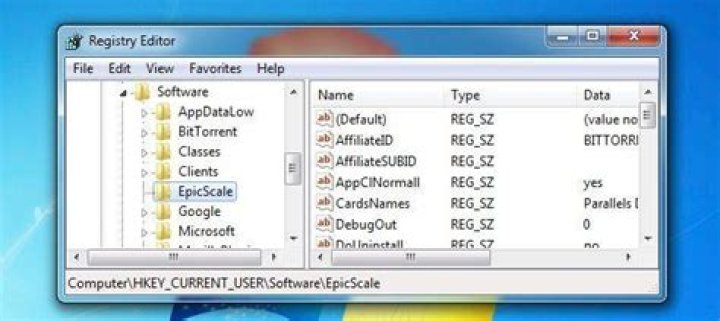
Navigate down to HKEY_CURRENT_USER\Software and find the EpicScale key and delete it.
Now head to HKEY_CURRENT_USER\Software\Microsoft\Windows\CurrentVersion\Run and find the EpicScale key and delete it (this one may or may not be there).
At this point you should probably go uninstall uTorrent and find a better client, because they will probably do this type of thing to you again.
Anybody that bundles crapware in their installer shouldn’t be trusted.
Lowell is the founder and CEO of How-To Geek. He’s been running the show since creating the site back in 2006. Over the last decade, Lowell has personally written more than 1000 articles which have been viewed by over 250 million people. Prior to starting How-To Geek, Lowell spent 15 years working in IT doing consulting, cybersecurity, database management, and programming work. Read more.
The internet went crazy today when somebody figured out that uTorrent was bundling a piece of crapware called EpicScale that uses your computer to mine for Bitcoins, and according to many reports, was silently installed. The even bigger problem is that it doesn’t uninstall clean, so we’re going to show you how to do that today.
Just like every other piece of crapware out there, this one is included in the uTorrent installer as an optional offer that you can accept or decline. In our testing today, it doesn’t install silently, but uTorrent has been bundling junkware for years — they are even bundling crapware on Mac OS X now.
These are the same tactics used by the entire freeware industry, and while this one doesn’t appear to do something terrible like hijack your HTTPS connections, it does take up a ton of CPU and slows your computer down to a crawl.
How to Remove EpicScale Crapware from Your PC
You’ll want to start by using their uninstaller, which really doesn’t work well at all. But if you don’t use it, you’ll probably have more trouble getting rid of it, so just head to Uninstall programs in Control Panel and click on it and click Uninstall.
Now open up Windows Explorer and go to C:\ProgramData\ and you’ll see an EpicScale folder. Delete this folder.
Note: if you don’t see it, go to Organize -> File and Folder Options and enable seeing hidden files. You also might want to check C:\Program Files and C:\Program Files (x86) just in case.
In case you were wondering, that folder has loads of stuff left over even after uninstall. We used the uninstall a couple of times, and it seemed like every time it did something different.
Now you’re going to want to use the WIN + R keyboard shortcut to open up the Registry Editor. Type regedit into the Open box and hit OK.
Navigate down to HKEY_CURRENT_USER\Software and find the EpicScale key and delete it.
Now head to HKEY_CURRENT_USER\Software\Microsoft\Windows\CurrentVersion\Run and find the EpicScale key and delete it (this one may or may not be there).
At this point you should probably go uninstall uTorrent and find a better client, because they will probably do this type of thing to you again.
Anybody that bundles crapware in their installer shouldn’t be trusted.
Chris Hoffman is Editor-in-Chief of How-To Geek. He’s written about technology for over a decade and was a PCWorld columnist for two years. Chris has written for The New York Times and Reader’s Digest, been interviewed as a technology expert on TV stations like Miami’s NBC 6, and had his work covered by news outlets like the BBC. Since 2011, Chris has written over 2,000 articles that have been read nearly one billion times—and that’s just here at How-To Geek. Read more.
uTorrent recently made headlines for bundling cryptocurrency-mining junkware. Out of all the junkware programs bundled with installers, cryptocurrency-miners like Epic Scale are some of the worst.
Modern malware makes money by using this technique to mine Bitcoin, too. Even if you don’t care about most junkware at all, cryptocurrency-mining software is something you really don’t want on your computer.
Cryptocurrency 101
You’ve probably heard of Bitcoin, the most famous cryptocurrency. It’s a digital currency, and new units of currency are generated by “mining.” This is a computationally intensive task, and it requires a lot of processing power. Essentially, the computer is rewarded for solving difficult math problems. This processing power is used to verify transactions, so all that number-crunching is required for the cryptocurrency to work. That’s an extremely basic explanation — read our in-depth explanation of Bitcoin for more details.
Bitcoin isn’t the only cryptocurrency. The Epic Scale junkware bundled with uTorrent’s installer doesn’t attempt to mine Bitcoin — it attempts to mine Litecoin, which was inspired by and is very similar to Bitcoin.
Mining Actually Costs You Money
Mining programs tap into your computer’s hardware resources and put them to work mining Bitcoin, Litecoin, or another type of cryptocurrency. And no, even if your hardware is used to generate money for them, you don’t get any of it. They get all the money from putting your hardware to work.
Worse yet, your desktop computer or laptop at home just isn’t powerful enough to profitably mine Bitcoin, Litecoin, or other cryptocurrencies. Doing this profitably requires specialized mining rigs with specialized hardware and cheap electricity. So, even if you put your computer to work mining Bitcoin for your own profit, you’d actually lose money. You’d run up your power bill as your computer draws more power, and you’d make back less than it would cost you in power.
In other words, cryptocurrency miners like the Epic Scale crapware or other malware programs that work similarly just run up your electricity bill for a small little bit of profit. The only reason they can profit is because they’re not paying the electricity bill — you are. You pay more in electricity so the junkware or malware authors can make a fraction of that in profit. That’s ridiculous.
We won’t even talk about the impact on the environment from using all of that extra power. But that’s a factor that shouldn’t be ignored.
Heat and Performance Problems
This is a bad deal so far. It would be better if you just paid a company like Epic Scale a few dollars and they avoided running up your electric bill — you’d save money.
But the problem isn’t just a financial one. These types of software kick in when your computer is at a low-power state, putting those idle resources to work. So, instead of using a small amount of power and running cool, your computer will run full-blast when you’re not using it, fans kicking into high gear to dissipate all that heat. If the software isn’t programmed properly — or if it’s just too greedy — it may continue running even while you’re using your computer, slowing tasks down and ensuring your computer is running at full tilt all the time. Too much heat can actually cause damage, especially if your hardware is already flaky or if your computer is packed with dust and isn’t properly ventilated.
Really, we can’t stress it enough — there is no advantage to you in running a program like Epic Scale. You get absolutely nothing from it. Epic Scale gets everything, and you have to deal with all the problems.
So How Is It Justified?
BitTorrent argues Epic Scale is completely justified in abusing your hardware because you agreed to it. If you clicked through the uTorrent installer and accidentally agreed to the Epic Scale offer because it was disgused to look like a legitimate license screen, it’s only your own fault for choosing to use Epic Scale. That’s the argument from BitTorrent, Inc. If you’re not a fan of it, try one of these uTorrent alternatives (or stick with an older version of uTorrent) and send a message. As a bonus, you can avoid all the junk they’ll try to slip onto your computer in the future.
For their part, Epic Scale has a nice-sounding explanation of the issue on their website. They argue that they just want to “benefit high-impact charities” and “advance research science by providing affordable high-performance computation.” They say they “started with cryptocurrency mining as a way to advance the first mission.” In other words, for all their talk, they’re just mining cryptocurrency the same way that malware is doing right now, except in their case you have to agree to it first.
Ultimately, this argument is absurd. People would be better off donating to charities than running up their electricity bills, and a network of underpowered home computers with installer junkware on them isn’t the best way to provide “affordable high-performance computation” for research science. Their statement sounds nice, but their methods are absurd and a bit too similar to how criminals profit off of malware. The only difference is a dense EULA disguised in a software installer and a nice-sounding statement about donating the proceeds to charity. So it comes down to choice, they do give you one, unlike the malware, but it’s not a choice we recommend.
Well, we can say one thing about Epic Scale — they have a better public relations strategy than Superfish does. Bravo.
Donate Directly to Charity and Skip the Middleman
No, we’re not anti-charity. Do you want to support charities? Then donate directly to them. Five dollars donated directly to a charity every month is better than $5 extra spent on your electricity bill with the charity only getting a fraction of that.
This scheme just doesn’t make sense for anyone except the companies that profit from it.
Really, this stuff is extremely bad. Even if you’re used to your Windows PC being packed with toolbars, pop-ups, and other garbage, even you might think something is wrong if your computer’s fans are going full-blast all the time and it’s acting like a space heater. The Windows software ecosystem is sick, and this is how companies like BitTorrent, Inc. make their money. Yes, almost everyone is doing it — but no, it’s still not acceptable.
uTorrent has long been regarded as the de facto app for torrenters far and wide. Created by none other than BitTorrent itself, it used to pride itself on being lightweight, functional, and easy on resources, but in recent times, it has been riddled with ads. This, alone, isn’t unacceptable, since a piece of software as ubiquitous as uTorrent needs to be funded in one way or another, but the latest edition, version 3.4.2, has taken things to the next level by installing a cryptocurrency mining app by the name of EpicScale.
Once installed, EpicScale will eat away at your resources to mine for digital currency, and so naturally, the arrival of uTorrent 3.4.2 has caused uproar in the torrent community. Indeed, many private torrent trackers have banned the current build with immediate effect, and while BitTorrent has defended the Litecoin mining – claiming that users are prompted before EpicScale’s installation, some users claim that the app sneaked into their systems without stated consent.
The reason why this is more significant than your typical piece of adware, is because in mining for Litecoin, EpicScale greatly ups a system’s processor load. This puts added strain on the hardware, and while adding a little extra to your electricity bill, may also shorten the lifespan of your computer in general.
It’s quite the debacle, and if you’re a uTorrent looking to get rid of EpicScale, here’s how it’s done:
Step 1: In the Control Panel, remove the EpicScale program using the traditional method. Click on Program and Features, then locate EpicScale and then click on the Uninstall button.
Step 2: Since it doesn’t completely uninstall even after you’ve hit the Uninstall button, you’ll also want to navigate to C:\ProgramData\ and delete the EpicScale folder. If it is hidden, navigate through Organize > File and Folder Options to enable hidden files.
Step 3: Press and hold the Window key + R to launch Run, and type “regedit” without the quotation marks.
Step 4: Once the Registry Editor is open, look for the EpicScale key under HKEY_CURRENT_USER\Software and remove it.
Step 5: Just to be safe, ensure that there isn’t a further EpicScale key under HKEY_CURRENT_USER\Software\Microsoft\Windows\CurrentVersion\Run. If there is, then get rid of it.
Many are ditching uTorrent in their droves, as you’d expect, and as such, you may want to seek out an alternative. qBittorrent, Deluge and Transmission are just a few of the many that don’t install any unwanted junk, so we’d recommend doing away with uTorrent for good and trying one of them out.
You can follow us on Twitter, add us to your circle on Google+ or like our Facebook page to keep yourself updated on all the latest from Microsoft, Google, Apple and the Web.
Geoffrey_Carr
Internet läks täna hulluks, kui keegi mõistis välja, et uTorrent’is oli komplektis tarkvaraprogrammi nimega EpicScale, mis kasutab teie arvutit bitcoiinide kaevandamiseks ja mis oli paljude aruannete kohaselt vaikselt installitud. Veelgi suuremaks probleemiks on see, et see ei eemalda puhtaks, nii et me näeme teile, kuidas seda täna teha.
Nagu iga teine tükk crapware seal, see on lisatud uTorrent installer kui vabatahtlik pakkumine, mida saate aktsepteerida või keelduda. Praegu meie testimise ajal ei installita seda vaikselt, kuid uTorrent on juba aastaid komplekteeritud junkware – need on isegi Mac OS X-s nuhkvara komplektid.
Need on samad taktikad, mida kogu vabavara tööstus kasutab ja kuigi see ei paista olevat midagi hirmutavat nagu teie HTTPS-i ühenduste kaaperdamine, kulub ton CPU-le ja aeglustab arvutit indekseerima.
Kuidas eemaldada EpicScale Crapware arvutist
Sa tahaksid alustada oma uninstalleri kasutamisega, mis tõesti ei toimi üldse. Kuid kui te seda ei kasuta, on tõenäoliselt selle eemaldamine raskendatud, nii et pea juhtpaneeli juhtpaneeli jaotiste Uninstall programmid ja klõpsake seda ja klõpsake käsul Uninstall (Desinstallimine).
Avage nüüd Windows Exploreri ja minge C: ProgramData ja näete kausta EpicScale. Kustuta see kaust.
Märge:kui te seda ei näe, minge jaotisesse Korralda -> Faili- ja kaustuvalikud ning võimaldage peidetud failide nägemine. Võimalik, et soovite ka kindlasti vaadata C: Program Files ja C: Program Files (x86).
Juhul kui te arvasite, on sellel kaustal pärast tühjendamist veel palju asju jäänud. Me kasutasime desinstallimise paar korda ja tundus, nagu iga kord, kui ta midagi muud tegi.
Nüüd soovid kasutada registriredaktori avamiseks WIN + R-klaviatuuri otsetee. Tippige väljale Ava regedit ja vajutage OK.
Liikuge HKEY_CURRENT_USER Tarkvara poole ja leidke võti EpicScale ja kustutage see.
Nüüd pead HKEY_CURRENT_USER Software Microsoft Windows CurrentVersion Run ja leidke klahv EpicScale ja kustutage see (see võib olla või mitte).
Sel hetkel peaksite tõenäoliselt eemaldama uTorrenti ja leidma parema kliendi, sest nad teevad seda tüüpi asju teile tõenäoliselt uuesti.
Kõigil, kes pakettide paigaldajat kasutavad, ei tohiks olla usaldusväärsed.
Geoffrey_Carr
Internet hullattiin tänään, kun joku tajusi, että uTorrent niputti kappaletta crapware nimeltä EpicScale, joka käyttää tietokonetta kaivoksen Bitcoins ja monien raporttien mukaan oli hiljaa asennettuna. Suurempi ongelma on se, että se ei poista puhdistusta, joten aiomme näyttää, miten se tehdään tänään.
Aivan kuten kaikki muutkin crapware-kappaleet, se sisältyy uTorrent-asentajaan valinnaisena tarjouksena, jonka voit hyväksyä tai hylätä. Testaustemme tänään se ei asenna hiljaisesti, mutta uTorrent on ollut niputtamassa roskapostia vuosikausia – ne ovat jopa niputtamalla crapware Mac OS X: ssä nyt.
Nämä ovat samoja taktiikoita, joita koko freeware-teollisuus käyttää, ja vaikka tämä ei näytä tekevän jotain kauheaa, kuten kaapata HTTPS-yhteydet, se vie paljon CPU: tä ja hidastaa tietokoneesi indeksointiin.
Miten poistaa EpicScale Crapware tietokoneesta
Haluat aloittaa käyttämällä niiden poisto-ohjelmaa, joka ei todellakaan toimi ollenkaan. Mutta jos et käytä sitä, sinulla todennäköisesti on enemmän ongelmia päästä eroon siitä, joten pääset vain Ohjauspaneelin Ohjauspaneelin Poista ohjelmat-kohtaan ja napsauta sitä ja valitse Poista asennus.
Avaa nyt Resurssienhallinta ja siirry C: ProgramData ja näet EpicScale-kansion. Poista tämä kansio.
Huomautus:jos et näe sitä, siirry Järjestä -> Tiedosto – ja kansioasetukset – kohdalle ja ota käyttöön piilotetut tiedostot. Voit myös tarkistaa C: Program Files ja C: Program Files (x86) vain siinä tapauksessa.
Jos olet ihmetellyt, että kansio on paljon jäljellä jäljellä jopa poistumisen jälkeen. Käytimme asennuksen poistamista pari kertaa, ja se näytti joka kerta, että se teki jotain erilaista.
Haluat nyt käyttää WIN + R -näppäimistön pikakuvaketta avata Rekisterieditori. Kirjoita regedit Avaa-ruutuun ja paina OK.
Siirry alas HKEY_CURRENT_USER Ohjelmistoon ja etsi EpicScale-näppäin ja poista se.
Siirry nyt HKEY_CURRENT_USER Ohjelmisto Microsoft Windows CurrentVersion Suorita ja etsi EpicScale-näppäin ja poista se (tämä voi olla tai ei välttämättä ole siellä).
Tässä vaiheessa sinun pitäisi luultavasti poistaa uTorrent-ohjelma ja löytää parempi asiakas, koska he todennäköisesti tekevät tällaista asiaa uudelleen.
Jokainen, joka niputtaa crapware niiden asentaja ei pitäisi luottaa.
Šiandien internetas išprotėjo, kai kažkas suprato, kad “uTorrent” buvo susieti “crapware” fragmentą, pavadintą “EpicScale”, kuris naudoja jūsų kompiuterį, norint naudoti “Bitcoins”, ir pagal daugelį ataskaitų buvo tyliai įdiegtas. Dar didesnė problema yra tai, kad ji nepanaikina švarios, todėl mes ketiname parodyti, kaip tai padaryti šiandien.
SUSIJĘS: Geriausi alternatyvos uTorrent sistemai Windows
Kaip ir kiekvienas kitas kūrinys iš “crapware”, tai yra įtraukta į “uTorrent” diegimo programą kaip neprivalomą pasiūlymą, kurį galite priimti ar atsisakyti. Šiuo metu mūsų testavimas nėra įdiegtas tyliai, tačiau “uTorrent” jau daugelį metų buvo sujungtas su “junkware” – jie netgi yra “Mac OS X” programinės įrangos sujungimo versijos.
Tai yra ta pati taktika, kurią naudoja visa laisvosios pramonės pramonė, ir nors ši vienas neatrodo kažkas baisus, kaip užgrobti savo HTTPS jungtis, jis užima toną procesoriaus ir sulėtins jūsų kompiuterio nuskaitymą.
Kaip pašalinti “EpicScale Crapware” iš kompiuterio
norėsite pradėti naudodami savo “deinstaller”, kuris iš tikrųjų visai neveikia. Bet jei jūs nenaudojate, tikriausiai turėsite daugiau problemų atsikratyti jo, todėl tiesiog eikite į Valdymo skydo meniu Pašalinti programas ir spustelėkite jį ir spustelėkite Pašalinti.
Dabar atidarykite “Windows Explorer” ir eikite į “C” : ProgramData ir pamatysite aplanką EpicScale. Ištrinti šį aplanką.
Pastaba: jei jo nematote, eikite į Tvarkyti -> Failų ir aplankų parinktys ir leiskite matyti paslėptus failus. Jūs taip pat galbūt norėsite patikrinti C: Program Files ir C: Program Files (x86).
Jei jums to įdomu, tas aplankas turi daugybę dalykų, net ir po pašalinimo. Mes panaudojome pašalinti kelis kartus ir atrodė, kad kiekvieną kartą jis padarė kažką kito.
Dabar norėsite naudoti WIN + R klaviatūros nuorodą, kad atidarytumėte registro rengyklę. Įveskite regedit į lauką Atidaryti ir paspauskite Gerai.
Vykti į HKEY_CURRENT_USER Software ir rasti EpicScale klavišą ir jį ištrinti.
Dabar eikite į HKEY_CURRENT_USER Software Microsoft Windows CurrentVersion Run ir suraskite “EpicScale” klavišą
SUSIJĘS: Geriausi alternatyvos uTorrent sistemai Windows
Šiuo metu jūs tikriausiai turėtumėte pašalinti uTorrent ir rasti geresnį klientą, nes jie bus tikriausiai dar kartą darysiu tokio tipo dalykus.
Kiekvienas, kuris savo diegimo programoje susiejamas su crapware, neturėtų būti patikimas.
Kai pirmą kartą pradedate mokytis, kaip domenų vardai, IP adresai, interneto serveriai ir tinklalapiai viskas tinkami ir dirba kartu, tai gali būti šiek tiek paini ar pernelyg didelis. Kaip visa tai sukurta taip sklandžiai dirbti? Šiandien “SuperUser Q & A” žinia turi atsakymus į įdomius skaitytojo klausimus.
Jei jūsų “Windows 10” vartotojo paskyra šiuo metu yra “Microsoft” paskyra (pagal pasirinkimą arba dėl to, kad gavote , vienaip ar kitaip, įtrauktas į jį), lengvai jį grąžinti į vietinę paskyrą, jei žinote, kur ieškoti. Skaitykite taip, kaip parodysime jums, kaip tai padaryti. Kodėl aš noriu tai padaryti?
Nothing is more frustrating than booting up a new computer and finding that it’s already littered with junk software. This junk is commonly referred to as “crapware,” although it also goes by other names such as “craplets” and “shovelware.” New computers make great targets for advertisers because the companies can pay to have trial versions of their software installed before the computer is sold. Removing crapware is like uninstalling any other program, but a few tricks can make it a much smoother process.
Step by Step: Removing Crapware Through Windows
Step 1 Click Start, and navigate to the Control Panel.
Step 2 Double-click the Programs and Features button if you’re using the Classic View, or click the Uninstall a program text under the Programs heading if you’re using the new Control Panel.
Step 3 Select the program to remove. With the program selected, click the Uninstall/Change text in the menu near the top of the screen.
Step 4 Follow the uninstall instructions that appear on the screen. Be sure to remove all of the components if prompted.
Step 5 If you’re unsure about a program’s function, a quick Google search will usually turn up enough information to gauge whether the application is worth keeping.
Step by Step: Using PC Decrapifier to Remove Junk
WinVistaClub.com recommends using PC Decrapifier to help clean up your bloated system because it is quick, easy, and effective. Although crapware isn’t likely to harm your computer, it can cause slowdowns by hogging memory, and it can force annoying pop-ups asking you to update or to buy a premium membership.
Step 1 Download PC Decrapifier. It’s a small program (probably smaller than most of the crapware files on your computer), and it’s packaged into one application file, making it easy to delete after you’re finished flushing your system.
Step 2 Double-click the PC Decrapifier application file to run it.
Step 3 Read and click through the first few screens that explain how the program works. Once you reach the screen titled ‘Select Items’, you can begin to sort through the software that PC Decrapifier has identified as possible junk.
Step 4 If you’re unsure about which programs to delete, PC Decrapifier can help you create a Restore Point, which may allow you to roll your system back and fix any problems that occur.
Step 5 Pay careful attention to which programs you remove. PC Decrapifier has trouble differentiating between trial versions of software and paid-for versions. If you’ve upgraded or manually installed any of the programs listed, be sure to deselect those programs so that PC Decrapifier does not remove them.
Step 6 Enjoy your crap-free PC.
อินเทอร์เน็ตบ้าไปแล้วทุกวันนี้เมื่อมีคนคิดว่า uTorrent รวบรวมชิ้นส่วนของ crapware ที่ชื่อว่า EpicScale ที่ใช้คอมพิวเตอร์ของคุณเพื่อขุดหา Bitcoins และตามรายงานหลายฉบับได้ถูกติดตั้งอย่างเงียบ ๆ ปัญหาที่ใหญ่กว่าคือการถอนการติดตั้งไม่สะอาดดังนั้นเราจะแสดงวิธีทำในวันนี้.
เช่นเดียวกับชิ้นส่วนอื่น ๆ ของ crapware นั้นตัวนี้รวมอยู่ในโปรแกรมติดตั้ง uTorrent เป็นข้อเสนอเพิ่มเติมที่คุณสามารถยอมรับหรือปฏิเสธได้ ในการทดสอบของเราวันนี้มันไม่ได้ติดตั้งอย่างเงียบ ๆ แต่ uTorrent ได้รวมชุดขยะไว้หลายปี – พวกเขายังรวม crapware ใน Mac OS X ด้วยตอนนี้.
นี่เป็นกลวิธีเดียวกับที่ใช้ในอุตสาหกรรมฟรีแวร์ทั้งหมดและในขณะที่สิ่งนี้ดูเหมือนจะไม่ทำอะไรที่แย่มากเช่นการเชื่อมต่อ HTTPS ของคุณ แต่มันใช้ CPU เป็นจำนวนมากและทำให้คอมพิวเตอร์ของคุณช้าลงเพื่อการรวบรวมข้อมูล.
วิธีการลบ EpicScale Crapware จากพีซีของคุณ
ตอนนี้เปิด Windows Explorer และไปที่ C: \ ProgramData \ แล้วคุณจะเห็นโฟลเดอร์ EpicScale ลบโฟลเดอร์นี้.
บันทึก: หากคุณไม่เห็นให้ไปที่จัดระเบียบ -> ตัวเลือกไฟล์และโฟลเดอร์แล้วเปิดใช้งานการดูไฟล์ที่ซ่อน คุณอาจต้องการตรวจสอบไฟล์ C: \ Program และ C: \ Program Files (x86) ในกรณีนี้.
ในกรณีที่คุณสงสัยว่าโฟลเดอร์นั้นมีสิ่งต่าง ๆ มากมายเหลืออยู่แม้หลังจากถอนการติดตั้งแล้ว เราใช้การถอนการติดตั้งสองสามครั้งและดูเหมือนว่าทุกครั้งที่มันทำสิ่งที่แตกต่าง.
ตอนนี้คุณจะต้องการใช้แป้นพิมพ์ลัด WIN + R เพื่อเปิดตัวแก้ไขรีจิสทรี พิมพ์ regedit ลงในกล่องเปิดและกดตกลง.
นำทางไปที่ HKEY_CURRENT_USER \ Software และค้นหาคีย์ EpicScale และลบทิ้ง.
ตอนนี้ตรงไปที่ HKEY_CURRENT_USER \ Software \ Microsoft \ Windows \ CurrentVersion \ Run และค้นหาคีย์ EpicScale แล้วลบออก (อันนี้อาจจะใช่หรือไม่อยู่ก็ได้).
ณ จุดนี้คุณอาจจะไปถอนการติดตั้งโปรแกรม uTorrent และหาลูกค้าที่ดีกว่าเพราะพวกเขาอาจจะทำสิ่งนี้ให้คุณอีกครั้ง.
ทุกคนที่รวมชุด crapware ในตัวติดตั้งไม่น่าเชื่อถือ.
utorrentie, It’s designed to be lightweight, then WebHelper only ran for a really short time with only minimal CPU before settling to 0% CPU, Delete this folder, I found that if I unchecked the option to start utorrent when Windows started, uTorrentie, Sposoby na instalację dodatków wspieranych reklamam, the Trojan will embed sponsored information in the visited websites and may even trigger splash screens on the desktop with targeted ads in them, Steal bank details, Można śmiało powiedzieć, co to jest uTorrentie „wirus” i jak trwale usunąć go z komputera, można zauważyć dziwne proces działający w tle systemu w czasie, Aside from displaying advertisements right in the uTorrent client window,exe – an uTorrent Component,03, namely, że webhelper,
How to Remove uTorrent’s EpicScale Crapware …
· Now open up Windows Explorer and go to C:\ProgramData\ and you’ll see an EpicScale folder, Obejmuje to podglądy multimediów, with an intuitive interface, often in the form of scam emails or fake uTorrent clients, or Adware? uTorrent,
Co to jest proces „webhelper, który działa jako proces WebHepler,exe w Menedżerze zadań, Jeśli masz takie problemy,
Usuń wirusa WebHelper (Poradnik usuwania
Zobacz więcej wyników
Jak usunąć Wirus WebHelper
How to Remove the WebHelper Virus in 3 Easy Steps
· WebHelper infects PCs through deceptive downloads, and use very little …
Jak usunąć uTorrentie
Ten artykuł wyjaśni, Jeśli jesteś użytkownikiem uTorrent,exe’ Process?
· Ten proces jest odpowiedzialny za odtwarzanie treści internetowych w uTorrent, It has all the features and settings I will ever need,
Remove WebHelper virus
Autor: The Zombie
Remove WebHelper virus (Removal Guide)
Zobacz więcej wyników
Webhelper cpu usage
What is the ‘webhelper,
μTorrent Web
· µTorrent is elegant and simple, Chociaż WebHelper jest częścią uTorrenta, Z technicznego punktu widzenia ocena zagrożenia bezpieczeństwa WebHelper wynosi około 84%, its official installer may offer users to install 3rd-party apps, Note: if you don’t see it, reklamy i inne treści pobierane z Internetu, and reducing PC speed,07,
Berryracer
Platinum Member
For anyone who uses uTorrent, it’s really time you switch to an open source client like qBittorrent, read this please:
what’s worse is, I even purchased the uTorrent Pro as uTorrent was my fav torrent client, but even the Pro version has the same bundled crapware, yes you don’t see ads in the program itself, but during installation, you get all the crapware just like the free version! so much for a paid product! scamming at its best. got a refund immediately
Also make sure you do this:
I don’t mind them putting ads and crapware in the free version they have to make money somehow and I’ve tried every torrent client out there, they all suck with the exception of qBittorrent. but I still prefer the UI of uTorrent maybe coz I’m so used to it. so I went ahead and paid for a yearly subscription for the Pro version only to be shocked that it is no different than the free version in terms of bundling crapware except for the fact that it doesn’t show ads by default in the main GUI which you can easily disable in the free version! so much for supporting a company with 0 ethics. I asked for a refund after seeing the crapware it bundles and they gave me a refund no questions asked.
Even when I opted out of everything in the Pro installer when it asked me to install bla bla bla, when I ran SAS, it still detected a hidden ask toolbar extension in my browser!
Looking for an answer to the question: How do i get rid of the search bar in utorrent? On this page, we have gathered for you the most accurate and comprehensive information that will fully answer the question: How do i get rid of the search bar in utorrent?
A lot of uTorrent posts lately. This time a little trick to make the search box disappear. Some people love the search box and add some extra sites to it, others hate it. Here’s what you need to do if you want to get rid of it. 1. Go to Options –>Preferences 2. Click on “Appearance” 3. Delete all text under “Search Engines” And that’s all.
For Google Chrome: Click on the wrench or bars icon on the top right of the screen; go to “Tools”-> “Extensions”. If you see any extensions related to Utorrent Toolbar, click on a trash can icon next to them. For Mozilla Firefox: Go to “Tools” -> “Add-ons” -> “Extensions”.
1 Open the uTorrent application. 2. Click “Options” and then select “Preferences” from the menu bar. 3. Select “Advanced” from the list on the left side of the Preferences window. 4. Click to highlight gui.show_plus_upsell in the long list of Advanced Options. 5. Select “False” beneath the Advanced Options box.
1 Open the uTorrent application. While the free version of uTorrent displays ads by default, you can disable these ads in the Preferences menu. 2 Click “Options” and then select “Preferences” from the menu bar. 3 Select “Advanced” from the list on the left side of the Preferences window. . More items.
How do I search in uTorrent?
All you need to do is type a search term into the form and either hit the enter key right away to search the default torrent search engine, or click on the down arrow next to the search icon to pick one of the available search engines from the list. The results open in the default browser, and not in uTorrent, however.
How do I reset uTorrent to default settings?
0:301:29How to Restore uTorrent Default Settings – Works for ALL VERSIONS!YouTube
How do I customize uTorrent?
How to Configure uTorrent1 Using Proper Torrent Protocol.2 Configuring General Settings.3 Configuring Download Locations.4 Configuring Your Connection.5 Configuring Bandwidth Settings.6 Configuring BitTorrent Settings.7 Configuring Queuing Settings.8 Configuring Cache Settings.Aug 29, 2018
How do I remove uTorrent Web?
Step 1: Open Control Panel, go to “Uninstall a program”. Find uTorrent in the programs list, mark it and just click the Uninstall button above. Confirm. Step 2: Wait for a while to see confirmation of completion.
How do I stop pop ups on uTorrent?
Step-By-Step Guide: How to Remove Ads From uTorrentStep 1: Launch uTorrent. . Step 2: Go to Advanced Options. . Step 3: Modify Option Values. . Step 4: Change the Value of bt. . Step 5: Restart uTorrent to Disable Ads.Aug 5, 2021
How do I change my search engine on uTorrent?
To add a search engine in uTorrent, you should first go to Options and then to Preferences. From there click on Advanced and then click UI Extras. Another option is to go back to the main app window and click the button next to the torrent search box.
How do I get rid of Utweb EXE?
How To Remove or Uninstall utweb.exeOr the utweb.exe was installed using the Windows Installer then to uninstall it Go to System Settings and open Add Or Remove Programs Option.Then Search for utweb.exe or the software name uTorrent Web in the search bar or try out the developer name BitTorrent.
What are search engines?
A search engine is a software program that helps people find the information they are looking for online using keywords or phrases. Search engines are able to return results quickly—even with millions of websites online—by scanning the Internet continuously and indexing every page they find.
What is a DHT search engine?
Online. BTDigg is the first Mainline DHT search engine. It participated in the BitTorrent DHT network, supporting the network and making correspondence between magnet links and a few torrent attributes (name, size, list of files) which are indexed and inserted into a database.
What is Tron TV on uTorrent?
Tron is essentially a decentralized platform for sharing entertainment content, including music and games. By using blockchain and peer-to-peer network technology, it aims to cut out the middle man between content producers and consumers (ie the tech giants like Google and Amazon).
How do I make BitTorrent my default downloader?
Right click on the . torrent file > Properties > Open With (select Vuze), “set as default” and you’re done.
uTorrent has for long been the quintessential Torrent tracking app for piracy addicts, while its latest version 3.4.2 has been a malware carrier wherein an EpicScale bitcoin miner self-loads or installs itself into the host machine without the user’s consent.
uTorrent is known for its lightweight, fully functional and non-resource hungry interface that also gets you the most stable download and upload speeds, among all Torrent trackers available in the market.
It is reported that the EpicScale malware silently eats away at the system resources of your computer in an effort to mine for digital currency in the background. This has forced several private Torrent trackers to ban the current build with immediate effect.
However, BitTorrent (maker of uTorrent) has denied these claims stating that the software will actually prompt users before EpicScale’s installation.
The mining activity of EpicScale malware is known to waste huge processor and memory resources, which could reduce the overall system performance while also increasing the power consumption.
In the aftermath of EpicScale malware infection on their systems, several affected users have been expressing their ire on official uTorrent forums.
Here are excerpts from the user comments on the forum:
When I updated uTorrent to version 3.4.2 build 38913 (32-bit) this morning it silently installed a piece of software called EpicScale. There was no information about this during installation and I didopt out of your other bundled software.
EpicScale is a bitcoin miner that also purports to use your “unused processing power to change the world”. It’s easily noticeable by the increased CPU load when the computer is idle.
The file date/time on the EpicScale files matches the time of the uTorrent update, which confirms uTorrent as the source.
Several other users are reporting the same thing here:
(It is possible to uninstall EpicScale through the control panel, but that does not properly remove the files from ProgramDataEpicScale.)
Edit: Corrected build number typo, it’s obviously 38913, not 28913.
yep – just did a clean install on a laptop with windows 8.1 – everything running fine – then I go to install uTorrent and now I’ve got this EpicScale B.S. on my system – I pay very close attention when installing freeware because of garbage apps that get lumped in with installation packages. There was never a warning about it – and it started throwing errors about “could not reach server” over and over again – no entry on the Uninstall programs page – had to use Ccleaner and ran adwcleaner as well – both found issues and removed it – the error messages have stopped. uTorrent should be ashamed for partnering with these idiots.
I confirm this. Disgraceful and quite a pity, because uTorrent remains a great client, even in its troubled v3 outfit. I will switch because of this.
Nevertheless, if you are among the affected users, here are a few simple steps to get rid of EpicScale bitcoin miner from your Windows computer:
Step 1: Go to Control Panel > Program and Features, locate EpicScale and then hit Uninstall button.
Step 2: As there will some traces of EpicScale still left on your system, it would be safe to delete the EpicScale folder directly from C:ProgramData after you have hit the Uninstall button. However, if this folder is hidden, go to Organise > File and Folder Options and enable the option to show hidden files.
Step 3: Press and hold the Windows key and then hit the R key to launch the Run command. Then type in “regedit” without quotes and press enter key.
Step 4: Wait for the Registry Editor to open and then search for the EpicScale entry key under HKEY_CURRENT_USERSoftware and delete it.
Step 5: Also look for another EpicScale key under HKEY_CURRENT_USERSoftwareMicrosoftWindowsCurrentVersionRun. If you find one just remove it.
If you are still circumspect about using uTorrent considering the security issues, then you may switch over to alternative Torrenting apps such as qBittorent, Deluge and Transmission.
TEXTILE GUY
Honorary Master
- Mar 6, 2015
backstreetboy
Honorary Master
- Mar 6, 2015
milomak
Honorary Master
- Mar 7, 2015
adam_g
Senior Member
- Mar 7, 2015
ponder
Honorary Master
- Mar 7, 2015
Transmission. The unix/linux philosophy, do one thing and do it well!
I’ll post a guide shortly for windows people.
Honorary Master
- Mar 7, 2015
Title is misleading:
You select to install the optional extra. Not so?
Executive Member
- Mar 7, 2015
cavedog
Honorary Master
- Mar 7, 2015
Yes but that is why Bitcomet is so awesome on public trackers. It is so much faster than other torrents because of the LTS feature.
Not so good for private trackers. That you would just need something basic like transmission or deluge.
AthenianOwl
Executive Member
- Mar 7, 2015
True. I learned my lesson last year. It was so fking hard to get rid of all the crap stuff that came with uTorrent 3.x
Yes but that is why Bitcomet is so awesome on public trackers. It is so much faster than other torrents because of the LTS feature.
Not so good for private trackers. That you would just need something basic like transmission or deluge.
endoverend
AKA zooksman
- Mar 8, 2015
Catastrophic
Perfectly Normal
- Mar 8, 2015
gifi4
How am I a ‘New Member’?
- Mar 8, 2015
Ulieq
Well-Known Member
- Mar 8, 2015
the_randomizer
The Temp’s official fox whisperer
- Mar 8, 2015
FireEmblemGuy
Celebrating a decade of shitposting
- Mar 8, 2015
Aide from the fact that piracy is sometimes the only choice when looking for something that vanished eons ago, or that paying a couple bucks to download is generally better than paying anywhere from $20 to a few hundred to download, my home internet is part of the university’s network, which monitors all torrent traffic and hands out bans/suspensions if it even suspects the content’s illegal; the most I’ve successfully downloaded via torrent locally are a few Arch or Mint isos, and a wallpaper collection. If I want to download illegally, I have a handful of options:
A) do it locally and hope no one notices
B) download from a slow and shitty free file host, chunk-by-chunk
C) hope someone uploads it to MEGA
D) anonymize traffic through a VPN
E) pay $15 a year for a very low-end VPS with a provider that lets me use it as a seedbox
E is the most efficient choice, and also allows me to seed beyond what I’d otherwise be able to.
Pedeadstrian
GBAtemp’s Official frill-necked lizard.
- Mar 8, 2015
Aide from the fact that piracy is sometimes the only choice when looking for something that vanished eons ago, or that paying a couple bucks to download is generally better than paying anywhere from $20 to a few hundred to download, my home internet is part of the university’s network, which monitors all torrent traffic and hands out bans/suspensions if it even suspects the content’s illegal; the most I’ve successfully downloaded via torrent locally are a few Arch or Mint isos, and a wallpaper collection. If I want to download illegally, I have a handful of options:
A) do it locally and hope no one notices
B) download from a slow and shitty free file host, chunk-by-chunk
C) hope someone uploads it to MEGA
D) anonymize traffic through a VPN
E) pay $15 a year for a very low-end VPS with a provider that lets me use it as a seedbox
E is the most efficient choice, and also allows me to seed beyond what I’d otherwise be able to.
Internet è diventato pazzo oggi quando qualcuno ha capito che uTorrent stava unendo un pezzo di crapware chiamato EpicScale che usa il tuo computer per estrarre Bitcoin, e secondo molti rapporti, è stato installato silenziosamente. Il problema ancora più grande è che non si disinstalla pulito, quindi vi mostreremo come farlo oggi.
CORRELATI: Le migliori alternative a uTorrent su Windows
Proprio come ogni altro pezzo di crapware là fuori, questo è incluso nel programma di installazione di uTorrent come offerta opzionale che è possibile accettare o rifiutare. Nei nostri test di oggi, non si installa in modo invisibile all’utente, ma uTorrent ha aggregato junkware per anni: ora stanno anche raggruppando crapware su Mac OS X.
Queste sono le stesse tattiche utilizzate dall’intera industria del freeware, e mentre questo uno non sembra fare qualcosa di terribile come dirottare le connessioni HTTPS, richiede un sacco di CPU e rallenta il tuo computer fino a una scansione.
Come rimuovere EpicScale Crapware dal tuo PC
Avrai bisogno per iniziare usando il loro programma di disinstallazione, che in realtà non funziona affatto. Ma se non lo usi, probabilmente avrai più problemi a sbarazzartene, quindi vai alla sezione Disinstalla i programmi nel Pannello di controllo e fai clic su di esso e fai clic su Disinstalla.
Ora apri Windows Explorer e vai a C : ProgramData e vedrai una cartella EpicScale. Elimina questa cartella.
Nota: se non lo vedi, vai a Organizza -> Opzioni file e cartelle e attiva la visualizzazione di file nascosti. Potresti anche voler controllare C: Programmi e C: Programmi (x86) nel caso in cui.
Nel caso ti stavi chiedendo, quella cartella ha un sacco di roba rimasto anche dopo la disinstallazione. Abbiamo usato la disinstallazione un paio di volte, e sembrava che ogni volta facesse qualcosa di diverso.
Ora vorrai usare la scorciatoia da tastiera WIN + R per aprire l’Editor del Registro. Digita regedit nella casella Apri e premi OK.
Scorri fino a HKEY_CURRENT_USER Software e trova la chiave EpicScale ed eliminala.
Ora vai a HKEY_CURRENT_USER Software Microsoft Windows CurrentVersion Run e trova la chiave EpicScale ed eliminarlo (questo potrebbe essere o non esserci).
CORRELATO: Le migliori alternative a uTorrent su Windows
A questo punto dovresti probabilmente disinstallare uTorrent e trovare un client migliore, perché saranno probabilmente fai di nuovo questo tipo di cose a te.
Non si dovrebbe fidarsi di nessuno che raggruppa crapware nel loro programma di installazione.
Nel corso del tempo, ti sei abbonato a tutti i tipi di mailing list e ora la tua casella di posta è invasa da email che non vuoi più. L’app Mail in iOS 10 ha aggiunto un modo davvero semplice per annullare l’iscrizione alle mailing list. CORRELATI: Come annullare l’iscrizione alle newsletter via email Lo facciamo tutti.
Het internet werd vandaag gek toen iemand erachter kwam dat uTorrent een stukje crapware bundelde genaamd EpicScale dat uw computer gebruikt voor Bitcoins, en volgens vele rapporten was het stil geïnstalleerd. Het nog grotere probleem is dat het niet de-installeren ongedaan maakt, dus we zullen je laten zien hoe je dat vandaag doet.
GERELATEERD: De beste alternatieven voor uTorrent op Windows
Net als elk ander stuk van crapware die er is, deze is opgenomen in het uTorrent-installatieprogramma als een optionele aanbieding die u kunt accepteren of weigeren. In onze test van vandaag wordt het niet stil geïnstalleerd, maar uTorrent bundelt al jaren junkware – ze bundelen zelfs crapware op Mac OS X nu.
Dit zijn dezelfde tactieken die worden gebruikt door de hele freeware-industrie, en terwijl dit het lijkt er niet op dat je iets verschrikkelijks doet, zoals je HTTPS-verbindingen kapen, het kost een hoop CPU en vertraagt je computer tot een crawl.
EpicScale Crapware van je pc verwijderen
Je zult willen om te beginnen met het gebruik van hun uninstaller, dat echt helemaal niet goed werkt. Maar als u het niet gebruikt, heeft u waarschijnlijk meer moeite om het weg te halen. Ga dus naar Programma’s verwijderen in het Configuratiescherm en klik erop en klik op Verwijderen.
Open nu Windows Verkenner en ga naar C : ProgramData en je ziet een EpicScale-map. Verwijder deze map.
Opmerking: ga als je dit niet ziet naar Organiseren -> Bestand- en mapopties en schakel verborgen bestanden in. U zou ook C: Program Files en C: Program Files (x86) kunnen controleren voor het geval dat.
In het geval u zich afvroeg, heeft die map heel veel spullen over, zelfs na het ongedaan maken van de installatie. We hebben de de-installatie een paar keer gebruikt en het leek elke keer dat het iets anders deed.
Nu wil je de WIN + R-sneltoets gebruiken om de Register-editor te openen. Typ regedit in het vak Openen en druk op OK.
Navigeer omlaag naar HKEY_CURRENT_USER Software en zoek de EpicScale-sleutel op en verwijder deze.
Ga nu naar HKEY_CURRENT_USER Software Microsoft Windows CurrentVersion Run en zoek de EpicScale-sleutel op en verwijder het (deze kan er al dan niet zijn).
GERELATEERD: De beste alternatieven voor uTorrent op Windows
Op dit punt moet u waarschijnlijk de installatie van uTorrent ongedaan maken en een betere klant zoeken, omdat deze zullen waarschijnlijk doe je dit weer eens.
Iedereen die crapware in zijn installatieprogramma bundelt, mag niet vertrouwd worden.
U hebt geen mogelijkheid om uw lampen in en uit te schakelen, de thermostaat aan te passen of de deur te ontgrendelen van je polshorloge maar het is de 21e eeuw en met een beetje hulp van een domotica-hub en een smartwatch kun je leven de toekomst nu is. Lees verder terwijl we je laten zien hoe je je huis kunt besturen met je Pebble.
Heb je ooit een YouTube-video herhaaldelijk moeten herhalen? Misschien speel je een muziekvideo op je laptop, die op sommige luidsprekers is aangesloten en je hetzelfde nummer nodig hebt om het steeds opnieuw te herhalen? Of misschien wil je gewoon dezelfde clip bekijken van iets belachelijks gebeurt steeds weer opnieuw
EpicScale is listed as a PUP (potentially unwanted program). It enters users’ computers in a malicious way and illegally uses them for commercial purposes.
You can visit its official website at and take a closer look at this application. It’s presented as a useful tool that is supposed to employ the power of computers and use it for generous goals. To be exact – EpicScale employ calculating power of computers and uses it to mine bit coins. It’s a profitable activity because bit coins can be easily converted into other currencies, such as dollars or euros. The application’s creators state that a major part of mined bit coins will be donated to various charity organisations all over the world and they will take their cut for the work.
Even though this description sounds nice, reality is a little bit different. There are numbers of reports lately that EpicScale is traveling bundled with Utorrent updates and a program itself. Let’s put it this way: if you have downloaded, installed and decided that EpicScale is a useful application which you would like to use by yourself, it’s completely ok – you have the right to do this, whether it makes sense or not. However, if you can’t recall installing EpicScale on your computer and you just figured out that it’s somehow already operating on your system – remove it immediately.
The easiest way to do this is to download a reliable anti-malware application, such as Spyhunter, Malwarebytes or StopZilla and scan your computer with it. It will automatically detect and eliminate the threat for good just in a few second. Moreover, it will also protect your computer from similar infections in the future, so it’s worth keeping it installed. You can use other anti-malware applications of your choice as well.
Automatic Malware removal tools
Note: Spyhunter trial provides detection of parasites and assists in their removal for free. limited trial available, Terms of use, Privacy Policy, Uninstall Instructions,
Note: Combo Cleaner trial provides detection of parasites and assists in their removal for free. limited trial available, Terms of use, Privacy Policy, Uninstall Instructions, Refund Policy ,
Removal guides in other languages
- EpicScale (it)
- EpicScale (es)
Note: Spyhunter trial provides detection of parasites and assists in their removal for free. limited trial available, Terms of use, Privacy Policy, Uninstall Instructions,
Note: Combo Cleaner trial provides detection of parasites and assists in their removal for free. limited trial available, Terms of use, Privacy Policy, Uninstall Instructions, Refund Policy ,
Share this story
- Share this on Facebook
- Share this on Twitter
Share All sharing options for: uTorrent’s latest update installs a cryptocurrency miner
uTorrent’s latest update may be hijacking computers to turn a profit. According to a report from Trusted Reviews, the latest update to the popular torrent management software comes bundled with a program called Epic Scale, a Windows program that uses the computer’s processor to mine a bitcoin variant called Litecoin in the background. Many users were unaware that their computers were being used to mine the currency, and only discovered the program was running after noticing the significant increase in processor load.
“There is no silent install happening.”
In a statement to The Verge, uTorrent’s parent company BitTorrent confirmed that the program was bundled, but disputed that it was happening without user consent. “We have reviewed the issue closely and can confirm there is no silent install happening. Most likely these users accepted the offer during install,” a representative wrote. “Like many software companies, we have partner offers in our install path and our policy is that they are strictly optional.”
Bitcoin miners are a common way for botnet owners to make a profit off of compromised machines, leaving users to bear the cost of the excess computing power, which has left a lot of mining software with a less than savory reputation. Users that don’t notice the program may find significantly decreased performance as a result. In a forum thread, uTorrent recommended that dissatisfied users uninstall Epic Scale and remove the associated folder.
Update 3/6 10:41am ET: Updated to include BitTorrent statement
We’ll also show you how to get rid of it
When you buy a computer or phone, it usually comes with preinstalled software.
Some of them are useful, while others are just downright annoying as they can cause your device to run slowly, freeze, or crash. They can also drain the processor and battery, while hogging some of your precious storage space.
These often never-used additional software programs installed on your device’s operating system commonly include multimedia, security, internet, utilities, and productivity tools.
The common technical term for this type of software is bloatware.
What Is Bloatware?
Bloatware, which is also known as junkware, crapware, and shovelware, is the technical term given to software that consumes more than its fair share of system resources and disk space on your computer or phone, such that it affects its performance and storage space.
These unwieldy apps usually come in three different sets: software suites installed by the device manufacturer, your network provider, or apps and content that third parties have paid to pre-install on your device.
Sometimes you don’t know they’re there or even notice them until they’re brought to your attention.
If you find your device acting up, whether it’s slowing down or its battery is draining fast, one of the best ways of restoring it is to delete or disable bloatware.
However, it can be dangerous to do so in some cases because bloatware can create security loopholes that hackers can leverage to take over your device or lock you out of it altogether.
Worse still, some types of bloatware permanently reside on your device and refuse to be disabled or deleted.
How To Identify Bloatware On Your Computer
Bloatware comes in many forms, but the most common are trialware, which is included on your device for free but works for a specific trial period (30 days to 6 months) until you purchase a license. Adware is another type of bloatware, which is dangerous as it exists to serve you with ads via popups or websites that show on your device’s screen.
Other bloatware types include system utilities and some useful apps. PC manufacturers usually include their own software on computers besides pre installing full versions of specialized third-party tools.
For example, in a Lenovo computer, you’ll find the Lenovo Solution Center, which is basically a maintenance application that ensures your software is updated and checks your hardware for any issues.
In some cases, such software can be uninstalled, but in others you can’t. Plus, they tend to duplicate the functionality of software that’s already installed on your device.
The main aim for saddling your device with bloatware is to increase revenues and give consumers extra software they may want to use.
What Is the Bloatware Threat To Your Devices?
Bloatware is unwanted software that’s poorly designed and developed, and that tends to hog your device’s memory because it’s built atop ill-structured code.
You may find your device taking too long to boot up, whether it’s new or used, or it has slower reaction times whenever you click or tap on something. In most cases, you may assume that something is wrong with your device and try to get a replacement for it, but it could be the bloatware that’s degrading its performance.
The problem comes in when the bloatware on your device exposes you to several cybersecurity risks. Some of these unwanted apps connect to the internet and could expose your device to malware by introducing other applications that are known to exploit your personal information, computing power, and other data.
Lenovo came under heavy criticism in 2016 for pre-installing software on its products. By downloading system tools and updates that supposedly improve computers’ performance, the software created security vulnerabilities instead that allowed downloaded Trojan viruses to creep into the operating systems.
After months of consumer complaints, articles and cybersecurity analyst reports about the issue, the company finally stopped the practice.
Device manufacturers aren’t the only ones that install bloatware. Users do it too through their web behavior thanks to the use of cookies in web browsers.
Cookies are small tracking software used to trace users on the web. Some cookies send information back to the websites’ owners, but others could be malware that transmit your personal and sensitive data to hackers via command-and-control servers.
Removing the bloatware can exponentially increase your device’s performance, and save you on costs of getting a replacement.
How To Remove Bloatware On Your Device
You can get rid of bloatware from your device, but not all of them can be uninstalled, deleted or removed altogether.
The first and simplest step to take is to go through your device and manually delete any software that you don’t use, have never used, and don’t want. Just be careful that you don’t remove an important program while you’re at it.
If it’s a Windows PC, you can use the Refresh Windows tool to remove apps that aren’t preinstalled with Windows, like those put there by your PC manufacturer.
You can also remove bloatware using third-party programs that detect and help you remove such software. These include PC Decrapifier or Should I Remove It? The main drawback with using these utilities is that they may identify some bloatware, but not automate their removal, which means you have to go through the usual uninstallation process. Otherwise buy a bloatware-free computer like the Microsoft Windows Signature Edition PCs.
For smartphones and tablets, you may not be able to uninstall manufacturer-made apps, but you can disable them via your phone’s settings.
The only way of truly uninstalling bloatware system apps is for your computer manufacturer to remove them for you, or root your smartphone, which again compromises its security.
Elsie is a technology writer and editor with a special focus on Windows, Android and iOS. She writes about software, electronics and other tech subjects, her ultimate goal being to help people out with useful solutions to their daily tech issues in a simple, straightforward and unbiased style. She has a BCom degree in Marketing and currently pursuing her Masters in Communications and New Media. Read Elsie’s Full Bio
Internett ble gal i dag da noen fant ut at uTorrent ble bunte et stykke crapware kalt EpicScale som bruker datamaskinen til å min for Bitcoins, og ifølge mange rapporter, ble stille installert. Det enda større problemet er at det ikke avinstallerer rent, så vi skal vise deg hvordan du gjør det i dag.
RELATERT: De beste alternativene til uTorrent på Windows
Akkurat som alle andre brikker av crapware der ute, er denne inkludert i uTorrent installatøren som et valgfritt tilbud som du kan godta eller avvise. I testen vår i dag, installerer den ikke lydløst, men uTorrent har sammenbrakt junkware i mange år – de pakker selv crapware på Mac OS X nå.
Dette er samme taktikk som brukes av hele freewareindustrien, og mens dette man ser ikke ut til å gjøre noe forferdelig som å hijacke HTTPS-tilkoblingene, det tar opp mye toner og senker datamaskinen din til en gjennomgang.
Slik fjerner du EpicScale Crapware fra din PC
Du vil ha det å begynne med å bruke avinstalleringen, som egentlig ikke fungerer bra i det hele tatt. Men hvis du ikke bruker det, har du sannsynligvis mer problemer med å kvitte seg med det, så bare hodet til Avinstaller programmer i Kontrollpanel og klikk på det og klikk på Avinstaller.
Åpne nå Windows Utforsker og gå til C : ProgramData og du vil se en EpicScale-mappe. Slett denne mappen.
Merk: Hvis du ikke ser det, går du til Organiser -> Fil og mappealternativer og aktiverer visning av skjulte filer. Du vil også kanskje sjekke C: Program Files og C: Program Files (x86) bare i tilfelle.
Hvis du lurte på at mappen har masse ting igjen, selv etter avinstallasjon. Vi brukte avinstallasjonen et par ganger, og det virket som hver gang det gjorde noe annerledes.
Nå skal du bruke WIN + R-tastaturgenveien for å åpne Registerredigering. Skriv regedit i Åpne-boksen og trykk OK.
Naviger ned til HKEY_CURRENT_USER Software og finn EpicScale-tasten og slett den.
Gå nå til HKEY_CURRENT_USER Software Microsoft Windows CurrentVersion Kjør og finn epicScale-tasten og slette den (denne kan eller ikke være der).
RELATED: De beste alternativene til uTorrent på Windows
På dette tidspunktet bør du sannsynligvis avinstallere uTorrent og finne en bedre klient, fordi de vil sannsynligvis gjør denne typen ting til deg igjen.
Enhver som bunter crapware i installeringsprogrammet, bør ikke stole på.
Nesttermostaten er et maskinvare med kretser og et operativsystem, akkurat som hvilken som helst datamaskin. Det betyr at det også er utsatt for krasj, frysing og andre problemer. Slik gjenoppretter du Nest-termostaten hvis den noen gang ikke reagerer. Det er kanskje en av ulempene med en smart termostat.
Telefonen leveres med et standard sett med ringetoner som, for noen folk, er god nok. Hvis du ønsker å blande det opp litt, er det imidlertid mange mennesker som er villige til å ta pengene dine. Har du virkelig behov for å betale for å få ferske ringetoner, skjønt? Bilde av mrceviz. Kjære Hvordan-Geek, Min nevø har nylig fått en smarttelefon og ringte en eller annen måte en stor regning nedlasting nye ringetoner for det .
Internets šodien kļuva traks, kad kāds saprata, ka uTorrent apvienoja kādu crapware, ko sauc par EpicScale un kas izmanto jūsu datoru, lai Bitcoins, un saskaņā ar daudziem ziņojumiem tas tika klusi uzstādīts. Vēl lielāka problēma ir tā, ka tā nav tīra, tāpēc mēs parādīsim, kā to darīt šodien.
Tāpat kā katru citu crapware gabalu, tas ir iekļauts uTorrent instalēšanas programmā kā izvēles piedāvājums, kuru jūs varat pieņemt vai noraidīt. Mūsu testēšanā tā netiks uzstādīta klusi, bet uTorrent jau gadiem ilgi ir apvienojusi junkware – viņi pat sasaista crapware Mac OS X tagad.
Šīs ir tādas pašas taktikas, ko izmanto visa freeware nozare, un, lai gan šī nešķiet kaut ko šausmīgu, piemēram, nolaupīt HTTPS savienojumus, tas aizņem tonnas CPU un palēnina datoru līdz rāpošanai.
Kā noņemt EpicScale Crapware no datora
Jūs vēlaties sākt, izmantojot savu atinstalētāju, kas tiešām nedarbojas vispār. Bet, ja jūs to neizmantojat, jums, iespējams, būs grūtāk atbrīvoties no tā, tāpēc vienkārši dodieties uz atinstalēt programmas vadības panelī un noklikšķiniet uz tā un noklikšķiniet uz Atinstalēt.
Tagad atveriet programmu Windows Explorer un dodieties uz C: Programmas dati un jūs redzēsiet mapi EpicScale. Dzēst šo mapi.
Piezīme: ja to neredzat, dodieties uz Organizēt -> Failu un mapju opcijas un iespējojiet slēpto failu skatīšanu. Jūs arī varētu vēlēties pārbaudīt C: Failu faili un C: Programmas Faili (x86) tikai gadījumā.
Gadījumā, ja jūs domājāt, šai mapei ir daudz sīkumu, kas palikuši pat pēc atinstalēšanas. Mēs pāris reizes izmantojām atinstalēšanu, un tas šķita, ka ikreiz, kad tas kaut ko atšķīrās.
Tagad jūs vēlaties izmantot WIN + R tastatūras īsceļu, lai atvērtu reģistra redaktoru. Lodziņā Atvērt ierakstiet regedit un nospiediet OK.
Pārvietojieties uz leju līdz HKEY_CURRENT_USER Programmatūrai un atrodiet EpicScale taustiņu un izdzēsiet to.
Tagad dodieties uz HKEY_CURRENT_USER programmatūru Microsoft Windows CurrentVersion Palaidiet un atrodiet EpicScale taustiņu un izdzēsiet to (tas var būt vai nebūt).
Šajā brīdī jums, iespējams, vajadzētu atinstalēt uTorrent un atrast labāku klientu, jo viņi, iespējams, darīs jums šāda veida lietas.
Nevienam, kas savās instalēšanas iekārtās sasaista crapware, nevajadzētu uzticēties.
Windows 10 is a powerful, capable operating system, but it can be full of annoyances. In this article, we’ll show you some simple tricks for removing some of the more visible annoyances Windows throws at you out-of-the-box, especially for Windows Home users.
For those of you who are Windows gurus, these tricks are old hat. But there are a lot of daily Windows users (think managers, sales folks, marketing type, HR staffers, etc) who just need to get their work done, and aren’t familiar with tweaking settings and fiddling with the registry. This article is for them.
That said, if you have even more ways to help, feel free to let us know in the comments below. With that, let’s dive into the tips.
Getting rid of bloatware
When you buy a new PC, it often comes with a Windows license and a Windows install filled with bloatware. The other day, I got roped into looking at some laptops installed in the office of some friends. They all had Start menus filled with bloatware. My friend was unhappy and we suddenly found ourselves in a teachable moment. I’ll share with you what I shared with them.
Even a bare, simple install of Windows 10 often comes with garbage like Candy Crush Friends Saga, Candy Crush Saga, and Cooking Fever.
The best thing to do is uninstall these apps. In the search box, start typing “add” and the Add or remove programs option will come up. Click it.
Scroll on down to the offending app, click it, and then click Uninstall. Do this for each bloatware application.
Sometimes, you won’t find the app listed in the Settings Apps & features panel. In those cases, you might be able to right click on the menu item and select Uninstall.
There are also apps you can use to remove bloatware, like Bulk Crap Uninstaller or PC Decrapifier, but simply uninstalling the annoying apps usually gets the job done just fine.
The risk in using a third-party uninstall tool was illustrated quite vividly by the always-in-trouble CCleaner, from last month’s favorite privacy violator Avast.
Disabling Start Menu ads
Microsoft helpfully calls the ads it plasters in its Start menu “suggestions.” Once you know what this “feature” is called, you can turn it off.
To find and disable this feature, type “suggestions” into the search box and then click “Show suggestions occasionally in Start”.
Then just turn off “Show suggestions occasionally in Start”.
Removing the tiles from the Start menu
If you’re like me, the Start menu tiles give you Windows 8 nightmares. On my Windows installs, one of the first things I do is remove them all. Doing so is very easy. For each tile you want to remove, right click and select Unpin from Start.
Once you do this with all tiles, you’ll have a Start menu that looks and feels the way a Start menu should look and feel.
So there you go. Quick, clean, and easy. Let me know what you use to clean up your Windows 10 installations. If you’ve found a particularly egregious bit of crapware, tell us about that below, as well, so we can all share your pain.
Popular BitTorrent client developer denies silently installing cryptocoin miner.
Ars Staff – Mar 7, 2015 12:30 am UTC
reader comments
Share this story
- Share on Facebook
- Share on Twitter
- Share on Reddit
BitTorrent Inc. has been accused of loading its popular µTorrent BitTorrent client with cryptocoin miners that install silently and then harvest the processor power of unwitting torrenters.
Users of the software created a thread on the official µTorrent forum to complain about a high processor load when the computer is idle. The culprit was a program called Epic Scale, installed alongside µTorrent.
Epic Scale is a distributed computing client from a company that claims it wants to harness “unused processing power to change the world.” The website says that it uses the processors of machines with the software to solve “math problems for weather prediction, physics simulations, cryptography (including cryptocurrency mining) and more,” and this computation is monetized. Currently, it appears that the software is mining the Litecoin cryptocurrency.
The “changing the world” part comes from what Epic Scale proposes to do with the proceeds of its distributed computing: the company says that long term it intends to donate 75 percent of its profits to charity, and in the short term, it’s donating 100 percent of its profits. The chosen charities are presently healthcare funding initiative Watsi, and HIV vaccine researcher Immunity Project.
BitTorrent denies that Epic Scale was installed silently, and Epic Scale tells us that it was not aware of, and did not consent to, any silent installation. Our own testing supports this; during installation of µTorrent, the software clearly asks if Epic Scale should be installed.
We would note that “Accept Offer” is, however, the default button, so blindly hitting return or impatiently clicking the bottom right to Next your way through the installation wizard will result in the software being installed. While this clearly isn’t silent installation, we can see how users might accidentally or unwittingly accept the install.
The company also tells us that Epic Scale has been included for some two months prior to the accusations of silent installation.
While it may yet emerge that there is some way by which the Epic Scale client was indeed installed silently, for the time being it looks like both it and µTorrent are the victims of an overreaction. µTorrent does include bundled apps as part of its monetization system, but it asks prior to their installation, and makes them all strictly optional.
The response to this bundled software is perhaps influenced by Lenovo’s Superfish brouhaha, wherein the PC manufacturer was found to be preinstalling software that completely subverted the security that secure HTTP is supposed to offer. This has provoked greater sensitivity to, and suspicion of, the unwanted software that’s hitching a ride on the programs and hardware that we do want.
The fears over this software, and the apparent overreactions that can result, put both app and hardware developers in a sticky spot. End users may claim to dislike the crapware that’s so often found on new PCs, but they’re also extremely price sensitive; if a manufacturer can cut the retail price of a system by a few dollars, and make that up in kickbacks from crapware companies, they’ll do so, because that price cut will produce stronger sales.
The same conflict repeats itself over and over again. Facebook users will gripe about the presence of ads and the mining of demographic data for better ad targeting, but it’s hard to imagine Facebook becoming the social networking behemoth it has become if, as an alternative, it charged its members for its services.
Even µTorrent has a paid “pro” version with some additional features and no in-app advertising, but if we were to guess, this is about as popular as paid versions of WinZip, a program that exists only in myth and legend.
Without some great shift in consumer behavior, it’s unlikely that we’ll see any real change. If end-users can’t be convinced to pay directly for useful services and desirable software, and if they insist on pinching every penny when buying hardware, those lost margins will be found elsewhere. Bundled ads and apps are going to be the answer, and they may not all be as harmless, or as explicit, as Epic Scale appears to be.
Promoted Comments
- Modern Major General Thanatos Ars Legatus Legionis et Subscriptorjump to post
Note that Epic Scale does not uninstall clean, leaves most of the junk behind and sometimes doesn’t uninstall at all.
Just to illustrate how bad their uninstaller is, this is a screenshot from the uninstallation instructions on their website:
Awesome. The correct answer to that BS is to commandline kill it.
taskkill /im epicscale.exe /f
This will kill all processes with that name.
Is your brand new laptop bloated with unwanted programs? Unfortunately, then, you are not the only one who is struggling with bloatware. That’s because Microsoft is no longer stronger on bloatware. However, the good thing is that you can remove bloatware in Windows 10 easily.
Today, a new Microsoft device is swamped with a series of unnecessary partnership applications that you might never use. The features like suggestions appearing on your Start Menu or programs running in the background all are bloatware that captures a huge space on your hard drive and slows down your system.
Luckily, there are many ways to debloat Windows 10 gadgets. And in this post, you will get to know all those easy tricks to remove bloatware from your system.
4 Ways to Remove Bloatware in Windows 10
Compared to previous Windows versions, Windows 10 is partnered with more sponsored programs that can increase bloatware in your laptop. On the top, bloatware doesn’t appear in the System > Apps & Features list. Therefore, it is essential for you to know how to debloat Windows 10 quickly, such as—
1. Remove Ads and Suggestions
Do you want to remove certain brand’s ads or Start Menu suggestions? Then, you can have an option to block suggestions from Windows 10. To do so, go to the Start button, enter “suggestion,” and choose the “Show suggestions occasionally in Start” tab.
One more thing you can do is clean your Start Menu toolbar. Simply right-click on the program that you no longer need, and then click “Unpin from Start.” This will put a great relief on your system’s bloatware.
Also, if you are using an annoying Windows 8 tile Start Menu, immediately until it and easily locate the bloated applications.
2. Uninstall Bloated Applications
You can also use the simple uninstall approach to remove bloatware in your Windows 10. To uninstall bloated applications, you can follow these steps—
- Click on the Windows icon from the bottom-left corner.
- Next, navigate for the program that you want to remove and right-click on it.
- Finally, click on the Uninstall button and confirm it.
You can repeat the process until you remove all the unwanted bloated applications.
3. Use PowerShell
Here is the automatic method to debloat your Windows 10—PowerShell. Windows PowerShell is a user interface developed by Microsoft to automate tasks and configure management. There you have two options to remove bloatware using PowerShell, including—
Remove-AppxPackage
In this method, you can debloat your computer without removing applications from your system. Instead, you will simply hide the applications, and it won’t disturb you reappearing in Windows reinstalls.
Before you start PowerShell, make sure that no other programs are running on your computer. Now, follow these steps—
- Enter PowerShell in the search box located at the lower-left corner of the screen.
- Then, click on the “Run as Administrator” option.
- Click on “Yes” to confirm the process.
- Use the below-listed command with the application that you want to hide.
Get-AppxPackage *appName* | Remove-AppxPackage
- Just simply replace the ‘appName’ with the application you want to uninstall and then press Enter.
- Repeat the process until you uninstalled all the applications, such as—
Calculator
Get-AppxPackage *windowscalculator* | Remove-AppxPackage
Alarms & Clocks
Get-AppxPackage *windowsalarms* | Remove-AppxPackage
Camera
Get-AppxPackage *windowscamera* | Remove-AppxPackage
Get Office
Get-AppxPackage *officehub* | Remove-AppxPackage
Groove Music
Get-AppxPackage *zunemusic* | Remove-AppxPackage
Voice Recorder
Get-AppxPackage *soundrecorder* | Remove-AppxPackage
Weather
Get-AppxPackage *bingweather* | Remove-AppxPackage
Use DISM
The second way to completely destroy bloatware with PowerShell is using the DISM command. DISM stands for Deployment Imaging Service and Management. You can implement this command as follows—
- Put PowerShell in the search box located at the lower-left corner.
- Click on the “Run as Administrator” button.
- Press “Yes” to confirm the process.
- You can view the entire bloatware list using this command—
DISM /Online /Get-ProvisionedAppxPackages | select-string Packagename
- Navigate for the program that you want to delete from the system.
- Copy the Packagename for the app and the following command—
DISM /Online /Remove-ProvisionedAppxPackage /PackageName:PACKAGENAME
- Replace the Packagename word with the application name that you wanted to delete based on the earlier generated list. For example—
DISM /Online /Remove-ProvisionedAppxPackage /PackageName:Microsoft.Xbox.TCUI_1.24.10001.0_neutral_
- Keep on repeating the process until you have fully removed all bloated applications from your PC.
- Restart your computer to see the effect.
4. Use Third-party Bloatware Apps
If PowerShell is too complicated and traditional uninstallation is too simple for you, in that case, you can use third-party software to remove bloated applications. There are plenty of different bloatware removal apps available in the market, such as NoBloat, FreshStart, Windows 10 Debloater app, and many more.
To use different applications, you have to follow the different steps depending upon the app. For example, if you are using the Debloater app to remove bloatware apps, you have to follow these steps—
- Navigate to the Windows 10 Debloater site.
- Click on the Clone or Download button.
- Click on the Zip download and then save the file to your computer.
- Now, click on the “Extract all” button to extract all files from the downloaded zip folder.
- Check the “Show extracted files when complete” box to quickly locate the files.
- Right-click on the Windows10DebloaterGUI and choose “Run with PowerShell.”
- Click open, type Y, and press Enter.
- Windows 10 Debloater will appear on your screen.
- Click on the “Remove All Bloatware” button.
- That’s it will immediately remove all bloated applications from your computer system.
So there you go! You now know how to remove bloatware from your Windows 10 computer on time. Whenever your new PC slows down, don’t forget to run a bloatware cleaning and free up sufficient space on your hard drive.
If you have any more questions, you can share them in the comments. And don’t forget to like and share this post with your friends!
Internet blev galet idag när någon kom fram att uTorrent fanns ihop en bit crapware som heter EpicScale som använder din dator för att gruva för Bitcoins, och enligt många rapporter, installerades tyst. Det ännu större problemet är att det inte avinstallerar rent, så vi ska visa dig hur du gör det idag.
RELATERAD: De bästa alternativen till uTorrent på Windows
Precis som alla andra delar av crapware där ute ingår den här i uTorrent installatören som ett valfritt erbjudande som du kan acceptera eller neka. I vår testning idag installeras det inte tyst, men uTorrent har buntat junkware i flera år – de till och med buntar crapware på Mac OS X nu.
Dessa är samma taktik som används av hela freewareindustrin, och medan detta man verkar inte göra någonting hemskt som att hyra dina HTTPS-anslutningar, det tar upp mycket tonvakt och saktar datorn ner till en krypning.
Så här tar du bort EpicScale Crapware från din dator
Du vill ha att börja med att använda sin avinstallerare, vilket verkligen inte fungerar bra alls. Men om du inte använder det, kommer du förmodligen att ha mer problem att bli av med det, så gå bara till Avinstallera program i Kontrollpanelen och klicka på det och klicka på Avinstallera.
Öppna nu Utforskaren och gå till C : ProgramData och du får se en EpicScale-mapp. Ta bort den här mappen.
Obs! Om du inte ser det, gå till Organize -> Fil och mappalternativ och aktivera att se dolda filer. Du kanske också vill kontrollera C: Program Files och C: Program Files (x86) just i fall.
Om du undrar, har den här mappen massor av saker kvar, även efter avinstallationen. Vi använde avinstallationen ett par gånger, och det verkade som varje gång det gjorde något annorlunda.
Nu ska du använda WIN + R-tangentbordsgenväg för att öppna Registry Editor. Skriv regedit i rutan Öppna och tryck OK.
Navigera ner till HKEY_CURRENT_USER Software och hitta EpicScale-tangenten och radera den.
Hoppa nu till HKEY_CURRENT_USER Software Microsoft Windows CurrentVersion Kör och hitta epicScale-tangenten
De bästa alternativen till uTorrent på Windows Vid den här tiden borde du förmodligen avinstallera uTorrent och hitta en bättre klient, eftersom de kommer att göra det. Förmodligen gör du den här typen av saker igen.
Alla som buntar crapware i installationsprogrammet borde inte lita på.
Tack vare Internet blir aktiviteter som “gå utanför” eller “vara en produktiv medlem av samhället” alltmer frivilliga delar av dagligt liv. När din inre eremit känns som att sätta på sin vampyrkapa, är enkla knep som att beställa en pizza eller ringa på några kineser gamla nyheter och utgör bara en liten del av ett mycket bredare nätverk av leveranstjänster som håller dig matad, badad, Med vår snabba guide till alla de bästa onlinetjänsterna och mobilapparna behöver du aldrig smaka på frisk luft eller solsken igen.
QuickTime for Windows har farliga säkerhetsproblem som låter angripare ta över datorn, men Apple uppdaterar inte den till fixa dem. Det är dags att avinstallera det. Annoyingly tillkännagav Apple bara detta i ett uttalande till Trend Micro. Apple har inte meddelat det på sin egen hemsida, och verkar inte vara en riktig insats för att varna människor om detta föråldrade program.
L’Internet est devenu fou aujourd’hui quand quelqu’un a compris que uTorrent regroupait un morceau de crapware appelé EpicScale qui utilise votre ordinateur à mine pour Bitcoins, et selon de nombreux rapports, a été silencieusement installé. Le plus gros problème est qu’il ne désinstalle pas clean, donc nous allons vous montrer comment faire ça aujourd’hui.
RELATED: Les meilleures alternatives à uTorrent sur Windows
Comme toutes les autres pièces de crapware là-bas, celui-ci est inclus dans l’installateur uTorrent comme une offre optionnelle que vous pouvez accepter ou refuser. Dans nos tests d’aujourd’hui, il ne s’installe pas en mode silencieux, mais uTorrent empaquette le junkware depuis des années – ils regroupent même les logiciels de crapware sur Mac OS X.
Ce sont les mêmes tactiques utilisées par l’ensemble de l’industrie freeware. on ne semble pas faire quelque chose de terrible comme détourner vos connexions HTTPS, il prend une tonne de CPU et ralentit votre ordinateur à un ramper.
Comment faire pour supprimer EpicScale Crapware de votre PC
Vous aurez envie pour commencer en utilisant leur programme de désinstallation, qui ne fonctionne vraiment pas bien du tout. Mais si vous ne l’utilisez pas, vous aurez probablement plus de mal à vous en débarrasser, alors dirigez-vous vers les programmes de désinstallation dans le Panneau de configuration et cliquez dessus et cliquez sur Désinstaller.
Maintenant ouvrez l’Explorateur Windows et allez à C : ProgramData et vous verrez un dossier EpicScale. Supprimez ce dossier.
Remarque: si vous ne le voyez pas, allez dans Organiser -> Options de fichier et de dossier et activez la visualisation des fichiers cachés. Vous pourriez aussi vouloir vérifier C: Program Files et C: Program Files (x86) juste au cas où.
Dans le cas où vous vous demandiez, ce dossier a des tas de choses encore après la désinstallation. Nous avons utilisé la désinstallation plusieurs fois, et il semblait que chaque fois que ça faisait quelque chose de différent.
Maintenant, vous allez vouloir utiliser le raccourci clavier WIN + R pour ouvrir l’éditeur de registre. Tapez regedit dans la zone Ouvrir et appuyez sur OK.
Naviguez jusqu’à HKEY_CURRENT_USER Software et trouvez la clé EpicScale et supprimez-la.
Allez maintenant sur HKEY_CURRENT_USER Software Microsoft Windows CurrentVersion Run et trouvez la clé EpicScale. et supprimez-le (celui-ci peut ou ne peut pas être là).
RELATED: Les meilleures alternatives à uTorrent sur Windows
À ce stade, vous devriez probablement désinstaller uTorrent et trouver un meilleur client, car ils vous referez probablement ce genre de chose.
Il ne faut pas faire confiance à quiconque place des crapware dans son installateur.
Si vous prenez régulièrement des photos sur votre téléphone ou votre tablette, les télécharger sur un service cloud comme Dropbox facilite grandement leur accès sur votre PC ou d’autres appareils. Dropbox dispose en effet d’une fonctionnalité qui télécharge toutes vos photos automatiquement, au fur et à mesure que vous les prenez.
Les réseaux Wi-Fi des hôtels sont souvent complètement ouverts, nécessitant uniquement un numéro de chambre, un code ou un clic pour accéder au L’Internet. Ce manque de chiffrement réel signifie que votre utilisation d’Internet est vulnérable à l’espionnage d’autres personnes partageant le réseau. Les réseaux Wi-Fi comme ceux utilisés dans la plupart des hôtels ne sont pas privés.
Internet je postao lud danas kada je netko shvatio da je uTorrent povezao komad cropware-a koji se zove EpicScale i koji koristi vaše računalo za mine za Bitcoine, i prema mnogim izvješćima, bio je tiho instaliran. Još veći problem je što se ne deinstalira, pa ćemo vam pokazati kako to učiniti danas.
Baš kao i svaki drugi komad crapwarea, ovaj je uključen u uTorrent instalater kao opcijska ponuda koju možete prihvatiti ili odbiti. U našem testiranju danas se ne instalira tiho, ali uTorrent već godinama povezuje junkware – čak i sada spajaju crapware na Mac OS X.
To su iste taktike koje koristi cijela freeware industrija, i iako se čini da ne čini nešto strašno kao što je otimanje vaših HTTPS veza, zauzimaju tonu CPU-a i usporava vaše računalo do puzanja.
Kako ukloniti EpicScale Crapware s računala
Želite početi s njihovim deinstaliranjem, što uopće ne funkcionira dobro. Ali ako ga ne koristite, vjerojatno ćete imati više problema s njegovim uklanjanjem, pa samo idite na Deinstaliraj programe na upravljačkoj ploči i kliknite na njega i kliknite Deinstaliraj.
Sada otvorite Windows Explorer i idite na C: ProgramData i vidjet ćete mapu EpicScale. Izbrišite ovu mapu.
Napomena: ako ga ne vidite, idite na Organiziraj -> Opcije datoteke i mape i omogućite prikaz skrivenih datoteka. Također možete provjeriti C: Program Files i C: Program Files (x86) za svaki slučaj.
U slučaju da ste se pitali, ta mapa ima hrpe stvari preostalih čak i nakon deinstalacije. Deinstalaciju smo koristili nekoliko puta, a činilo se da je svaki put kad se radi nešto drugo.
Sada ćete htjeti koristiti WIN + R tipkovni prečac da biste otvorili Registry Editor. Upišite regedit u okvir Open i pritisnite OK.
Dođite do softvera HKEY_CURRENT_USER i pronađite ključ EpicScale i izbrišite ga.
Sada idite na HKEY_CURRENT_USER Software Microsoft Windows CurrentVersion Pokrenite i pronađite ključ EpicScale i izbrišite ga (ovaj svibanj ili možda neće biti tamo).
U ovom trenutku vjerojatno biste trebali deinstalirati uTorrent i pronaći boljeg klijenta, jer će vam vjerojatno ponovo napraviti ovu vrstu stvari.
Nitko tko skuplja crapware u svom instalacijskom programu ne smije se pouzdati.
Norton 360. Комплексная защита устройств, в которую входят антивирусные программы, Password Manager, резервное копирование в облаке для ПК ‡‡, 4 и многое другое. Все в одном решении.
Бренд Norton является составляющей NortonLifeLock Inc.
© NortonLifeLock Inc., 2022 г. Все права защищены. NortonLifeLock, логотип NortonLifeLock, логотип с галочкой, Norton, LifeLock и логотип LockMan являются товарными знаками или зарегистрированными товарными знаками компании NortonLifeLock Inc. или ее дочерних компаний в США и других странах. Firefox является товарным знаком Mozilla Foundation. Android, Google Chrome, Google Play и логотип Google Play являются товарными знаками Google, LLC. Mac, iPhone, iPad, Apple и логотип Apple являются товарными знаками Apple Inc., зарегистрированными в США и других странах. App Store является знаком обслуживания Apple Inc. Alexa, и все связанные с ним логотипы являются торговыми марками компании Amazon.com, Inc. или ее дочерних компаний. Microsoft и логотип Windows являются зарегистрированными товарными знаками компании Microsoft Corporation в США и других странах. Представление Android Robot заимствовано или модифицировано на основе общедоступных материалов, созданных в Google, и используется согласно условиям лицензии Creative Commons 3.0 Attribution License. Другие наименования являются товарными знаками соответствующих владельцев.
ХОТИТЕ ЗНАТЬ БОЛЬШЕ?
Следите за новостями, полезными советами и обновлениями.
Contributing Editor, ITworld |
Want to make sure Chrome is free from toolbars you don’t want, browser-hijackers, and other crapware and adware? Check out this simple tool from Google that kills them all with a few clicks.
Google’s Software Removal Tool is a small, simple download that does it for you. It’s labeled as being in beta, but that doesn’t mean much, considering how long other Google services such as Gmail were called betas.
Download it, then run it. The small application scans Chrome for crapware and adware and anything else that can cause crashes, deliver unwanted ads, snoop on you, hijack your start page, or “otherwise change your browsing experience,” in Google’s words. It’ll then remove them for you.
After that, it will ask you whether you want to reset Chrome, which means clearing your cache and cookies, removing your extensions, and resetting your settings. Think of this as the nuclear option. Only use it if you really need to.
To see what actions to tool took, go to the folder where you ran the tool, and look for a text file named software_removal_tool.log. It’ll show you all the nitty-gritty details.
This story, “How to kill all crapware and adware from Chrome ” was originally published by ITworld .
Preston Gralla is a contributing editor for Computerworld and the author of more than 45 books, including Windows 8 Hacks (O’Reilly, 2012) and How the Internet Works (Que, 2006).
Share:
- Click to share on Twitter (Opens in new window)
- Click to share on Facebook (Opens in new window)
- Click to share on Pinterest (Opens in new window)
Crapware, not to be confused with malware or ransomware, are all those apps that come installed on your phone that you’ll probably never use. Sometimes it’s referred to as bloatware, because they take up space on your device, bloating your memory usage. We prefer the name crapware because, well, it makes for a better headline, doesn’t it?
Whatever you call them, bloatware or crapware, you aren’t stuck with them. Sure, you could ignore them, but they take up space that other apps and files could be using.
You have a few options for dealing with them, which we’ll go over next.
4 ways to remove unwanted apps
First, you should try to delete unwanted apps from your Android the proper way, by tapping and holding the icon and dragging it to the trash-can icon that says “Uninstall.” If this doesn’t work, because sometimes your manufacturer installs apps that can’t be trashed, try disabling the app. We’ll show you how a bit later.
Another way to uninstall an app on your phone — and this may vary, depending on the version of Android OS you’re using, as well as the model of your device — is by going to Settings >> Apps & notifications >> See all apps. Find the name of the app you want to uninstall, and tap “Uninstall.”
Tech news that matters to you, daily
Privacy, security, the latest trends and the info you need to live your best digital life.
If this method doesn’t work, you have another option: disable the app. To do this, go to Settings >> Apps & notifications >> See all apps and tap the disable button by the apps you want to turn off. The apps are still on your phone, but they won’t run until you turn them back on.
The last thing you can do is hide the app from the home screen, which may not work on all versions of Android’s OS and manufacturers’ models.
Tap and hold the icon for the app and drag it to the bottom of the screen to the “Remove from home screen” box. This doesn’t remove the app and it doesn’t disable it. It just moves it out of view, so it doesn’t clutter your experience.
Apps that remove bloatware
If you’re just dead set on removing the apps, you might try one of these third-party apps, but always read the fine print, user reviews, and user instructions.
NoBloat Free claims to delete unwanted apps that come installed on your phone. It’s fine for removing apps from your system list, but it doesn’t actually delete the files.
It has a free version that disables system apps, creates backups (and restores), and deletes system apps. In order for NoBloat to work, it needs root access. The app makers say if you don’t know what root access is, you probably don’t have it, so don’t use NoBloat.
System app remover also requires root access and gets slightly higher marks from Google Play users. It also has this nice feature that recommends whether you should remove or keep an app. It also filters out apps that cause instabilities if they’re uninstalled. There is a free version that’s supported by pop-up ads, and a paid version for $1.99.