· 22 October 2020 ·
– Changes are in the US and only temporary
(Pocket-lint) – Twitter recently announced changes coming to its platform to help prevent the spread of misinformation ahead of the US Presidential election, including a temporary change to retweets.
Yes, you can still retweet, but it’s no longer frictionless.
What’s new with Twitter?
For the first time, Twitter is actively encouraging its users to write something before they share a tweet. Now, when you click or tap the retweet icon, Twitter will immediately serve up the quote tweet composer, rather than let you choose to retweet or quote tweet. In addition, if you attempt to retweet an article that you haven’t opened on Twitter, you may see a prompt asking if you’d like to read it.
Note: A tweet you share publicly with your followers is a retweet. A quote tweet is a retweet with a comment or media that you’ve added.
LastPass is the best way to avoid forgetting your passwords, and to keep them secure.
Why did Twitter change how retweeting works?
Twitter is hoping that, by making the retweeting process much less seamless, its users might take a moment to consider what they’re sharing and possibly even add their own insight. Twitter said it hopes the changes to retweeting will give users “better context” while simultaneously help reduce the “unintentional spread of misleading information” ahead of the US Presidential election.
How to retweet without quote tweeting
To retweet without quote tweeting, just don’t add a comment. Simply hit retweet the icon on the tweet and then the retweet button from the pop-up composer. You can totally skip the add your own comment/media bit. If while trying to retweet you see a prompt asking you to open the article and read it first, you can still retweet the article without opening it and without leaving a comment.
Here’s how the new retweet process works (as of 21 October 2020):
- Open Twitter on the web or the iOS or Android app.
- Hover over a tweet you’d like to share and click the retweet button.
- A composer will appear with the tweet you want to retweet.
- You can leave the composer blank and hit retweet to retweet.
- Or, type add your own comment and then hit retweet.
- You also have the option to add media before retweeting.
- Once you hit retweet, the tweet will then be shared as a retweet.
When will retweeting go back to normal?
Twitter said the changes to retweeting went into effect in the US on 21 October 2020. The changes are expected to last until at least the end of the election week. (The US Presidential election will be held on 3 November 2020.)
Chris Hoffman is Editor-in-Chief of How-To Geek. He’s written about technology for over a decade and was a PCWorld columnist for two years. Chris has written for The New York Times, been interviewed as a technology expert on TV stations like Miami’s NBC 6, and had his work covered by news outlets like the BBC. Since 2011, Chris has written over 2,000 articles that have been read nearly one billion times—and that’s just here at How-To Geek. Read more.
Twitter has temporarily changed its retweet system. When you try to retweet something, you’ll see the “quote tweet” dialog that asks you to share your own thoughts. Here’s how to send a normal retweet instead.
What’s the Difference Between a Retweet and Quote Tweet?
What’s the difference? Well, when you send a normal retweet, you’re sharing the original tweet directly. The other account’s tweet will directly appear in your followers’ timeline. Any interactions—including likes, comments, and further normal retweets—will be associated directly with the original tweet.
When you send a quote tweet, your followers will see whatever comment you type with the original tweet embedded. Any interactions on the tweet—like likes and comments—will be associated with your quote tweet rather than the original tweet. As The Verge notes, a lot of artists are upset about this.
How to Retweet Without Quote Tweeting on Twitter
Luckily, sending a normal retweet is still pretty simple. To do so, just click or tap the normal Retweet button on Twitter’s website or in a Twitter app.
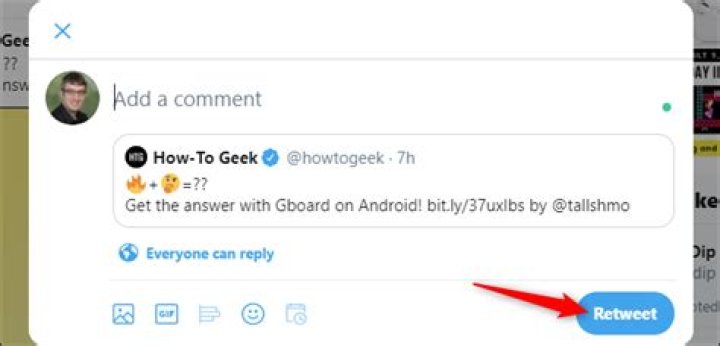
Twitter will show you the Quote Tweet dialog and ask you to add a comment. Don’t type anything here—just click or tap the “Retweet” button.
If you don’t enter anything in this dialog, Twitter will send a normal retweet instead of a quote tweet.
This change was implemented worldwide on October 20, 2020. Twitter says it will “assess [the] continued necessity” of it and other changes after the end of the 2020 election in the USA.
What is a Retweet?
A Tweet that you share publicly with your followers is known as a Retweet. This is a great way to pass along news and interesting discoveries on Twitter. You have the option to add your own comments and/or media before Retweeting. When using Twitter’s Retweet icon, your Retweet orВ Quote Tweet will reference the Tweet you are sharing. When someone replies to your Quote Tweet, the author of the original Tweet will not be automatically added to the conversation. If you want to include the author of the original Tweet, you will need to mention their username.
In addition to sharing other’s Tweets on Twitter, with your own Tweet you can Retweet orВ Quote Tweet. This function is particularly useful when you want to re-post one of your older Tweets because it is relevant again, or Retweet your replies to other people when you want to make sure all of your followers see it.В
We think it’s important to help you have better and safer conversations on Twitter –– and that starts with being more informed about what you’re sharing with your followers.
If you choose to Retweet or Quote Tweet an article that you haven’t opened recently on Twitter, you may see a prompt asking if you’d like to read the article before Retweeting or Quote Tweeting it. We believe this helps to give you better context and to reduce uninformed sharing on Twitter. When you see this prompt you’ll have the option to open and review the article. You can still go ahead and Retweet or Quote Tweet the article without opening it.
Twitter has temporarily changed its retweet system. When you try to retweet something, you’ll see the “quote tweet” dialog that asks you to share your own thoughts. Here’s how to send a normal retweet instead.
What’s the Difference Between a Retweet and Quote Tweet?
What’s the difference? Well, when you send a normal retweet, you’re sharing the original tweet directly. The other account’s tweet will directly appear in your followers’ timeline. Any interactions—including likes, comments, and further normal retweets—will be associated directly with the original tweet.
When you send a quote tweet, your followers will see whatever comment you type with the original tweet embedded. Any interactions on the tweet—like likes and comments—will be associated with your quote tweet rather than the original tweet. As The Verge notes, a lot of artists are upset about this.
How to Retweet Without Quote Tweeting on Twitter
Luckily, sending a normal retweet is still pretty simple. To do so, just click or tap the normal Retweet button on Twitter’s website or in a Twitter app.
Twitter will show you the Quote Tweet dialog and ask you to add a comment. Don’t type anything here—just click or tap the “Retweet” button.
If you don’t enter anything in this dialog, Twitter will send a normal retweet instead of a quote tweet.
This change was implemented worldwide on October 20, 2020. Twitter says it will “assess [the] continued necessity” of it and other changes after the end of the 2020 election in the USA.
In order to curb fake news ahead of the US presidential elections, Twitter has made some changes to its retweet feature. The micro-blogging platform is now asking users to quote tweets rather than simply retweeting others’ posts. However, there is a trick using which you can still retweet without comment.
Previously, retweeting was just a two-click process where you have two options either simply retweet or add a comment. Now, when you try to retweet a post, the quote window opens automatically to ask users to add some comments. However, if you don’t want your thoughts, let’s know how to retweet without a quote.
Retweet Without Comment
Fortunately, sending a normal retweet is still quite simple. Follow these steps to do so:
1] Just click or tap on the Retweet button on Twitter’s website or on Twitter mobile app.
2] Twitter will now show you the ‘Quote Tweet’ dialog box asking you to add a comment.
3] Now, just don’t type anything here and click or tap on the “Retweet” button.
4] If you don’t type anything in this box, Twitter will send a normal retweet instead of a quote tweet.
This new change was implemented worldwide starting from October 20, 2020. Twitter says it will assess the necessity of this feature till the end of the 2020 election in the USA.
Here’s how you can retweet something without adding a comment. For more such tips and tricks, stay tuned with Gadgets To Use.
(Photo : Sara Kurfeß/Unsplash) Twitter mobile app
(Photo : Twitter) How to Quote Tweets
(Photo : Twitter) See how many have Quote Tweets there are
Twitter has rolled out a new feature that separates them from regular retweets to all users worldwide.
Unlike the standard reply, a tweet is considered a quote when reposted with a comment, but quote tweets will now have a dedicated section right after retweets.
Twitter Support announced the update on Aug. 31 via a tweet that says: “Tweets about a Tweet add more to the conversation, so we’ve made them even easier to find.” The tweet also includes a short clip on how to access the Quote Tweets.
The previous “Retweets with comments,” Twitter is renaming the feature as “Quote Tweets,” in which tweets are shared with photos, videos, GIFs, or just plain text. This is a great improvement from before, when retweets are considered regular tweets that make it difficult to find certain answers on a specific post.
Tweets about a Tweet add more to the conversation, so we’ve made them even easier to find.
Retweets with comments are now called Quote Tweets and they’ve joined the Tweet detail view. Tap into a Tweet, then tap “Quote Tweets” to see them all in one place. — Twitter Support (@TwitterSupport) August 31, 2020
In order to access quote tweets, all you have to do is tap a tweet and then tap the quote option. Once you choose the “Quote Tweets” option, you’ll have access to all retweets with other users’ comments. Regular retweets, replies, and likes will remain with dedicated sections.
The update is now available with the latest version of the Twitter app, which can be downloaded from Google Play for Android and the App Store for iPhone, iPad, or iPod touch that runs with iOS 12.0 or later.
How Quote Tweets Are Useful
On Twitter, aside from sharing tweets, users can also share other people’s tweets by retweeting them, so your own followers can also view the tweet.
A quote tweet is also a retweet, in which you add your own comment on the tweet before sharing it. It was previously called “Retweet with comment.” These are some uses of the new feature:
- Quote tweets are commonly used throughout the Twitterverse and are regarded as a direct way to add your own comments about a trending topic. It is also a great way to add context for your thoughts since it directly references the subject being discussed.
- Add a new comment on an old tweet to share a new perspective or pay attention to it if it is deemed relevant to be discussed.
- Quote tweets to highlight other tweets about videos, pictures, or news stories and add your thoughts on why it was significant to share it.
How to Use the Quote Tweets feature
The Quote Tweets feature can be used from the Twitter desktop website or through the mobile app for Android or iOS. Here is a simple way to quote a tweet.
Jobs come through Twitter, and quote tweets offer less exposure
Share this story
- Share this on Facebook
- Share this on Twitter
Share All sharing options for: Artists are irked by Twitter’s change to retweets
Illustration by Alex Castro / The Verge
Artists on Twitter have a request: stop quote-tweeting their work.
It’s all the more pressing now that Twitter has, temporarily at least, changed its retweet system to encourage users to quote tweets and add their own words on top, rather than simply boost someone else’s message. Artists say quote tweets take attention away from their profiles, making it harder for them to be discovered, while someone else gets the glory.
“When you’re quote tweeting an artist, it’s almost like saying ‘I feel like what I have to say about this piece is more important than the actual piece,’” RadiantG, an artist, journalist, and indie game developer, told The Verge.
Twitter made the change yesterday as part of an effort to “encourage more thoughtful consideration” of tweets — and presumably, to curb the spread of misinformation — around the US election. Twitter no longer plainly presents the option to retweet someone else’s post and instead jumps straight into the quote retweet interface. You can still post a straight retweet by not adding a comment, but the interface is designed to discourage it. Twitter said the change was “temporary” and would remain in place through “at least the end of Election week.”
Twitter has made the *awful* decision to encourage quote tweets over normal retweets. This is going to be deeply damaging to our community. This change will affect livelihoods & incomes!
Non-Artists: don’t QRT art. Reply below & normal retweet. Thank you
It’s a problem for artists who have found Twitter to be a particularly useful platform for getting discovered and getting work. Amalas Rosa, an illustrator whose work includes video game concept art, album artwork, and an in-progress graphic novel, said that most of her jobs have come through people finding her work on Twitter. “Especially this year,” Rosa said, “a lot of remote work is actually due to Twitter.” Radiant said that all of his commissions this year have come through Twitter.
That’s why it’s important to artists that they get the signal boost directly when someone wants to share their work. “It’s easy to go to our profile,” Rosa said, “but many people don’t check it out if it’s only a quote retweet that’s doing the numbers.” Rosa said she doesn’t mind when people quote-tweet her work, but she’s concerned the new interface will confuse people who might otherwise want to directly promote an artist.
In response to Twitter’s change, artists have been retweeting each others’ messages about the new system, with some posts gaining thousands of retweets. Several artists have annotated screenshots about how to skirt the new system and send a plain retweet. One artist even illustrated a diagram about how to avoid the quote retweet.
BUT
you can still normal retweet!
The default setting will be quote retweet! But if you don’t add any text or anything and just hit retweet it will show up as a normal retweet!
It’s annoying! But please keep retweeting! For artists 😀
Quote tweets were a sore spot even before this week’s update was put in place. Many artists already had “No QRT” (for “no quote retweet”) or a similar request in their name, bio, or location, Radiant said.
Twitter said it was aware of artists’ concerns, though the company didn’t indicate that it would make any adjustments. “We heard your overall feedback and understand that some of you, like artists who share their work on Twitter, value Retweets,” the company wrote yesterday. “You can still Retweet by not adding anything into the QT composer.”
While the change remains in place, artists will have to keep educating followers about best practices for supporting their work, Radiant said.
“We’re not telling you how to use the platform,” Radiant said. “All I’m saying is how to best support us.”
The changes will be in place until ‘at least’ the end of election week
Share this story
- Share this on Facebook
- Share this on Twitter
Share All sharing options for: How to retweet using Twitter’s new temporary format
Illustration by Alex Castro / The Verge
Twitter is temporarily changing how you retweet ahead of the November 3rd US presidential election, to help prevent abuse and the spread of misinformation. Don’t worry, you’ll still be able to retweet. But until at least the end of election week, it won’t be quite as easy as usual to retweet something to all of your followers.
Starting today, when you click or tap the retweet icon, Twitter will pull up the Quote Tweet composer to encourage you to write something about that tweet before you share it. You don’t have to write anything if you don’t want — just leave the composer blank and hit the retweet button to retweet like you normally would. But Twitter is hoping that by introducing some friction into the process, people might better consider exactly what they’re retweeting or take the opportunity to add their own perspective.
Here’s what the new retweet workflow will look like:
The changes to retweets aren’t the only differences you might see to your Twitter experience today. Twitter also won’t show “liked by” or “followed by” recommendations from people you don’t follow, and the trends box will only show trends with included additional context. Like the changes to retweets, these tweaks will be in place from today until at least the end of election week in the US, according to Twitter. All of these changes were first announced on October 9th.
Twitter is fighting election chaos by urging users to quote tweet instead of retweet
Update October 21st, 4:08PM ET: Updated headline to reflect the “how to” nature of this article.
Sponsored Links
B/Zmk9ZmlsbDtoPTQ1MDt3PTY3NTthcHBpZD15dGFjaHlvbg–/ /> Mike Blake / Reuters
Twitter is ending its experiment that encouraged users to quote tweet rather than retweet. The company first implemented the change in October as part of its work to prepare for the 2020 presidential election. Twitter said at the time that it hoped that the change would remind users to be more thoughtful about what they share.
That’s not what happened, according to the company. “The use of Quote Tweets increased, but 45 percent of them included single-word affirmations and 70 percent had less than 25 characters,” Twitter says. “The increase in Quote Tweets was also offset by an overall 20 percent decrease in sharing through both Retweets and Quote Tweets.” The change was also confusing for users, many of whom didn’t understand that a regular old retweet was, in fact, still possible (even though Twitter attempted to clarify).
The increase in Quote Tweets was also offset by an overall 20% decrease in sharing through both Retweets and Quote Tweets. Considering this, we’ll no longer prompt Quote Tweets from the Retweet icon. For more details: (3/4)
Despite the somewhat clumsy experiment, though, Twitter says it will “continue to focus on encouraging more thoughtful amplification,” such as its feature that reminds people to read articles before they tweet. That one, according to Twitter, has been successful.
There seems to be quite a lot of confusion surrounding some recent updates Twitter made to its platform.
Specifically, Twitter changed what happens when you click the “retweet” button.
Previously, if a user clicked the retweet button, Twitter would provide two options. The user could simply retweet the tweet or post a quote tweet, basically a user’s own commentary with the retweeted tweet shared via an embed.
Now, if a user clicks the retweet button on Twitter, it will immediately pull up the quote tweet option. This has confused a lot of Twitter users, who believe they can only quote tweet now.
This is not true! Users can still retweet without having to quote tweet. To do so, simply click the retweet button again and the retweet will go through as normal.
Twitter actually announced this change earlier this month. The reason for the update is to help curb mass retweeting of misinformation and fake news in the weeks heading into the U.S. presidential election. According to the company, it hopes the extra prompt encourages you to think about what you’re sharing before retweeting it — and maybe even add your own opinions via a quote tweet instead.
But, that’s not all. There’s another retweet change confusing Twitter users too.
In addition to quote tweets being the default, if a user tries to retweet an article, Twitter will also now first display a prompt double-checking to see if they read the article first before sharing. Twitter first started testing this feature out during the summer and has now rolled it out to all users. Again though, many users were confused — like the social media manager for the Republicans on the House Committee on the Judiciary.
To be clear, Twitter isn’t showing this prompt to certain people or on certain articles. This isn’t shadow banning or anti-conservative bias. This label will appear on every article as we head towards the election.
I can personally testify to this fact as Twitter asked me if I’d read the article when I attempted to retweet my own piece.
Once the new label shows up, users can just bypass it by hitting the retweet button. Twitter isn’t even requiring that you open up the link to the article first. It’s just a text prompt.
So, this is how Twitter will work for the next few weeks. You can still mindlessly retweet and share articles if you want to. Twitter just wants you to take an extra moment to think about it before you do.
Share
in: Twitter
by: Katie Hellmuth Martin
The Quote Tweet enhancement to the traditional Retweet happened in April of 2015. Here’s Twitter’s tweet about rolling it out, and then here are Twitter’s technical directions for how to use it. Basically, a Quote Tweet is a KABLAM of a Retweet. The quote option adds a personal touch to when you want to simply Retweet someone.
An Evolution Of The Retweet
Historically, modifying the Retweet was always possible. Years and years ago, when I first started giving private Tweetworking sessions to people, I gave them homework. That homework stated that they needed to Tweet in general (aka tweeting to no one), Tweet to people on purpose, Reply to people, to simply Retweet people, and the bonus round – to Retweet and include a bit of their own input before the Retweet. Twitter took notice that people were doing this, and they invented an actual button for it – the Quote Tweet – so that you didn’t have to mess around with customizing a Retweet. These days, you can’t customize a Retweet at all, you just click that little square arrow icon and the tweet is Retweeted. But the Quote Tweet.
The “Quote Tweet” Steps Up The Game Of The “Reply” and of the “Retweet”
The Quote Tweet let’s you say something along with your Retweet, while showing people the original tweet. Literally, you’re saying something above the Retweet. This gives your readers a frame of reference to what you’re talking about quickly. You want to do this because you feel so strongly about what you are Retweeting, that you want to give your followers and readers your own take on what you are passing along to them. Look at these examples:
Example: Simple, Humorous or Showing Your Feelings
This is Barak Kassar. He’s the founder of the digital content marketing agency Engage Rassak. He followed me on Twitter one day, so I tapped over to his tweet stream to see what he was all about. Immediately I saw these Quote Tweets, and saw that he was an engaging guy who cared about showing others his opinion of a major event. Even if in brief, he took the time to personalize the Retweet. I liked that. It helped me “get him” a little faster, and I followed back, looking forward to reading his tweets.
Example: Including a Hashtag in That Tweet
Let’s say someone tweeted something for you, but they did not include a great hashtag that you know would give the tweet more mileage. Here is an example of the Editor in Chief of Women’s Health Quote Tweeting a tweet that someone wrote who was sharing a link with her. Women’s Health is building a movement around the hashtag #PaidLeavePays. Another website wrote an article about it, and pinged Amy via this tweet. However, the official hashtag was not used in the original tweet. This is where the Quote Tweet has a huge advantage of spreading the tweet again, but this time, with additional hashtags.
Does The Quote Tweet Replace The Reply?
Could you simply Reply to a tweet that you really get behind or want people to know about? Sure! But your followers wouldn’t see it. Replying is not the same as a broadcasted Quote Tweet. Replies are now hidden behind a Reply tab in Twitter. The folks at Twitter decided that Replies between Twitter accounts was getting a little narrow-visioned between two or three people, so they filed them in a Reply tab. Still public info, but not seen by as many people.
Should You Always Quote Tweet? And Forget About Retweeting?
Nah. Retweet is great for quickly showing support of something, or passing along information. In fact, a Quote Tweet every time would make your Twitter stream that much longer. Save the Quote Tweet for when you really want to show your true colors about something.
Note: You Can’t Retweet AND Quote Tweet
You need to make a choice. Do you want to add lines of text above a Retweet to your followers? Or do you want a clean and simple Retweet that gets them the information. Or do you feel strongly about adding your two cents. This is the choice you must make. But don’t think too hard about it 🙂
Membership Program
Tin Shingle’s membership program and media resources are designed for small businesses, artists and communication directors who are doing their own PR and getting the word out.
The best way to share your take on current events with your followers
:max_bytes(150000):strip_icc()/AnitaGeorge-d50ba5f507844f5ea2f54a1b1d9e7fd1.jpg "How to send a normal retweet on twitter (not a quote tweet)")
:max_bytes(150000):strip_icc()/jonfishersquare-93eb80e77a004035887f56816d3623c5.jpg "How to send a normal retweet on twitter (not a quote tweet)")
- Wichita Technical Institute
- Tweet
- Share
What to Know
- In a web browser, go to Twitter.com, open the tweet to quote, select Retweet >Quote Tweet >type a comment >Retweet.
- On the app, tap the tweet to quote, tap Retweet >Quote Tweet > enter a comment in the text box, and tap Retweet.
This article explains quote tweeting on the Twitter desktop website and its mobile apps for iOS and Android devices.
What Is a Quote Tweet?
On Twitter, you’re not limited to sharing your tweets. You can also share other people’s tweets by retweeting. A retweet shares another person’s tweet on your Twitter page, usually so others (your followers) can view the tweet.
A quote tweet is a kind of retweet. A simple retweet shares another person’s tweet. A quote tweet lets you share another person’s tweet and add your comments to it. Quote tweets are sometimes also referred to as a Retweet with comment.
How Quote Tweets Are Useful
Quote tweets are commonly used throughout Twitter. These are a quick and direct way to add your thoughts to a conversation about a trending topic. Quote tweets are a great way to provide context for your thoughts since these tweets reference the subject you’re discussing.
You can also quote tweet your past tweets. This allows you to comment on those tweets to share a new perspective or bring attention to a tweet because its subject matter is relevant to a topic you’re discussing.
You can also use quote tweets to highlight other tweets featuring news stories, videos, or pictures by using the comment portion to explain why you felt it was important to share it.
How to Quote Tweet (or How to Retweet With Comment)
A great way to get involved in interesting discussions on Twitter or add your two cents about trending topics is to quote tweets. Quote tweeting is a staple form of interaction on this social media platform. If you want to be more involved on Twitter, quote tweeting is a good way to start.
How to Quote Tweet Using the Twitter Website
Navigate to the Twitter website and log in to your account if you haven’t already.
Find a tweet you want to quote tweet, then select the Retweet icon at the bottom of the tweet. The icon resembles a square made of two arrows.
Select Quote Tweet.
A dialog box appears. In the text box, type the comment you want to add to the quote tweet.
After you’re done writing your comment, select Retweet at the bottom of the Quote Tweet dialog box to post the quote tweet.
Your quote tweet posts and your followers should be able to see it.
How to Quote Tweet From the Twitter App
Launch the Twitter app, sign in to your account, then choose a tweet you’d like to quote tweet.
Within this tweet, tap the Retweet icon.
A menu pops up from the bottom of the phone screen—tap Quote Tweet.
You’re taken to another screen. Above the tweet you’ve chosen to quote, write your desired comment.
Once you’re done typing, tap Retweet in the upper-right corner of the screen to post the quote tweet.
To answer your first question: can you retweet your own tweet? Well, yes you can! It’s pretty common too.
You can RT 2 different types of tweets really. Your own tweet on your timeline. Your comment on someone else’s tweet — a quoted Retweet.
Your own tweet will just literally be RT’ed and your followers will be able to see it (again). I don’t know if people who already interacted or didn’t interact with it will see it again, but it is an extra signal for Twitter. It makes your tweet fresh again. People who’re online and browsing Twitter will have a higher chance of seeing your tweet.
If you retweet your own comment on someone else’s timeline it will actually do something great to your comment 🙂
A comment on someone else’s tweet is less visible to people than a tweet on your own timeline. The comment can be one of many. Some people who follow you might see it, but more often than not the comment is not really visible.
To give more visibility to your tweet you can RT your comment. This way your followers will see the comment more. It will be as visible as a normal tweet.
RT a comment is a tactic often used to get more interaction on your own tweet. Because what happens is:
- Your followers see the comment more
- They interact and engage with it
- Comments that get more engagement rank closer to the main tweet
- The closer your comment gets to the main tweet the more engagement you’ll receive from the original author’s audience.
Retweeting your own tweet more than once
If you want you can even RT your own tweeter more often. It’s pretty common for Tweeps (people on Twitter) to RT their best tweets. They get extra engagement on their tweets without any extra effort.
Hypefury can even automate this RT’ing for you. Just select what tweets you want marked as “evergreen tweets” and we can automatically RT them for you.
If you want to manually RT a tweet you already RT’ed, just click the RT button again and click “undo retweet”. Click the RT button again to RT your tweet.
Don’t overdo retweeting
Twitter has been overrun by bots. They behave unnatural and try to inflate tweet activity. One of the key points Twitter makes in its rules of engagement is to not SPAM.
From Twitter’s guidelines:
Spamming: You may not send automated Tweets or Direct Messages that are spam, or otherwise engage in spamming activity. Some examples of spammy behaviour to avoid with automation include:
- Trending topics: You may not automatically post about trending topics on Twitter, or use automation to attempt to influence or manipulate trending topics.
- Multiple posts/accounts: You may not post duplicative or substantially similar Tweets on one account or over multiple accounts you operate.
If you overdo your RT’s, as in, the only thing you do is RT’ing your own tweets than that can be seen as spamming. Twitter doesn’t want to see the same message being (re)tweeted over and over again. It’s bad user experience and your account can get suspended for this kind of behaviour.
Be careful with retweeting your comments on bigger accounts
The big accounts aren’t stupid. They know what you’re doing. By RT’ing your tweet you create extra engagement. Doing that once or twice won’t raise eyebrows. But if you keep doing it the big accounts might see it as harassment and will block you.
RT’ing your comment also shows that you don’t just want to add value to the conversation, you want to profit from it.
Some people don’t like their account being used as a piggyback to gain followers or engagement.
On the other hand, it’s very normal that if you want to make a point you also like the backing of your followers. By RT’ing your own tweet you gain a lot of visibility with your own followers. They can also (re)act upon seeing your tweet if you retweet it.
There are a lot of accounts that are on complete autopilot, like @DalaiLama. He won’t notice 😉 But others will and will block you.
With Hypefury you can even schedule RT’ing a comment one someone else’s timeline.
Just copy the url by clicking the share icon. Next, paste the url in one of the RT boxes a few hours after you initially commented.
You can wait a little while because in the first hour after you tweeted your tweet will get more engagement anyway. Once the comment has aged a bit you can help it get more engagement again by RT’ing it.
If you’re serious in growing your Twitter account and saving time, you should try Hypefury Today.
Retweet. It’s a word in the dictionary, added in 2011 a few years after Twitter was founded in 2006.
Look for it in the Oxford dictionary and you’ll find it’s a verb and noun with the definitions, “(on the social media website Twitter) repost or forward (a message posted by another user)” and “a reposted or forwarded message on Twitter” respectively.
Yes you can read the definition… but what exactly does it mean? How do you use a retweet? Why should you retweet? Which kind of retweet should you use (yes there are different kinds)? Questions, questions, questions… This is your guide on how to retweet on Twitter.
What’s a Retweet?
Let’s say you’re on Twitter reading tweets in your timeline. If a tweet catches your attention and you’d like your followers to see it too, you would Retweet or for short, RT it.
Why Retweet?
1. Share valuable content
The tweet you find worth retweeting is probably of some value. (Hopefully you don’t retweet every tweet you see on your timeline!) This tweet whether a quote, link, text or picture is something you think your followers would also find valuable.
If you retweeted a tweet from someone you are following, they will see that you retweeted it and may thank you. Then you can start having a conversation. That’s engagement. Another example is if one of your followers sees a tweet that you’ve retweeted and also finds it valuable, they may want to talk to you about it. This is also engagement.
On your timeline, if you follow your favorite charity, you may see their tweet about their newest campaign. To help them out, you can retweet their tweet. This spreads their message by reaching more people.
How to Retweet on an App: Retweet or Quote Retweet?
Chances are you use Twitter mainly on an app and not a desktop. Twitter has even said on their blog, “…mobile is often the primary way people around the globe experience Twitter.” Since this is the case, here’s how to retweet on Twitter on the Twitter iPhone app:
1. For this example, we’ll be using the Four Seasons Magazine’s Twitter account. I love this magazine and their tweets!
2. Click on the tweet that you want to retweet. Locate the retweet button, which is a symbol of two arrows.
When you select it, two options will pop up that is Retweet and Quote Retweet.
3. If you select Retweet, this is how it will show up on your profile.
It’s the exact same tweet that Four Seasons Magazine tweeted, just on your profile now.
4. On the other hand, if you selected the Quote Retweet option, this is what will show up.
5. You can see that Twitter has copied the tweet’s text into a new tweet. All you have to do to retweet it is add “RT” in front of the text. You can also add something like “Love this!” before writing RT.
6. Another thing to note about Quote Retweets is if you’re quote retweeting a picture.
For example, Four Seasons Magazine tweeted this picture of a dessert from Bottega Louie, a restaurant in Los Angeles.
7. I used Quote Retweet to retweet this picture including a little commentary before the RT.
8. After I tweeted it, the picture showed up on my profile’s recent photos.
Note: You can’t Quote Retweet on your desktop. Instead, you’ll have to manually copy and paste the tweet into a new tweet, put RT in front of it and then only tweet.
Should you use Retweet or Quote Retweet?
It’s really up to you but here are some notes to help you decide.
1. Regular Retweets can be turned off
There’s an option to turn off retweets from a user, meaning they won’t see the tweets you retweet.
2. Share your opinions or support
Only Quote Retweet will allow you to add a little of your opinions, commentary, or praise for the tweet that you retweet.
3. More engagement?
With Quote Retweet, since you added some of your thoughts to the tweet, this may encourage the original tweeter to talk to you about it.
Try not to use the regular Retweet too often or no one can see your own content especially in mobile. If you view your profile on the iPhone app, it only shows three of your most recent tweets. When someone clicks on your profile and only sees Retweets, it’ll look like you don’t have any content to show for yourself.
Update: Please note that this way of retweeting has sine changed. Stay tuned for an updated post. In the meantime follow and tweet me @bethanylooi 🙂
The microblogging platform said that they did not achieve the desired result from this process as very few users added their own thoughts and words to the quoted tweets. The change was first brought on in October ahead of the 2020 US presidential election.
- News18.com
- Last Updated: December 17, 2020, 12:17 IST
- FOLLOW US ON:
The good ol’ retweet button is back on Twitter.
The microblogging site, which had previously initiated the quote tweets which aimed to let people add their own words to the tweets they wish to retweet, was launched in October with an idea towards “encouraging everyone to consider why they are amplifying a Tweet, and brings more thoughts, reactions & perspectives to the conversation.” But the platform said, that was not to be found.
In a series of tweets, the microblogging platform said that they did not achieve the desired result from this process as very few users added their own thoughts and words to the quoted tweets. The change was first brought on in October ahead of the 2020 US presidential election.
“We don’t believe that this happened, in practice. The use of Quote Tweets increased, but 45% of them included single-word affirmations and 70% had less than 25 characters,” the platform said.
Twitter Modifies ‘Retweet’ Option with New ‘Quote Tweet’ Feature, But Netizens are Disgruntled
Twitter is Temporarily Changing How You Retweet Ahead of US Presidential Elections
After learning from this product experience, we’re sharing an update: today Retweet functionality will be returning to the way it was before.Here’s what we saw while we prompted Quote Tweets (1/4):
Twitter however had not made it mandatory for users to write anything in the quote tweet prompt.
One could also leave the prompt blank and hit retweet button where it would be tweeted to one’s followers.
The move was welcomed by most of the twitter users. Check out a few reactions:
Super pumped that #RETWEEET is back to its old self. That extra click was really putting me out here in 2020.No, really, it was awful.
GUYS THE ORIGINAL RETWEET BUTTON IS BACK. #RETWEEET YESSSSS— Brendan (@B_smith0445) December 17, 2020
FINALLY the #RETWEEET is back to normal!— Max W. Ritter 🇺🇸📷 (@2084_media_usa) December 17, 2020
welcome back retweet button, you were missed :’))— rose (@rosee_diaz) December 17, 2020
Thank you for returning the plain old Retweet. I’m not sure how I feel about being part of a forced social science experiment on Quote tweeting to test engagement with items we choose to share. Next time, please pilot such attempts with volunteers, not all of your users.— Joel M. Petlin (@Joelmpetlin) December 16, 2020
Several users also suggested that the platform brings in a new editing feature for one’s tweets.
What’s preventing you from bringing the editing feature?? 😬 Sergio⭐ 🇬🇭 (@sergio_de_ennin) December 16, 2020
While a few were unsure about the outrage the temporary feature had caused.
i dont get the outrage… you didnt have to add any text to RT— Ravinder Singh (@__ravishing__) December 17, 2020
Also, a few seemed to have liked the efature and thought it was too soon to let it go.
Wait what? I was just getting used to it guys and started to like it— Ammon (@ItsAmmon) December 16, 2020
I found it easier, because you no longer had to navigate to a little box containing a tiny ticky box to select whether you wanted a retweet or a quote tweet.— DorsetGirl (@DorsetGirl1) December 16, 2020
thank you! Never understood why Twitter suddenly imitated one of Facebook’s worst characteristics.— Tejanarusa (@Tejanarusa) December 16, 2020
Sometime back in May, the platform had also started a feature of “retweets with comments” where users could see how many people retweeted their posts with comments and how many without it.
If you’re new to Twitter or not as experienced with the platform, there’s a good chance you have quite a few questions on how to do certain things. That’s why I’ve been putting together a variety of posts on all the Twitter basics you need to know.
And to add to the series, I want to talk about replying to someone on Twitter as opposed to retweeting their posts and adding a comment of your own. This is a topic someone recently asked me about and I’m here to deliver!
So, what’s the difference between replying on Twitter and quote tweeting? And how do you know when to use each one? That’s what you’ll learn in this post!
Replying on Twitter: How to Respond to Tweets
Because social media is meant to be social, it’s important to take the time to engage with others. And that includes replying to their tweets and actually having a conversation with the people you’ve connected with.
So, let’s say that you’ve stumbled upon my Twitter profile. You see my latest pinned tweet and it sparks something in you so that you feel compelled to share a reply with me. All you’d have to do is click on the little comment bubble on the lower left-hand side of the tweet (marked in the screenshot above). When you click this, a box will pop up where you can write your reply.
Replying to someone this way sends the message directly to that person. Now, that doesn’t mean it’s private. Only direct messages are private conversations between you and other Twitter users. This response will show up on your profile (when you click “Tweets and replies” on your page) and can sometimes be seen in the feed of those who follow you.
— Madalyn Sklar ? Digital Marketing since 1996 (@MadalynSklar) August 10, 2019
Sending a quick reply is a great way to keep the conversation going or to simply say thanks to someone who shared your work. In the tweet above, I thanked Nicky for listening to my podcast and sharing the episode with her audience.
Quote Tweeting: How to Retweet a Post & Add Your Thoughts
Sometimes, you might want to draw more attention to the replies you send to someone. And in that case, you might want to do quote tweet. This is when you would retweet a post from another Twitter user and add a comment to the conversation.
Unlike a reply, these posts will show up on the main section of your Twitter profile. They’ll also be widely seen by those who follow you when the post pops up in their timeline.
To create a quote tweet of your own, you simply need to click on the retweet button at the bottom of the tweet you want to share. (Marked in the screenshot above.)
Then, you’ll see a pop-up that gives you two options: retweet or retweet with comment. You’ll want to select “Retweet with comment.” A box will then appear where you can write your tweet. And when it’s shared, it’ll look something like this:
I ❤️ @zubtitles! If you want to quickly and easily add subtitles to your videos, you’ve got to check this out.
— Madalyn Sklar ? Digital Marketing since 1996 (@MadalynSklar) August 10, 2019
In the example above, I chose to do a quote tweet because it would generate more exposure. People who followed me would see my response, as well as the post from Zubtitles. It allowed me to draw some attention to a brand I love and support. Whereas, if I had just replied to their post, not as many people would have seen it.
Knowing Whether You Should Reply or Quote a Tweet
The good thing is, deciding whether you should reply to someone directly or retweet their post and add a comment is actually pretty simple. And there are a couple of questions you should ask yourself to help you figure it out:
- Would your response be better off it was sent directly to the person you’re replying to? In this instance, your response likely wouldn’t garner much attention outside of the person it was intended for.
- Would you prefer your audience to see not only your response, but the original tweet as well? This will likely generate more traction in terms of awareness and engagement and people can easily see the full conversation taking place.
The next time you’re about to respond to someone and wondering if you should send a regular reply or go with quote tweeting, ask yourself these questions to help you decide!
Twitter has announced that it’s reverting back to its regular retweet process after removing straight retweeting as an option in the US back in October, within the lead-up to the Presidential Election.
The hope was that by prompting users to Quote Tweet, instead of just Retweeting, it would make users think more carefully about what they were sharing, instead of blindly amplifying messages across the network. If you have to think about why you’re sharing something, and add your own thoughts, maybe you’ll be less inclined to help spread misleading or false messages.
In practice, that kind of worked, but not really:
Twitter says that the use of Quote Tweets did increase as a result, “but 45% of them included single-word affirmations and 70% had less than 25 characters”.
So people were using quote tweets more often, instead of just retweeting (it was still possible to just retweet without adding any text into the field, so you could still blank retweet, technically), but they weren’t exactly adding their own thoughts or logic, which was the desired effect.
“The increase in Quote Tweets was also offset by an overall 20% decrease in sharing through both Retweets and Quote Tweets.”
So people also slowed their engagement overall, which Twitter definitely doesn’t want. Which is why it’s now rolling back the change, and enabling users to choose between a Retweet and Quote Tweet when they go to share.
It was an interesting experiment either way – the idea was an extension of Twitter’s small prompts to add friction within the tweet process, which have seen good results in other contexts.
Back in June, Twitter added a new pop-up alert on articles that users attempt to retweet without actually opening the article link and reading the post.
Those alerts have seen users open articles 40% more often, and Twitter sought to replicate the same by adding a similar, small step within the retweet process, as part of its broader election integrity approach.
It may not have delivered the desired results in this instance, but it’s good to see Twitter trying new things, which it says it’ll keep doing:
“We’ll continue to focus on encouraging more thoughtful amplification. We believe this requires multiple solutions – some of which may be more effective than others.”
There may be other ways to add simple, effective friction in problematic areas, and as such, it’s good to see that Twitter will look to continue its experiments.
But now, retweeting goes back to normal, which will be welcome news for the many users who express frustration at the change.
“Our goal with prompting QTs (instead of Retweets) was to encourage more thoughtful amplification,” said Twitter.
Twitter is switching back to its old retweeting system and users couldn’t be happier.
Retweets are back to normal and Twitter users couldn’t be happier. Earlier this year, microblogging platform Twitter changed its retweeting system, showing users the ‘Quote Tweet’ prompt when they tried to retweet a post. The new system encouraged users to quote tweets and add their own comments, rather than simply ‘retweeting’ or sharing someone else’s post. The change was first implemented in October ahead of the US Presidential Election and drew a fair bit of criticism from users, but it has now been reversed.
In a statement released at the time, Twitter had said they hoped the new retweeting rules would “increase the likelihood that people add their own thoughts, reactions and perspectives to the conversation”.
“We don’t believe that this happened, in practice,” Twitter admitted in a series of tweets shared Thursday. “The use of Quote Tweets increased, but 45% of them included single-word affirmations and 70% had less than 25 characters.”
The company is now changing retweets back to the way they were in a move that has been warmly welcomed by users. News of the reversal has led to a number of memes and jokes flooding the microblogging platform. Take a look at the funniest memes welcoming the change in retweets:
“We did it Joe, ITS BACK. we’re gonna be able to retweet post like normal again!”
Back to using Twitter without multiple fingers just to retweet. We won
The demand for an edit button has still not been met
you listened to the people now continue listening and add the edit button
Here’s how Twitter users reacted
Everyone on Twitter after finding out the retweet button is back
twitter users when they see the retweet button is back
Artists on Twitter were among those most vocal in criticism of the quote-tweet system, claiming that quote-tweeting took attention away from their artwork. Take a look at how they welcomed the rule reversal:
is the old way to retweet tweets freed again? can artists finally come back?
here’s my pikachu as a metaphor to test this
What do you think? Let us know using the comments section.
Twitter has made some changes to its platform, and one of the fan-favorite options is gone (for now). The recent update to the social media platform has a lot of users confused, and if you’ve also been wondering why Twitter won’t let you retweet, there’s actually a pretty simple explanation — and you can still retweet as you’d please. The update, which dropped on Tuesday, Oct. 20, is a temporary change for the platform in light of the upcoming presidential election on Tuesday, Nov. 3.
Usually, when you try to retweet a tweet on Twitter desktop, Twitter gives you two options: “Retweet” or “Quote Retweet.” With the temporary change, any retweet is automatically a quote retweet, which means you’ll see the compose comment box above the tweet you want to retweet. The social media platform explained the change to retweets in a blog post detailing election information efforts on Friday, Oct. 9.
Twitter implemented the change in an effort to combat misinformation and to encourage users to add a comment and give more consideration to their retweets during the days leading up to the 2020 presidential election. But now that you know why the update is here, you probably also want to know how to get back to retweeting.
If you don’t want to quote tweet with a comment above your retweet, simple leave the text field blank and hit the “Retweet” button, and it will appear as a regular retweet on your timeline. If you want to add a comment, you can do so as you normally would with a quote tweet.
Before Twitter announced the update in a tweet on Wednesday, Oct. 21, there was some confusion, since the change began showing up on Twitter for desktop as early as Oct. 9 for some users. According to the blog, the retweet update will last through the end of the week of the election, which is on Tuesday, Nov. 3. Twitter may extend the feature if needed.
The initial user reaction was a mixed bag of confusion and dismay:
Twitter has said it will not allow any of its users – including candidates – to claim victory prematurely in the forthcoming US election.
It said any tweets claiming victory before a clear projection would have a warning label added.
The move follows a similar decision from Facebook last month.
Twitter will also temporarily change the way retweets work – prompting users to “quote tweet” and add their own thoughts before spreading a message.
If users do not add anything, it will appear as a normal retweet.
“Though this adds some extra friction for those who simply want to retweet, we hope it will encourage everyone to not only consider why they are amplifying a tweet, but also increase the likelihood that people add their own thoughts, reactions and perspectives to the conversation,” the company said.
That change is planned to happen on 20 October, “until at least the end of election week”.
Disputed results
On top of its ban on “premature” claims of victory, Twitter said it would also remove any tweets that incited interference with election results, “such as through violent action”.
“Under this policy, we will label Tweets that falsely claim a win for any candidate and will remove Tweets that encourage violence or call for people to interfere with election results or the smooth operation of polling places,” the company said in a blog post.
Twitter gave election results as an example of one area covered by its new civic policies, which were updated in September. But Friday’s post sets a high bar for what will be allowed.
The benchmark for when Twitter users can claim a result will be either an announcement from state election officials or the projection of two “authoritative”, independent national news outlets.
Tweets that falsely claim a win will not only be labelled but also direct users to the platform’s official US election page.
Both Twitter and Facebook are under intense scrutiny in the run-up to the election, and have announced revised policies to deal with misinformation on their platforms.
- Social media’s US election nightmare
- Facebook to freeze political ads before US vote
- Google and Twitter vow to block voting misinformation
But in the wake of the pandemic, many more postal ballots have been cast than is usual, which may take longer to count – leading to a much longer gap than usual between the close of polls and official results.
Facebook boss Mark Zuckerberg has publicly addressed the problem, writing: “With our nation so divided and election results potentially taking days or even weeks to be finalised, there could be an increased risk of civil unrest across the country.”
As well as warning users over results, Twitter announced a handful of extra election-related measures on Friday.
Tweets that have had warning labels added to them will now see a pop-up prompt if they attempt to re-tweet them, with a prominent link to “credible” information about the topic.
Tweets from major accounts – such as US politicians or US-based accounts with more than 100,000 followers – will also only have the option to “quote tweet” on labelled tweets. And the social network said it wouldn’t recommend such tweets to new people through its algorithms.
It also said it would halt recommendations from strangers in timelines, and restrict recommended trends for US users to topics that include “additional context” – a description or article that explains the trend.
Facebook to freeze political ads before US vote
Follow ScreenRant.com
Something New
Sharing someone else’s Twitter video without retweeting the entire Tweet is easier than you think. Here’s how to do it on Android, iOS and desktop.
It is actually possible to post a Twitter video from another user without having to retweet their Tweet. While the process is simple enough, it does vary slightly depending on whether using an Android smartphone or an iPhone. There’s also a pretty simple way to tweet someone else’s video using the desktop version of Twitter as well.
Twitter is a popular platform for individuals looking to express themselves, in spite of the limited number of characters a user can put in a single Tweet. One of the easiest ways to overcome the character limitation is to include media and visual assets. These not only add the visual element to a post, but can also further add context, or expand on a point being made. For example, while a user can only post so many characters, they can easily record a video and share that, with the video going into far more detail than the limited number of characters ever could. Similarly, there are times when a user might want to share someone else’s video, but not actually share their Tweet.
There are many reasons why you might want to share someone else’s video without actually retweeting. One reason could be to create a unique post with just the text, message and video without another account, or information in the original Tweet included. Being able to retweet just the video in this case, results in a more streamlined post with just the user’s Twitter account and message. Likewise, Twitter users don’t have to worry about promoting another account that they do not know anything about. Twitter is all about users voicing their own opinions and this way video posts can be personalized exactly to the user’s requirements. As detailed in a Medium post, there are multiple ways to share a video on Twitter, including via mobile phone and the desktop browser.
Sharing Videos On Twitter Without Retweeting
All iPhone users need to do is find the video they wish to share and then hold down on the video’s play button. This will open the settings menu that includes options like “Tweet video” or “Share Via.” Clicking on the Tweet Video option will generate a Twitter URL in a new Tweet message. Then it is just a matter of customizing the text before hitting sending. For Android users, the process is a little different. First, find the video to be shared and then copy the URL. Compose a Tweet as normal and then paste the URL link in the Tweet. To ensure you only reshare the video, “/video/1” (without the quotation marks) needs to be added to the end of the pasted URL.
- ‘)” data-event=”social share” data-info=”Pinterest” aria-label=”Share on Pinterest”>
- ‘)” data-event=”social share” data-info=”Reddit” aria-label=”Share on Reddit”>
- ‘)” data-event=”social share” data-info=”Flipboard” aria-label=”Share on Flipboard”>
Related
- How to Get 10,000 Twitter Followers
- How to Confirm & Add Followers to a Twitter Account
- How to Use Twitter to Introduce Customers to Your Brand
- How to Get on the Front of Reddit
- Sharing Tweets on Facebook via Android
Twitter allows you to build a company brand in a public space, but spreading your message depends on having an audience to see it. Because Twitter relies on followers to build a presence, there are many tips and tactics to increasing the number of followers you have. One of the more popular ways to increase followers is to retweet posts from influencers in your field or when a tweet is especially humorous or inspirational.
Retweeting
A retweet is simply when you post someone else’s tweet, sharing the content the other account provided and giving them credit within the system. When you retweet, it will appear similar to a normal tweet except that it will also include a “Retweet” icon and have the username of the original poster. Retweets follow the most posting rules as regular tweets in terms of who can see them and how they are displayed. The only addition is when you retweet an account you don’t follow, it will be visible on both your home screen and profile timeline.
Two Targets
Every retweet has two potential targets: existing followers and the account being retweeted. Retweets are broadcast to your current followers and you can engage them by showing relevant content to their business or interests, boosting your credibility as a go-to source for good information. You will also get noticed by the account you retweet, which can lead to a conversation between you and that tweeter. People like to have their content shared and check to see who is sending it out.
Retweet or Quote
There are two types of retweets that Twitter supports: Retweet and Quote Tweet. The “Retweet” option use Twitter’s retweet button and instantly send out the information to your followers, without the ability for you to add in a comment. Twitter’s retweet button also offers a “Quote Tweet” option on its mobile app, which copies an entire tweet in quote marks and puts the original poster’s handle at the front of the tweet. This allows you to add your take to what’s being said but isn’t available through Twitter’s regular website; you must manually cut and paste the tweet and add proper attribution.
Always Choose Quality
Retweets gain you followers by spreading a message worth reading or content worth seeing, a process known in social media as “curating.” Curating tweets is one step in gaining a following and helps you show appreciation of others. Retweets cannot guarantee you new followers, so retweeting or creating messages that promise you or others new followers neither provide results nor makes your account look professional. Sharing quality content you find or retweet is the best rule of thumb for gaining an audience.
Follow MUO
You may have noticed a new feature on Twitter these past few days: You can now retweet with comments! Here’s all you need to know about the new tool.
You may have noticed a new feature on Twitter these past few days: You can now retweet with comments!
Until now, anyone who wanted to comment on a tweet they were retweeting would be forced to use the RT convention, then the original Tweet, and something brief like “
Confusing Terminology
Throughout Twitter and Tweetdeck, there seems to be two ways of describing what we’re doing here. In some buttons you’re asked to “Quote Tweet”, while in other places you’re just asked to “Add a Comment” while you retweet. It’s not a big deal, but it means you’ll find people using different terms to say exactly the same thing. Officially, Twitter talks about them as “Quote Tweets”.
How Does It Look?
Tweets that have been commented on look slightly different when quoted. The images in the tweet, which are normally shown as a horizontal rectangle, show up as a square to the left of the username and text. You could easily confuse it with a userpic given the positioning.
Undoing Quote Tweets
Unlike a normal retweet, you can’t just click on the retweet button again and un-highlight it. If you added a comment, Twitter treats it like a normal tweet and you need to go to the more icon (. ) and choose “Delete”.
Features & Bugs
Much as this new comment retweet feature can look pretty good, it’s not without faults. For instance, if you choose to embed a tweet that has commented on another tweet you just see a simple link. On the Twitter site and in Tweetdeck it looks great.
Presumably, there will be many more Twitter clients yet to catch up and feature the quoted tweet properly, too. And in the meantime, your followers using those clients are not going to know what you’re talking about until they click through to the original tweet, which is both a pain and unlikely to happen.
The positive side of this move is that your followers CAN easily go back to the original tweet if they wish. How often have you seen someone using the “RT @person Here’s a Link
Thoughts on Twitter Comments
Within the Twitter-Tweetdeck ecosystem, this new quote tweet feature looks pretty good and does have its uses. If they fix their embedding to show the original tweet, the integration will be complete. However, the various Twitter apps still need to catch up, and when they do this will no doubt help user uptake.
What do you think of quote tweets? Will you use them or hate them with a passion?
An unhealthy workplace can make any job unbearable. Here are some tips to deal with it.
Ange is an Internet Studies & Journalism graduate who loves working online, writing and social media.
Subscribe to our newsletter
Join our newsletter for tech tips, reviews, free ebooks, and exclusive deals!
Everybody wants a little of that TikTok magic.
To that end, Twitter is rolling out a new test feature that invites people to post video reactions to tweets instead of quote-tweeting the old-fashioned way. It’s a very un-Twitterlike choice, but the company has been actively experimenting with new products for a while now, including the now-retired disappearing tweets known as Fleets, may they rest in peace.
We want to give you more creative ways to join the conversation and express yourself on Twitter. Starting today, we’re rolling out a test on iOS that gives you the option to Quote Tweet with a reaction video (or photo) with your very own Tweet Take.
The test is limited to iOS for now and lets users opt to “Quote tweet with reaction” right from the retweet menu. Twitter is calling these reaction vids “Tweet Takes” and they play with the tweet embedded, which is fun if entirely derivative of TikTok’s own video replies. TechCrunch reached out to Twitter to hear more about how wide the test is and how likely Tweet Takes are to make it into the final product.
Twitter says it’s only running the test with a small subset of iOS users for now and will monitor feedback from the group to see how the feature goes. The company says it wants to give users “more creative ways to express themselves” which tracks with its generally experimental vibe lately.
Last month, Instagram added its own version of TikTok’s video replies to encourage people to reply to comments on posts through Reels. Given how video replies make TikTok feel more interactive and alive, it makes sense that Instagram would integrate the option into its existing TikTok clone. It might make less sense on Twitter, but we much prefer the see-what-sticks product approach to the company’s prior strategy of making no changes in the app for years on end and hoping for the best.
Twitter has been testing a way to change its ‘Retweet with comment’ feature for a much precise and better name. Recently, it came up with ‘Quotes’ and now, it has officially launched the rebranded name ‘Quote Tweets’ in the place of ‘Retweets with comment.’
Before this official launch, Quotes were thought to be just like any other regular retweet. But now that they have been given a dedicated section in the tweet details under a tweet, it has become apparent that they are different from regular retweets.
When a tweet is forwarded as it is, it is called a Retweet. When someone comments along with retweeting, that was ‘Retweets with comment.’ ‘Quote Tweets’ is essentially the same as ‘Retweets with comment’ in functionality, and allows tweets to be shared with text, GIFs, photos, and even videos.
Under a tweet, there are several features available which include ‘Retweets, ‘Quote Tweets,’ and ‘Likes.’ Retweets and Likes are counters which give a numeric value and tells the users about the reach and popularity of the original tweet. Quote Tweets gives access to all the retweets, comments, and replies to that original tweet.
According to the Twitter Support Team, Tweets about a Tweet add more detail and value to a conversation, and now, the company has made it also easily available to see.
This feature certainly adds more detail to a conversation, and it brings more people to engage and exchange their views, express their pleasure, or displeasure more eloquently.
Tweets about a Tweet add more to the conversation, so we’ve made them even easier to find.
Retweets with comments are now called Quote Tweets and they’ve joined the Tweet detail view. Tap into a Tweet, then tap “Quote Tweets” to see them all in one place.
Twitter has been bringing different features to its forum for a while now, and recently, there was news of adding some details about a person who sends you a DM, so that you can see if and how you may be connected to that person. While the feature sounds quite amazing and beneficial, some people expressed concerns over users being able to send harassing messages or unacceptable content through Direct Messages, as they will be blocked to do so in comments under a tweet as per Twitter’s policies.
Now with this ‘Quote Tweets’ feature, there is a mild concern too, that people may use GIFs or videos that may contain objectionable content that may pass through Twitter’s content moderation and checking.
Other than this concern, rest everything looks good with this rebranded feature. It is now widely available for all users with the latest version of the Twitter app on both iOS and Android.
Photo: Fabian Sommer/picture alliance via Getty Images