Tip!: You must have your compatible tuner & antenna connected to your Plex Media Server to be able to tune over-the-air broadcasts. The ability to record broadcasts (e.g. DVR) is a premium feature and requires an active Plex Pass subscription.
If you have a Plex DVR set up, not only can you watch it live on supported Plex apps, but you can also (with an active Plex Pass subscription) record content! So, now you can watch live TV on your lunch break, the commute to work, or while lying in bed where you don’t otherwise have a TV.
Prerequisites
- Plex Media Server v1.16.1 or newer
- Plex DVR configured using a supported tuner and antenna
- An active Plex Pass subscription (for recording)
Supported Apps and Plex Media Server
The following Plex apps currently support watching live TV from your Plex DVR:
- Amazon Fire TV
- Android (mobile)
- Android TV
- Apple TV
- Chromecast*
- iOS
- macOS (desktop)
- PlayStation
- Plex Media Player
- Plex Web App
- Roku
- Smart TVs (LG 4K/UHD [webOS 3.0+], Samsung 2016+ UHD, VIZIO SmartCast)
- Windows (desktop)
- Xbox
* Live TV on Chromecast is supported for casting from iOS and the web app in a Chrome browser.
We’ll continue working to bring support to more apps as we move forward. Full Live TV support (including time shifting) requires Plex Media Server v1.16.1 or newer and you must set up the DVR in your server.
How to Watch Live TV
Watching live TV is super simple. When browsing the Program Guide in a supported app, if the item is currently airing, then you’ll have the option to Watch in addition to Record . The specifics can vary from app to app, but as an example, here’s how it works in iOS:
- Open the Program Guide and you’ll see On Right Now content
- Choose an item to watch and you’ll see details
- Hit the Play button to start playing that item live
- During playback, you can hit the button at the bottom right to see other content currently airing, allowing you to quickly switch to it
Similarly on Android TV, you can browse the Program Guide and then Watch from the item preplay screen.
Allowing Plex Home members to watch Live TV
If you run a Plex Home, you can choose to allow members of your Home to also watch Live TV. This is done through the Restrictions tab when sharing with a user. When creating or editing a sharing invitation:
- Go to the Restrictions tab in the sharing window for the Plex Home member
- Enable the Allow access to Live TV option
- Save the changes
After that, the Plex Home member will be able to access Live TV in supported apps. They do not get access to DVR scheduling.
Tip!: Remember that the ability to share access to Live TV is available only to members of your Plex Home.
Related Page: Plex Home
Related Page: Restricting the Shares
Limitations
There are some limitations when watching live TV currently:
- Live TV requires the ability to transcode the content, so you need to ensure you run Plex Media Server on a device capable of transcoding. (Some NAS Devices and Limitations may not be able to transcode.)
- Closed-captioning or alternate audio channels are not currently supported for Live TV.
- Flinging or casting playback to another Plex app is not currently supported.
- You cannot initiate a recording of what you’re currently watching in the client. If you wish to start recording, you’ll need to stop live playback and then start recording.
To vote if this article was helpful, please sign in with your plex account.
Cord cutters rejoice!
If you buy something from a Verge link, Vox Media may earn a commission. See our ethics statement.
Share this story
- Share this on Facebook
- Share this on Twitter
Share All sharing options for: Plex Live TV is live
Today Plex is taking the wraps off its first live television offering: Plex Live TV, now available in beta. Combined with Plex DVR, the Plex platform is even more compelling for people hoping to cut the cord from their cable company. With today’s announcement, Plex is now a one-stop shop for live and recorded television, in addition to personal videos, images, and music, accessible from just about any device with a screen.
In addition to a Plex Pass subscription, Plex Live TV requires a digital tuner (and antenna) to suck down that free over-the-air signal — an option I’ll bet most of you have largely forgotten about. Once procured, you’ll have access to local news, live sports, and 86 of the 100 most popular US network television shows, according to Plex; from channels like ABC, CBS, NBC, Fox, PBS, Univision, Telemundo, and many more.
Viewing Live TV is currently limited to Plex iOS devices, Android TV users, and the Nvidia Shield. By the end of June, Plex should be ready to support Live TV on Apple TV and Android mobile, according to Scott Olechowski, Chief Product Officer and Plex co-founder. Olechowski also says that Plex Pass subscribers should be able to timeshift Live TV in “another month or so.”
I’ve been testing the Live TV beta for the last few days with an HDHomeRun Extend digital tuner, and a macOS Plex Media Server streaming the live broadcasts to my iPhone. I can tell you that it works. Yesterday my streams were rock solid, but this morning I saw some buffering hiccups while watching live BBC and CNN broadcasts from my home in The Netherlands — I’d get about one to two seconds of buffering pauses after roughly three minutes of viewing, on average. I should also point out that I’ve watched more live television in the past few days than I have in the last few years so I’m not really the audience for this. Still, I can see the appeal for people who want that live TV fix, especially when factoring in Plex DVR recordings and future timeshifting support.
Plex likes to play up the “free TV” angle of today’s announcement but its Live and DVR solutions are far from free. First you’ll need to pony-up for a Plex Pass subscription at $4.99 each month, $39.99 a year, or $119.99 for a lifetime. You’ll also need to buy a compatible digital tuner (and antenna) — a one-time cost that will run between about $70 and $180 depending upon the features and quality you want. Oh, and you’ll need to keep your Plex Media server running all day in your home (consuming electricity) or in the cloud (consuming GBs).
Hey, nobody said cutting the cord would be cheap, but it is getting easier.
Because 80+ channels of free Live TV is just the beginning. For just / month plus a home tuner and antenna, the power to watch, pause, and record your favorite free HD broadcast channels is yours.
A TV lover’s dream for only / month.
The Power to DVR
Record local news, sports and shows to stream anywhere, on any device
Pause and Seek
Time-shift your way through whatever you’re watching. Pause or fast forward with ease
Picture-in-Guide
Keep watching while you browse or set recordings on Android TV and Apple TV
The Guide You Need
More complete and responsive than ever. Available on Android, Apple, Roku, and our web app
Featured Rows
See your most recent channels or genre-specific rows on Android, Apple, Roku, and our web app
Chromecast Support
Cast your Live TV stream via Chromecast—available on iOS and Android
Watch and record local news, sports, shows and more.
Upgrade in three easy steps.
Get a Plex Pass
Live TV and DVR require a Plex Pass and Plex Media Server.
Install your hardware
Plex supports a wide variety of tuners and aerials.
Set up Live TV & DVR
Use our Setup Wizard to find local channels and customize your guide.
Live TV & DVR
Supported Hardware
- Tuners
- Antennas
Antennas Direct
HDHomeRun
DVBLogic
AVerMedia
Hauppauge
With a Plex Pass you’re one step closer to streaming free over-the-air live TV and recording the latest shows. Plex supports any antenna—here are a few from our partners.
Antennas Direct
HD Frequency
View a complete list of supported antennas and tuners.
Pick your Plex Pass subscription.
Level up your Plex experience – get started by choosing your plan.
We value your privacy.
Plex and our partners use standard Web technologies, such as browser cookies, which may be necessary to make our site work and enable core functionality, such as security, network management, and accessibility. You may disable these by changing your browser settings, but note that it may affect how our site functions.
We’d also like to enable analytics cookies, optional to you, to improve our website by collecting and reporting information on how you use it; we specifically use Google and Facebook analytics to derive insights about who is doing what on our site and to help us improve your experience. We won’t set these optional cookies unless you agree to and enable them. This tool will set a cookie on your device to remember your preferences once you have accepted.
We value your privacy.
Plex and our partners use standard Web technologies, such as browser cookies, which may be necessary to make our site work and enable core functionality, such as security, network management, and accessibility. You may disable these by changing your browser settings, but note that it may affect how our site functions.
We’d also like to enable analytics cookies, optional to you, to improve our website by collecting and reporting information on how you use it; we specifically use Google and Facebook analytics to derive insights about who is doing what on our site and to help us improve your experience. We won’t set these optional cookies unless you agree to and enable them. This tool will set a cookie on your device to remember your preferences once you have accepted.
Plex’s use of cookies
Necessary cookies make our site work. We’d also like to enable analytics cookies, optional to you, to help us improve the site and your experience. This tool will set a cookie on your device to remember your preferences once you have accepted. You can change your mind and change your consent choices at any time by returning to this site.
For more information on how these cookies work please see our Tracking Technologies page.
Necessary cookies
Necessary cookies enable core functionality on our site, such as security, network management, and accessibility. You may disable these by changing your browser settings, but it may affect how the site functions.
Analytics cookies
Analytics cookies help us improve our website by collecting and reporting information on how you use it; we specifically use Google analytics to derive insights about who is doing what on our site. These cookies collect information anonymously.
Third Party Cookies
Third-party cookies enable us to correctly attribute traffic driven to our site; specifically, we use Facebook cookies to measure performance of Facebook campaigns, as well as cookies from Commission Junction, which help us see traffic directed to our site by affiliates we work with in marketing.
Because 80+ channels of free Live TV is just the beginning. For just / month plus a home tuner and antenna, the power to watch, pause, and record your favorite free HD broadcast channels is yours.
A TV lover’s dream for only / month.
The Power to DVR
Record local news, sports and shows to stream anywhere, on any device
Pause and Seek
Time-shift your way through whatever you’re watching. Pause or fast forward with ease
Picture-in-Guide
Keep watching while you browse or set recordings on Android TV and Apple TV
The Guide You Need
More complete and responsive than ever. Available on Android, Apple, Roku, and our web app
Featured Rows
See your most recent channels or genre-specific rows on Android, Apple, Roku, and our web app
Chromecast Support
Cast your Live TV stream via Chromecast—available on iOS and Android
Watch and record local news, sports, shows and more.
Upgrade in three easy steps.
Get a Plex Pass
Live TV and DVR require a Plex Pass and Plex Media Server.
Install your hardware
Plex supports a wide variety of tuners and aerials.
Set up Live TV & DVR
Use our Setup Wizard to find local channels and customize your guide.
Live TV & DVR
Supported Hardware
- Tuners
- Antennas
Antennas Direct
HDHomeRun
DVBLogic
AVerMedia
Hauppauge
With a Plex Pass you’re one step closer to streaming free over-the-air live TV and recording the latest shows. Plex supports any antenna—here are a few from our partners.
Antennas Direct
HD Frequency
View a complete list of supported antennas and tuners.
Pick your Plex Pass subscription.
Level up your Plex experience – get started by choosing your plan.
We value your privacy.
Plex and our partners use standard Web technologies, such as browser cookies, which may be necessary to make our site work and enable core functionality, such as security, network management, and accessibility. You may disable these by changing your browser settings, but note that it may affect how our site functions.
We’d also like to enable analytics cookies, optional to you, to improve our website by collecting and reporting information on how you use it; we specifically use Google and Facebook analytics to derive insights about who is doing what on our site and to help us improve your experience. We won’t set these optional cookies unless you agree to and enable them. This tool will set a cookie on your device to remember your preferences once you have accepted.
We value your privacy.
Plex and our partners use standard Web technologies, such as browser cookies, which may be necessary to make our site work and enable core functionality, such as security, network management, and accessibility. You may disable these by changing your browser settings, but note that it may affect how our site functions.
We’d also like to enable analytics cookies, optional to you, to improve our website by collecting and reporting information on how you use it; we specifically use Google and Facebook analytics to derive insights about who is doing what on our site and to help us improve your experience. We won’t set these optional cookies unless you agree to and enable them. This tool will set a cookie on your device to remember your preferences once you have accepted.
Plex’s use of cookies
Necessary cookies make our site work. We’d also like to enable analytics cookies, optional to you, to help us improve the site and your experience. This tool will set a cookie on your device to remember your preferences once you have accepted. You can change your mind and change your consent choices at any time by returning to this site.
For more information on how these cookies work please see our Tracking Technologies page.
Necessary cookies
Necessary cookies enable core functionality on our site, such as security, network management, and accessibility. You may disable these by changing your browser settings, but it may affect how the site functions.
Analytics cookies
Analytics cookies help us improve our website by collecting and reporting information on how you use it; we specifically use Google analytics to derive insights about who is doing what on our site. These cookies collect information anonymously.
Third Party Cookies
Third-party cookies enable us to correctly attribute traffic driven to our site; specifically, we use Facebook cookies to measure performance of Facebook campaigns, as well as cookies from Commission Junction, which help us see traffic directed to our site by affiliates we work with in marketing.
Basic Info About Live TV on Plex
Do I need special hardware or a Plex Pass subscription?
Our free streaming does not require any special hardware. All you need is your supported Plex player app. As mentioned, it is a free service, available to everyone, and does not require any Plex Pass subscription.
How is this different from the Live TV/DVR premium feature?
Our Plex Pass subscribers can optionally connect a compatible tuner device and antenna to their Plex Media Server to watch and record over-the-air broadcasts available at their location. That is not required for this free streaming, though.
They’re two different features, even though both are related to accessing live TV broadcasts.
Can I pause or rewind/fast forward live channels?
Unfortunately, due to licensing restrictions, we are not able to offer pausing, rewinding, or fast forwarding of Live TV channels.
Can I schedule DVR recordings?
Sorry, no. Again, due to licensing restrictions, Live TV channels cannot be used with our DVR feature.
Do I need a Plex Media Server? Do these stream through my server?
No, this service is independent of any Plex Media Server. You don’t need to run your own server or have one shared with you. The content streams from online and does not go “through” any Plex Media Server you have installed or shared with you.
Channel Information
Are the live channels available in my country?
Pretty much, yes! Over 80% of our channels are available worldwide, with a minority of channels licensed only in the United States. There’s lots of awesome content for everyone!
However, due to local regulations in a few countries, Live TV on Plex will not be available for users located in the following countries:
- Bahrain
- Cuba
- Egypt
- Iran
- North Korea
- Qatar
- Saudi Arabia
- Sudan
- Syria
- Turkey
- Turkmenistan
- United Arab Emirates
Will more channels get added?
Yes! We are actively expanding our collection of channels to bring more variety and more genres to our Live TV lineup. You’ll see more channels get added over time.
Where is the [big brand name] channel?
Traditional broadcast and cable television channels continue to be largely exclusive to legacy forms of delivery, such as free over-the-air broadcasts, as part of a bundled television subscription, or more recently direct-to-consumer via a dedicated app.
Channels for this newer generation of free ad-supported TV streaming are growing and evolving quickly, with many of the biggest names in television looking to create their own new channels from their vast catalogs of content. Plex will continue to evaluate potential channels that are available to us in an effort bring our users diverse and engaging television content.
Why ads? Will having a Plex Pass remove them?
Our goal is to bring a wide assortment of channels—from kids shows, anime, sports, movies, and more—from around the globe to you for free. In exchange, we’re asking for a bit of your time to watch some ads.
Since ad revenue is how the studios and distributors get paid, having a Plex Pass will not remove ads or reduce their frequency.
Are you putting ads into my personal content?
Absolutely not! That would be a really terrible idea for many, many reasons. Your personal media collection—including your recorded movies and TV shows, home videos, photos, music collection, and more—will continue to stream to all of your devices ad-free.
Why am I seeing the same ad so many times?
Due to the way that the ad industry works, it’s fairly likely that you may see the same ad more than once, and it’s likely a phenomenon you’ve noticed on other streaming platforms as well. As people start watching content from around the world, a wider variety of advertisers will come on board, which means a much broader pool of possible ads (and thus a much lower likelihood of seeing the same ad multiple times.
Accessing or Restricting the Content
Can my family watch this content?
Absolutely. Our ad-supported Live TV streaming is available to all users for free. If your family members already have their own, regular Plex account, then they’ll have access directly, or they can choose to enable/disable the media source for themselves, as desired.
You can also create a managed user for a family member and add them to your Plex Home for fast user switching.
Related Page: Managed Users
Related Page: Plex Home
Can I restrict the content my child can access?
If you’ve set up a managed user for your child, you can personalize the channel lineup displayed for their account. Do that by switching to their account and personalizing the guide as normal. You can reorder the channels (e.g. putting the “kids” channels at the top) or hide any channels you don’t want them watching.
Note: While you can hide channels for that user, you cannot currently “lock” things or prevent them from personalizing the guide themselves. That includes potentially making channels visible again.
How do I turn Live TV off so I don’t see it?
If you simply don’t want it in the sidebar of your app, you can unpin it via normal customization. You’d still be able to access it (when desired) under the More sidebar entry.
Alternatively, if you’re simply not interested in the service at all, you can disable it for your account altogether. Instructions are available in our “Free Live TV Streaming on Plex Overview” article.
To vote if this article was helpful, please sign in with your plex account.
Live TV
Stream over 130 channels free. Upgrade to the ultimate TV experience to watch and record local shows, news and sports.
Free Movies & Shows
Stream over 20,000 free on-demand movies and shows from Warner Brothers, Crackle, Lionsgate, MGM and more.
Your Media
Curate and stream your personal collection of movies, TV, music and photos anywhere on all your devices.
Go Premium
Become a Plex Pass member today to support our community and experience the gold standard in entertainment.
Become a Member
Get started
Sign up
Get Plex
Want more?
Get premium features with a Plex Pass.
Let the gaming begin. Play dozens of Atari classics plus your own collection of game ROMs and emulators on your favorite devices, courtesy of Plex Labs and Atari.
From /mo after free trial.
Why Plex?
Plex brings together all the media that matters to you. Your personal collection will look beautiful alongside stellar streaming content. Enjoy Live TV & DVR, a growing catalog of great web shows, news, and podcasts. It’s finally possible to enjoy all the media you love in a single app, on any device, no matter where you are.
Level up your music library with 60 million high-quality songs.
Go premium and get the best of Plex!
Ready to stream smarter?
Go premium and get the best of Plex!
Ready to stream smarter?
Plex Blog
One Giant Step for Plex-Kind
Game On: A Plex Blog Story
Happy Plexivus 2020
We value your privacy.
Plex and our partners use standard Web technologies, such as browser cookies, which may be necessary to make our site work and enable core functionality, such as security, network management, and accessibility. You may disable these by changing your browser settings, but note that it may affect how our site functions.
We’d also like to enable analytics cookies, optional to you, to improve our website by collecting and reporting information on how you use it; we specifically use Google and Facebook analytics to derive insights about who is doing what on our site and to help us improve your experience. We won’t set these optional cookies unless you agree to and enable them. This tool will set a cookie on your device to remember your preferences once you have accepted.
We value your privacy.
Plex and our partners use standard Web technologies, such as browser cookies, which may be necessary to make our site work and enable core functionality, such as security, network management, and accessibility. You may disable these by changing your browser settings, but note that it may affect how our site functions.
We’d also like to enable analytics cookies, optional to you, to improve our website by collecting and reporting information on how you use it; we specifically use Google and Facebook analytics to derive insights about who is doing what on our site and to help us improve your experience. We won’t set these optional cookies unless you agree to and enable them. This tool will set a cookie on your device to remember your preferences once you have accepted.
Plex’s use of cookies
Necessary cookies make our site work. We’d also like to enable analytics cookies, optional to you, to help us improve the site and your experience. This tool will set a cookie on your device to remember your preferences once you have accepted. You can change your mind and change your consent choices at any time by returning to this site.
For more information on how these cookies work please see our Tracking Technologies page.
Necessary cookies
Necessary cookies enable core functionality on our site, such as security, network management, and accessibility. You may disable these by changing your browser settings, but it may affect how the site functions.
Analytics cookies
Analytics cookies help us improve our website by collecting and reporting information on how you use it; we specifically use Google analytics to derive insights about who is doing what on our site. These cookies collect information anonymously.
Third Party Cookies
Third-party cookies enable us to correctly attribute traffic driven to our site; specifically, we use Facebook cookies to measure performance of Facebook campaigns, as well as cookies from Commission Junction, which help us see traffic directed to our site by affiliates we work with in marketing.
By Tom Westrick 17 October 2018
While there are a few options out there if you want to watch and record OTA (“over the air”) broadcasts, you can do it all in Plex, which is great if you already have a Plex account and server set up. It’s also great to be able to have all your media in one place. Here’s how to watch and record live TV with Plex!
Products used in this guide
How to set up Live TV
If you already have an antenna you love , you don’t need to go buy anything new. Also, if you already have a tuner like HDHomeRun , you can use that with Plex. If you’re not sure if your tuner works with Plex, check out the list of compatible models . You’ll need to pay for a Plex Pass in order to use the Live TV & DVR feature.
- Plug your tuner into your router, a free USB port on your desktop, or a PCIe slot in your desktop (depending on which tuner you have).
- Attach the coaxial cable from the antenna to your tuner.
- Open Plex .
- Sign into your Plex account.
- Click Settings on the left side.
- Click Live TV & DVR under Manage .
- Click Set up Plex DVR.
- Plex should automatically detect your tuner. If it does not, make sure the tuner is plugged into your network or USB port properly. Once it’s working, click Continue .
- Plex will start scanning for channels your antenna can pick up. Once it’s done, click Continue.
- Enter your ZIP Code so Plex downloads the correct guide. Click Continue . Downloading the guide can take a few minutes, so sit tight.
That’s it! You can start watching your shows while Plex downloads the guide.
How to watch Live TV
Most of Plex’s platforms support watching Live TV, though the exact interface and naming will vary. For example, the Plex app on Roku labels the Live TV feature as Guide , while on Xbox One and Android it’s labeled as Live TV . It’s also available in the Microsoft Store .
- Open the Plex app on your device.
- Navigate and select Guide or Live TV .
- Select the program you want to watch.
That’s it! Now you’re watching Live TV! Depending on the platform, you can pause and rewind the shows so you don’t miss your favorite scenes.
How to schedule a recording
If you can’t be home when your shows air, never fear! It’s pretty easy to schedule a recording, even from the Plex app on your phone.
- Open Plex.
- Tap or click the name of the show you want to record .
- Click Record. If you’re using a smartphone, tap the three-dot icon, then tap Record.
- You can select if you want to just record one episode, or all episodes of that show. You can also change which library with recording will appear in.
- Select Show advanced to change settings like resolution, how many minutes before and after the scheduled time to record, and whether to remove commercials.
- Select Record .
That’s it! Your program will record as it airs. The amount of recordings you can have at once depends on how many tuners your unit has. For example, having four tuners means you can record four shows at once, or record three shows and watch one live. You can also watch the show while it’s recording.
How to watch your recorded shows and movies
- Open Plex .
- Navigate to the library where your recordings are stored.
- Select the show you want to watch.
- Select the episode you want to watch.
That’s it! You’re watching your recorded TV show or movie!
Our top equipment picks
You need just a few pieces of hardware to get Live TV up and running in Plex.
HDHomerun Connect Quatro
Record all the things.
If you want to record different shows and movies that are airing at the same time, this is the tuner for you.
More tuners means you can record more things at once, so if you know you’ll want that, spend the extra money up front. This tuner from HDHomerun can handle four streams at once, and it works perfectly with Plex.
Mohu Blade TV Antenna
Not your old bunny ears
This antenna works well inside and out, and it can get channels from 50 miles away.
If you want a good looking antenna, the Mohu Blade is for you. It’d look nice mounted on your wall, or sitting at the edge of your TV stand. The Blade is weather proof, so it can be mounted outside as well. And when all is said and done, you should be able to pick up every channel in your market.
All your content, on all your devices.
Plex makes it super easy to have access to your favorite movies, TV shows, music, photos and more, from anywhere you have an Internet connection. Plex is adding new services all the time, like Live TV and DVR recording.
You’ll need a whole bunch of gear and a little bit of patience to get Plex Live TV and DVR up and running, but the process isn’t difficult.
Plex’s Live TV and DVR feature is a relatively simple and straightforward way to watch and record live network TV anywhere in your home (or from anywhere in the world, if you’re willing to run a 24/7 media server).
Setting up the feature isn’t as foolproof as I would have liked, but it’s nothing that some simple step-by-step instructions can’t solve.
For the record, I followed Plex’s own Live TV and DVR setup support page to get my own media server up and running. That support page is a good resource, but this tutorial will hopefully walk you through the process a little faster.
To start, you’ll need quite a few different components:
- A Plex subscription
- An HD antenna
- A DVR tuner (Plex has a list of supported devices, though others may work, too)
- A computer or an Nvidia Shield TV
- A smart TV, or a regular TV with a streaming player attached (optional)
Once your gear is all assembled, here’s how to put the whole package together:
1. Set up your DVR tuner
This process varies a bit depending on what kind of antenna, as well as what kind of tuner, you have. But generally, setup goes like this: Attach your antenna to your DVR tuner, then attach your tuner to your router. Whether you accomplish this with or without an amplifier, and via ethernet or Wi-Fi, largely depends on what kind of equipment you have. But if you follow the instructions that came with your devices, you should be fine.
Just remember: The antenna receives the TV signal. The DVR tuner decodes it. The router distributes the signal to the rest of the network. As long as your setup facilitates all of those steps, in that order, you’ll be fine.
2. Download and run the Plex Media Server (computer or Shield TV)
Download the media server software from the Plex website.
Once you install it, you’ll have the option to launch it right away. If it’s already on your system, you can simply right-click on the icon in your task bar and select Open Plex. This will bring up the interface in your web browser.
3. Open the Server menu (computer or Shield TV)
Click on the settings icon (the wrench picture in the upper right), then select Server from the top row of options. After that, navigate down to “Live TV & DVR” on the left-hand menu.
BONUS TIP: If you want to watch your media server from outside your home network, you’ll need to go to Remote Access on the left menu and select Enable Remote Access. In my experience, this process failed more often than it succeeded. Sometimes, signing in and out alleviated the problem; another time, I had to update my router’s firmware first. Neither the Reddit nor Plex forums have a perfect solution for this, but signing in and out (or using incognito mode) after updating your router is at least a good starting point.
4. Connect your DVR tuner
Click “Set up Plex DVR” under the “Live TV & DVR” menu to start the process. Then, wait for Plex to find your DVR tuner on the network.
In case it doesn’t do so automatically, you can enter your tuner’s IP address manually. (Check your tuner’s instructions for more details on how to do this.) Click Continue once you’ve selected your tuner or programmed its address.
5. Scan for channels
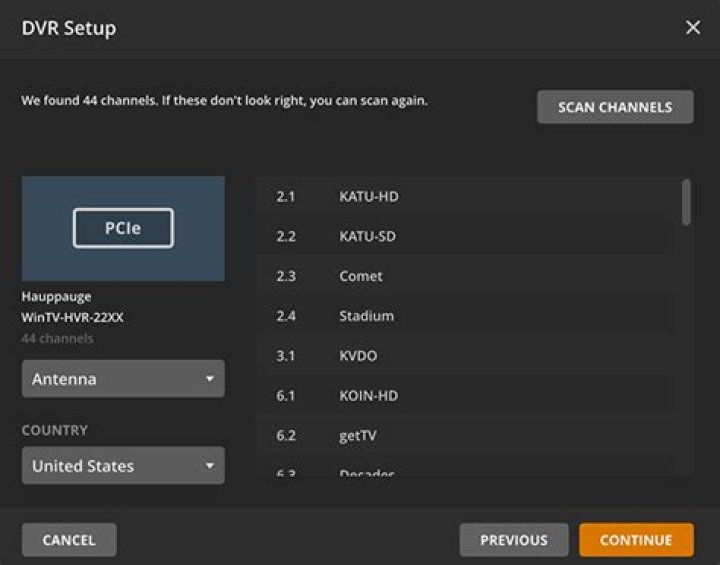
Your tuner may have already found channels, but it couldn’t hurt to scan again. (My tuner found 35 channels initially and 65 upon a re-scan.) Just click the button that says Scan. You’ll also have to input your type of connection (antenna), your country and your zip code.
Now, you’ll have to be patient for a few minutes while Plex finds the channels in your area.
6. Confirm your channels
Plex’s list is probably accurate, so feel free to just accept and move on to the next step.
But if you know your local lineup backward and forward, it’s probably worth checking to make sure that all the channel names are right.
7. Let Plex compile a recording schedule
This step is optional, but Plex will automatically (and periodically) scan your local airwaves to get an idea of everything that’s playing within the next few weeks.
You can start watching programs right away, but if you wait a little while (somewhere between 5 and 30 minutes, in our experience), you’ll know exactly what programs are playing as soon as you start using Plex. Again, the program will do this in the background if you don’t do it now, so you can’t screw this up either way.
8. Use Plex’s live TV features
Setup is now done, and you can enjoy live TV on your computer or Shield TV.
9. Watch on your TV (or mobile device)
If your preferred Plex platform is a streaming player, game console, smart TV or mobile device, you’ll have to go through one additional step. Download Plex for your platform of choice, log in and then navigate to Live TV, just as you’d normally navigate to your Movies or Music folder. Just be aware that while most Plex platforms support Live TV, not every single one does. (Older smart TVs won’t, for obvious reasons; neither will PS4, for reasons that are less obvious to us.)
That’s it! You can now watch and record live broadcast TV to your heart’s content. Just remember that your computer is acting as a media server, so if you shut it off, you won’t be able to watch or record anything, even though your antenna and DVR tuner are still hooked up. Having a powerful computer and a strong internet connection will also help ensure that your live stream looks just as good as what you get from hooking an HD antenna directly into your TV.
Marshall Honorof is an editor for Tom’s Guide, covering gaming hardware, security and streaming video. After hours, you can find him practicing taekwondo or doing deep dives on classic sci-fi.
Cord cutters can do just about everything that cable subscribers can—it’s just that some of our options aren’t that well advertised. Take HDTV Tuners (OTA DVRs), for instance. It’s not widely known that you can record live TV off of an antenna with an over the air DVR just as easily as you can with cable, but it’s true.
86 of the 100 most-watched shows in the U.S. are available for free via antenna, including shows from all major US networks
A ccording to Nielsen Media Research, 86 of the 100 most-watched shows in the U.S. are available for free, including shows from all major US networks like ABC, NBC, CBS, FOX, and CW, as well as local programming, news, and sports.
Of course, just as with cable, your DVR will be a separate device. Cord cutters don’t have cable companies giving them DVRs, so there’s an upfront cost to consider here. If you do buy a tuner, make sure that you get a good one! There are a few companies that make really great OTA DVRs.
Let’s run through a few of the quality HDTV tuners (OTA DVRs) on the market. This isn’t an exhaustive list, but it’s enough to get you started.
Plex Live TV and DVR
Plex Live TV and DVR allows you to watch and record high definition, over-the-air television broadcasts using a variety of digital tuners.
With an intuitive, customizable program guide and powerful search, you are able to easily find, watch and record single episodes, entire series, news, documentaries, and sports. And all of your recordings are integrated seamlessly with your existing media libraries, giving your DVR the full power of Plex.
Your recorded TV shows and movies are always at your fingertips, wherever you go, on more mobile and home streaming devices than any other DVR solution. The includes iOS, Android, Windows, Mac, Linux, Roku, Chromecast, Amazon Fire, NVIDIA SHIELD and other Android TV devices, Apple TV, Xbox, PlayStation, and most Smart TVs.
Channel Master DVR+
Like most OTA DVRs, the Channel Master DVR+ uses the internet to set up a programming guide that looks just like your old cable TV guide screen. From there, you can select programs to watch live or record. Recorded programs are saved to a hard drive (external or internal, depending on which model you spring for). Channel Master also has an OTT package that they include – you’ll be able to watch their digital channels and access apps like YouTube and Pandora through the TV guide, just like they were regular channels.
Tablo DVR
Tablo DVR models include 2- and 4-tuner devices that connect to the home’s Wi-Fi router instead of the TV, which lets you watch your live and recorded content anywhere on your home network using apps on your favorite set-top box or mobile device—something that’s not possible with many competitor devices. So, for instance, you can record something on an antenna in your living room and watch it on your Roku in your bedroom.
TiVo Roamio OTA DVR
TiVo invented the DVR, so it’s no surprise that they have an OTA entry in their lineup. The Roamio family of products (including models like the Roamio Pro, which targets cord havers) has long been a critical favorite, but cord cutters tended to be leery of the $15 a month TiVo subscription fee. TiVo answered the criticism with a subscription-free model, though the $400 upfront cost is pretty steep. The storage space is built in, so you won’t have to buy your own hard drive like you would with most competitors. The user experience is second to none.
Use your PC as an OTA DVR
Using a PC as an OTA DVR is a convenient cost-effective solution, because it keeps all of your cord cutting solutions on just one device. The drawback is that PCs have larger footprints than OTA DVRs, and many cord cutters may find setting up a PC to be more difficult than setting up a streaming box and OTA DVR separately.