Updated on September 27, 2020
Facebook has dropped a new feature that goes by the name of Watch Together. People on Facebook can use this through the Messenger app to watch a video with their friends. We can think of it as a similar format as that of the Netflix party. Multiple users can watch the same video from various locations. The video content will play or pause for everyone that is watching it together from any part of the world. In this guide, I will explain how to use this feature to watch videos on Facebook Messenger with your near and dear ones.
The new feature is available on all platforms. You can try it out regardless of what device or operating system you use. Additionally, you can also use Picture in picture mode in case you want to multitask such as send a message or email. Make sure to install or update the Messenger app to use the new Watch Together feature.
Watch Videos with Friends on Facebook Messenger
Here, are the steps you have to follow.
- Launch the Messenger app on your devices
- Tap on Create Room to start a new group of viewers by adding members from your Facebook contacts
- If you already have a group that you use for regular chatting you can tap on that as well to select it.
- With the Create Room option, you will have to send an invite to your contacts with whom you wish to watch videos together.
- You have to initiate a voice or an audio call. For that, tap on the Phone or the video icon on the top of the group. This call will bring together all the users consisting of that group.
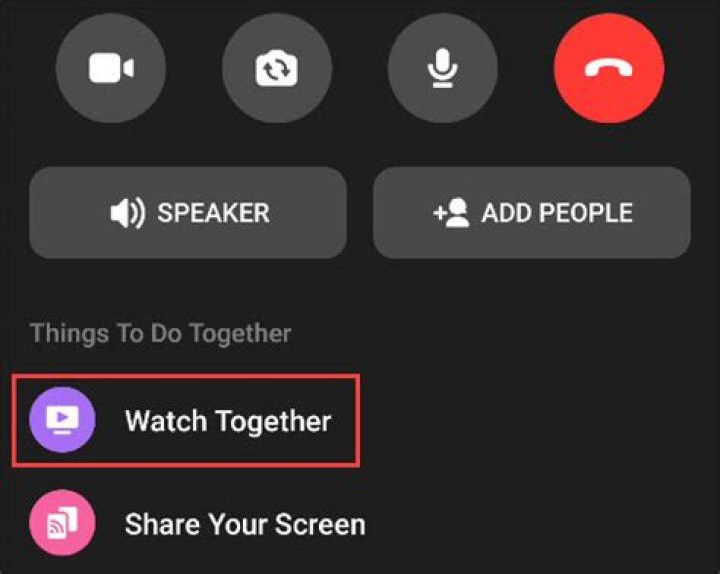
- After the call begins, slide down the toolbar on the top of the display. There will be the Things to Do Together tab.
- Under that, you will see the option Watch Together. Tap on it.
- You will redirect to a collection of Suggested videos, TV shows, and Movies.
- If you wish you can search for your choice of video as well. Simply use the search bar.
- The video will easily sync with everyone that is present within the group and is watching the video.
So, if you like to enjoy movies or general videos with your friends, then Watch Together is a great feature on Facebook Messenger. Watch your favorite videos by following the steps I have put up in this above guide. Have fun and share this guide with your friends.
Did you know you can watch movies together with your friends on Facebook Messenger? I guess not. Anyways don’t worry because I am going to show you exactly how to watch movies together with your friends on Facebook Messenger.
Mostly, we have a movie we would like to watch with our friends who don’t live closer to us. Also, the size of some of these movies does not permit us to send them over to our friends who live away from us.
Even for those who live closer to each other, this coronavirus pandemic has become a barrier for allowing our friends over to our house. As a result, the only way possible is to watch it together with our friends online.
To make this streaming more fun and have real-life reactions, we are going to use Facebook Messenger’s Watch Together feature.
In this Article:
What Is Facebook Messenger Watch Together
Facebook Messenger Watch Together is a new feature introduced by Facebook to make streaming movies together with your friends easier and fun. With this feature, you can see your friend (s) reactions as you watch the movie together.
According to Facebook, they created “Watch Together to make spending quality time with friends and loved ones feel as close to an in-person experience as possible. Whether it’s watching a trending video, a movie, a sports, highlight, a makeup tutorial, or a Facebook Watch original, the feature allows you to watch your friends’ reactions at the same time.”
How To Watch Movies Together With Your Friends On Facebook Messenger
Just as the name suggests, before you begin the entire process, you need to have Facebook Messenger installed on your device. You can download it for free from the Google Play Store or the Apple App Store.
Once you are done with the installation, follow the procedure below:
Open the Facebook Messenger App
After opening the Facebook Messenger app, select the person or group chat you would like to watch the movie with. In case you want to invite friends also, you can tap on Create Room and invite your friends over to join.
Tap on the “Phone” or “Video” icon next to the name of the individual or the group.
Because you are going to stream the movie together with your friends, you need to call them on “Phone” or “Video”. The best recommendation is by making a video call instead of a voice call.
Drag the toolbar up for more options.
As soon as your friend (s) accept the call, you need to drag the toolbar up for more options. This is where you will find all the options you need for the Watch Together.
Select “Watch Together” from the options available.
From the list of options that will pop up after dragging the toolbar, select Watch Together to start watching the movie together.
Select your preferred movie from the Suggested list.
Facebook automatically suggests movies for you to watch with your friends; these movies can be found in the Suggested list. Scroll through and select the one that you would like to watch with your friends and loved ones.
- When you are watching the movie, the movie is synced to all the contacts, and pausing it at your end will pause it for all the people in the Watch Together. Likewise, stopping the movie will stop it for everyone.
- For those in a video call, you can see the members in the Watch Together and the movie you are watching together.
When you tap on the video, a Search icon and the option to close the video will pop up on top of the screen. If you wish to change the movie, you can do so with the search bar.
Additionally, persons with phones that support Picture-in-Picture, you can leave the Messenger app and still watch the movie with your friends.
Conclusion
Facebook Messenger Watch Together is the perfect way to watch movies together with your friends over the internet with little data charges. Because the streaming is done over the internet, you need to have a stable network to make the streaming smooth, i.e. no buffering.
This guide was written in the simplest way possible to make reading easier and understandable for everyone. That being said, in case you find any difficulty following the procedure, make sure to write it down in the comments section below.
Do you have any method that was not talked about in this article, feel free to share it in the comments section below?
Watching a movie or TV show with a friend over the internet can be a bit cumbersome. Starting the video at the exact same time, pausing it for bathroom breaks, etc. Facebook Messenger’s “Watch Together” feature solves that issue.
What can you actually watch with Facebook Messenger’s Watch Together feature? While you can’t use popular streaming services like Netflix, it does support any of the videos found on the Facebook “Watch” tab. That includes videos produced specifically for Facebook and some TV shows and movies.
RELATED: Facebook Watch Together Joins the Growing List of Co-Vewing Experiences
First, open the Facebook Messenger app on your iPhone, iPad, or Android device. Select the person or group chat you want to watch videos with. You can also tap the “Create Room” button, and invite people to join.
Next, start a voice or video call by tapping the “Phone” or “Video” icon in the top-right corner of the app.
Once you’re in the call, drag the bottom toolbar up to reveal more options.
Select “Watch Together” to start watching a video.
You’ll see a “Suggested” video tab and a “TV & Movies” tab. Select something to watch and it will begin playing.
When the video is playing, it’s synced up with everyone who is watching. Pausing the video will pause it for everyone. If you’re in a video call, you will see the members of the call on the screen as well as the streaming content.
Tapping the video will bring up a Search icon to go back to the video search and the option to close the video.
If your phone supports Picture-in-Picture, you can leave the app, and the video will continue to play in a floating player.
Now you can enjoy videos with your friends and family without being in the same room.
- › How to Watch Videos with Friends in Facebook Messenger
- › How to Disable Private Wi-Fi MAC Addresses on iPhone and iPad
- › How to Add Photos to Your iPhone Home Screen
- › How to Show or Hide Notification Badges in the App Library on iPhone
- › What Is the Xbox Cloud Gaming (Project xCloud)?
The new feature, Watch Together, lets users in Messenger Rooms watch movies and series together online.
Image supplied: Facebook
Since the COVID-19 outbreak, people from all over the world were forced to take their social lives online, more so than ever before. Zoom conferences and Netflix Party hangout become common practice. Now, we have Watch Together too.
Facebook joined the fray and added a new Watch Together features that lets you watch movies and series with your friends; the perfect addition to our pandemic-riddled world. Facebook said in a statement:
“We created Watch Together to make spending quality time with friends and loved ones feel as close to an in-person experience as possible”.
Facebook Messenger Watch Together
Facebook said in the announcement post that “some things are simply better together”, and explained that they rolled out several new tools througout the course of the years bring users together.
Users will be able to watch videos and TV shows together. The promo image, for example, shows a group of social-distanced friends watching the series Community together. The post adds:
“So go ahead and oooh and ahhh over a video by your favourite celebrity, shed a tear over a puppy rescue video, laugh out loud at the latest viral videos; scream during Blair Witch or feel nostalgic while watching your favourite episode of ‘Community’”.
Facebook adds that the Watch Together feature “will help you feel together even when you’re not”, and to be honest, some of us can really do with a virtual pick-me-up during these strange, strange times.
Image supplied: Facebook
Content and availability
Facebook has yet to confirm which movies and series will be available to stream on Watch Together; however, guaranteed content includes the original content uploaded and shared on Facebook Watch.
The Watch Together streaming feature, which rolled out on earlier this month, is free and will be available on Messenger and Messenger Rooms for the iPhones and Android apps.
The celebrate the launch, Facebook partnered with celebrity fitness trainer and author Melissa Alcantara; who created a series of fitness videos to enable people to virtually work out with their friends.
How to use Watch Together on Facebook Messenger
You’ll need to download the Messenger app on your phone if you’re not using it already. Then simply start a Messenger call or create a Messenger Room.
Once that’s set up, swipe up to access the menu and select the Watch Together option. Videos are divided in categories – Uploaded, Watched, TV & Movies – and you simply a select a video from there.
Facebook’s algorithms will also suggest videos to view. You’ll be able to stream with up to eight people in a video call; and up to 50 people in Messenger Rooms. Have fun!
Facebook is adding stuff to Messenger again.
On Monday, the company announced a new feature called Watch Together, enabling Messenger users to play Facebook Watch videos together with friends.
To use the feature, you can either start a Messenger video call or create a Messenger Room, then swipe up and choose Watch Together. From there, you’ll be able to select videos from several categories, including TV & Movies, Watched, or Uploaded (yes, you can watch your own uploaded videos together with remote friends).
The motivation behind the feature is clear. At a time when a global pandemic is forcing millions to stay home, a feature like Watch Together is another way to connect with friends and family without actually being in the same room.
Facebook says the new feature should be interesting to creators. Folks such as DJs and personal trainers will now be able to engage their audience with their own video in a group Messenger call. Facebook has partnered with fitness trainer Melissa Alcantara, who has created a series of fitness videos, allowing people to virtually work out together (well, the workout should be real, but the socializing is virtual. These are weird times.).
Since 2018, Facebook has had a feature called Watch Party, allowing people in Facebook Groups to watch videos together and chat. Watch Together is similar, only for Messenger — these things can get confusing since Facebook has a lot of interconnected products that don’t always share the same features.
Facebook’s Messenger team has been on fire lately. The company launched a desktop version of the Messenger app in April and Messenger Rooms in May. Most recently, forwarding limits have been added to Messenger to combat fake news.
Facebook says more video selections should be coming to Watch Together soon. The feature itself should be rolling out to all users in the coming weeks.
Facebook is introducing Watch Together – a new co-viewing experience in Messenger allowing up to 8 people to watch videos together.
Facebook Messenger now allows up to 8 users to watch videos together with the new ‘Watch Together’ co-viewing experience.
Videos on Facebook Watch can be viewed with friends and family over Messenger video calls.
That means the content people can watch together is limited to what’s on Facebook. Although that library is expanding to include both licensed content and user-uploaded videos.
“So go ahead and oooh and ahhh over a video by your favorite celebrity, shed a tear over a puppy rescue video, laugh out loud at the latest viral videos, scream during Blair Witch or feel nostalgic while watching your favorite episode of Community. Watch Together will help you feel together even when you’re not.”
Facebook says over 150 million video calls are facilitated through Messenger every day.
To further demonstrate the popularity of video, Facebook adds that over 200 million videos are sent each day through Messenger.
Given users’ penchant for videos, and sharing them with friends, Facebook launched Watch Together so users can enjoy the content together.
“We created Watch Together to make spending quality time with friends and loved ones feel as close to an in-person experience as possible. Whether it’s watching a trending video, a movie, a sports highlight, a makeup tutorial or a Facebook Watch original, the feature allows you to watch your friends’ reactions at the same time.”
How ‘Watch Together’ Works
A co-viewing session can be initiated with a video call in Facebook Messenger.
Swipe up on the screen during the video call and select “Watch Together” from the menu.
From there you can select content to watch, which will play as the video feeds from your friends are displayed at the bottom.
Alternatively, users can create a Messenger Room where up to 50 users can watch content together using the main Facebook app.
However, Messenger Rooms have relaxed restrictions compared to a traditional video call. They’re designed to be more casual in nature.
It’s worth understanding the difference before creating one.
A Boon For Advertisers?
Watch Together is a way for Facebook users to stay entertained and maintain social connections with their friends and family.
In addition, Watch Together serves Facebook’s interests of keeping people on its platform. Perhaps even spending more time on Facebook than they already were.
The inclusion of co-viewing on Messenger may even lure users away from similar features on other platforms – such as Netflix, Disney+, and Twitch to name a few.
With that being the case, Watch Together is a potential boon for Facebook advertisers, considering how ads play before/during videos.
If Watch Together takes off it could cause ad views to multiply. That would certainly keep advertisers happy and encourage them to keep spending a portion of their ad budget on Facebook.
Ad publishers would be wise to keep an eye on this feature and begin thinking about how they can incorporate more video into their strategy.
Watch Together rolls out globally this week in Messenger and Messenger Rooms on mobile for iOS and Android.
The latest app to add a watch party feature
Share this story
- Share this on Facebook
- Share this on Twitter
Share All sharing options for: Facebook Messenger adds Watch Together to let you watch videos with friends
The latest app to add joint video viewing is Facebook Messenger. The company today announced Watch Together, a new feature inside the messaging app that lets you view videos from Facebook Watch while also seeing live video of your friends. It’s rolling out globally starting today on iOS and Android.
To use the feature, swipe up on a video call or Messenger Room and tap the new Watch Together option. Facebook will suggest videos for you to watch, or you can browse categories or search for a specific video. You can watch with as many as eight people on a Messenger video call or up to 50 people in a Messenger Room.
Facebook says there are now 150 million video calls on Messenger a day, and that people send 200 million videos to one another daily. “It’s really getting more and more visual, and it continues to grow very, very fast,” said Stan Chudnovsky, who runs Messenger, in an interview.
Joint video consumption is maybe the most popular new app feature of 2020. Disney Plus introduced its own version, GroupWatch, on Friday, following Netflix, Hulu, Amazon, and Twitch. Meanwhile, third-party apps like Scener let people watch multiple different services together; Scener includes HBO.
There are significant differences between Watch Together and those apps, though. All of them have much bigger and more popular libraries of content than Facebook Watch, which contains a somewhat confusing hodgepodge of original series, live events, music videos, creator content, and a small number of Hollywood movies. (Fruitvale Station and Dear White People, both of which are excellent, will be available at launch.)
And other joint video solutions can generally be enjoyed on the larger screen of the laptop or desktop, whereas Watch Together requires viewing video on the smaller mobile phone screen. You can use Watch Together in either portrait or landscape mode, though.
Chudnovsky said that early tests found that the feature is popular, especially with next-generation users who may not have access to their own laptops yet. “The younger you are, the more you like it,” he said.
Watch Together lets you tap into Facebook Watch content on Messenger with friends at the same time.
If you’re looking for another way to connect virtually with friends, Facebook today rolled out Watch Together for Facebook Messenger.
Watch Together lets you tap into Facebook Watch content on Messenger with friends at the same time. Facebook Watch dates back to 2018 and offers live and on-demand clips, from music videos to shows like Red Table Talk.
To watch something with a friend, start a Messenger video call or create a Messenger Room (Facebook’s version of Zoom), swipe up to access the menu, and select Watch Together. From there, you can pick a suggested video or search for something specific. Watch Together works with up to eight people on a Messenger video call and up to 50 people in Rooms. The feature rolls out globally this week on mobile for iOS and Android.
Other services with heftier content libraries—Hulu, Netflix, Disney+—offer similar “watch together” features, and they’re not limited to tiny mobile screens. But as Facebook notes, Messenger logs 150 million video calls and more than 200 million videos sent every day.
Related
- Facebook Wants to Know If It’s Ruining Democracy
- Facebook Sues 2 Companies Over Fake Instagram Likes, Data Collection
- Customize Your Facebook Watch Video Feed by Selecting Topics to Follow
To help beef up its content offerings, Facebook introduced a partnership with celebrity fitness trainer and author Melissa Alcantara so people can work out with their friends. “According to a study conducted by Messenger in the US, 70% of people who work out with a partner have achieved a fitness goal in the past 6 months; only 45% of people who work out alone have done the same,” Facebook says.
Facebook Messenger Added Watch Together Feature To Let You Watch Videos With Friends
Facebook has added a new feature to its Facebook Messenger and it is called ‘Watch Together feature’. This a new feature inside the messaging app that lets you view videos from Facebook Watch while also seeing live videos of your friends. It’s rolling out globally starting today on iOS and Android.
With the Watch Together feature, you can have a fun time with friends and other people without leaving your home while watching a movie, a game, or an original Facebook Watch production. The new feature allows you to watch together and see your friends’ reactions.
How to use the Watch Together feature
To use the feature, swipe up on a video call or Messenger Room and tap the new Watch Together option. Then, slide the screen up and select the Watch Together option from the menu. You can choose between suggested content or access a specific category like ‘TV and movies’, for example.
Facebook will suggest videos for you to watch, or you can browse categories or search for a specific video. You can watch with as many as eight people on a Messenger video call or up to 50 people in a Messenger Room.
Facebook Watch Together for creators
The company promotes the new Watch Together feature also as a good thing for content creators. As part of the launch, Facebook entered into a partnership with Melissa Alcantara, a well-known author, and gym instructor. The partnership focuses on creating a series of fitness videos. It can be used by people who want to exercise with their friends without having to be physically in the same environment.
Almost everyone will use this feature once it is rolled out. As, due to this Covid-19 pandemic, we can’t meet each other. So, at this time, you can share the screen with your friends and family who are far away from you.
If You Want To Get More Daily Such Tech Updates, Career Advice Then Join the Telegram Group From Given Link And Never Miss Update.
Join Telegram Group of Daily Jobs Updates for 2010-2021 Batch: Click Here
Why You’re Not Getting Response From Recruiter?: Click here
How To Get a Job Easily: Professional Advice For Job Seekers: Click here
Cognizant Latest News: Up To 20K+ Employees Will Be Hired: Click here
COVID-19 Live Tracker India & Coronavirus Live Update: Click here
Why Remove China Apps took down from the Play store?: Click here
Feel Like Demotivated? Check Out our Motivation For You: Click here
List of Best Sites To Watch Free Movies Online in 2020: Click here
5 Proven Tips For How To Look Beautiful and Attractive: Click here